
A garage can make a fun movie space, but its lighting, wall layout, and hard surfaces can affect the picture and sound. For a better setup, look for a projector that fits your viewing distance, is easy to aim, and has streaming or connection options that match how you watch. These five picks range from Roku-equipped portable models to brighter options with built-in apps and stronger speakers.
| Projector | Picture details | Standout feature | Best fit |
|---|---|---|---|
| Aurzen Roku TV D1R | 1080p Full HD; brightness not stated | Built-in Roku TV and auto focus | Simple streaming setup |
| TOPTRO X9 Pro | Native 1080p; 4K decoding; 920 ISO lumens claimed | VIDAA smart system and 40W speakers | Bright picture and built-in sound |
| HAPPRUN J7 | 4K decoding; 1,500 ANSI lumens claimed | Built-in apps and auto focus | Garage spaces with some ambient light |
| WiMiUS P62 Pro | Native 1080p; 4K support; 600 ANSI lumens claimed | Two HDMI ports and built-in apps | Multiple connected devices |
| Aurzen Roku TV D1R Air | Resolution and brightness not stated | USB-C PD power and gimbal design | Portable room-to-room viewing |
Our Picks: Best Projectors For Garage Movie Nights reviews
1. Aurzen Roku TV D1R: A straightforward streaming pick

The D1R combines a portable projector with Roku TV, so you can access streaming apps from its interface rather than relying on a separate streaming stick. It supports 1080p Full HD and is described for screen sizes from 60 to 150 inches. You’ll need an internet connection and a Roku account to activate the streaming features.
Auto focus and auto keystone correction are useful in a garage, where you may need to move the projector between a shelf, table, or other temporary spot. Its dual 5W speakers provide built-in sound, and Bluetooth 5.2 lets you connect compatible headphones or speakers. The brightness figure isn’t provided, so a darkened garage is the safer bet for a satisfying picture.
Compared with the brighter models in this group, the D1R’s clearest advantage is its familiar Roku interface and simple setup. It suits viewers who want to start streaming without adding another device. If you plan to watch with the garage door open or lights on, consider a model with a stated brightness rating instead.
Pros:
- Roku TV and popular streaming apps are built in.
- Auto focus and keystone correction reduce setup work.
- Supports 1080p Full HD and a range of screen sizes.
- Bluetooth can connect to headphones or external speakers.
Cons:
- Brightness is not specified in the supplied product details.
- Streaming activation requires internet access and a Roku account.
Verdict: Choose the D1R if easy Roku streaming and automatic picture adjustment matter more than a stated brightness figure.
2. TOPTRO X9 Pro: Brighter picture with powerful built-in speakers

The TOPTRO X9 Pro pairs a smart VIDAA system with a claimed 920 ISO lumens and native 1080p resolution. Its 4K decoding means it can process 4K-labeled content, but the displayed image remains at its native 1080p resolution. HDR10 support and a stated wide color gamut add to its picture feature set.
For garage movie nights, the stated brightness makes this a more compelling option than models with no brightness figure, though a darker room will still help movies look their best. The projector also has two 20W speakers, Dolby Audio, Bluetooth 5.4, and HDMI ARC and CEC. Those built-in speakers may be useful when you want a simple setup without a separate sound system.
The VIDAA interface is intended to provide built-in streaming and live channels, but app availability can vary by region and service. This model is a strong fit if you want a projector that can handle picture and sound on its own. Its listed 4K feature should not be mistaken for native 4K resolution.
Pros:
- Native 1080p picture with 4K decoding and HDR10 support.
- Claimed 920 ISO lumens offers a useful brightness reference.
- Two 20W speakers are a substantial built-in audio setup.
- VIDAA provides built-in streaming features and live channels.
Cons:
- 4K content displays at native 1080p resolution.
- App selection may differ by region.
Verdict: The X9 Pro is a good choice if you want a brighter specified picture and stronger built-in sound, while understanding that its resolution is native 1080p.
3. HAPPRUN J7: A high-brightness option with built-in apps

The HAPPRUN J7 is described with 1,500 ANSI lumens, built-in apps, and 4K decoding. That brightness claim makes it one of the more appealing choices here if your garage is not fully dark, though closing the door and reducing other light will still improve the viewing experience. Its 4K decoding does not mean native 4K resolution; the supplied details do not state the native resolution.
Auto focus and automatic screen adjustment are designed to get the picture into focus and shape quickly after you place the projector. For sound, it has two 15W speakers with Dolby Audio. Wi-Fi 6, Bluetooth 5.2, HDMI, USB, and a headphone jack give you several ways to connect streaming devices, consoles, computers, or audio gear.
Built-in apps can keep setup simple, while the ports make it flexible if you prefer your own streaming device or want to connect a game console. This is a practical pick for a garage used for both films and gaming. If native resolution is a deciding factor, check the product listing before buying, since it isn’t stated in the supplied specifications.
Pros:
- Claimed 1,500 ANSI lumens is the highest stated brightness in this group.
- Built-in apps include popular streaming services.
- Auto focus and screen adjustment simplify placement.
- Multiple ports support streaming devices, computers, and consoles.
Cons:
- Native resolution is not stated in the supplied product details.
- 4K decoding should not be confused with native 4K display resolution.
Verdict: Consider the J7 if you want a high claimed brightness level, built-in apps, and flexible connections for a multipurpose garage setup.
4. WiMiUS P62 Pro: Flexible connections for a shared garage setup

The P62 Pro offers native 1080p resolution, 4K support, HDR10, and a claimed 600 ANSI lumens. As with other projectors in this list, 4K support means 4K-labeled video is displayed at the projector’s native 1080p resolution. Its stated brightness is lower than the figures listed for the TOPTRO and HAPPRUN models, making a dim garage a better setting for movie watching.
Its connectivity is a key strength: the projector has two HDMI ports, two USB ports, Wi-Fi 6, Bluetooth, and a 3.5mm audio output. The product details also describe built-in apps and screen mirroring for supported devices. Two 10W speakers provide built-in sound, and HDMI ARC can help connect compatible audio equipment.
If your garage setup switches between a console, laptop, and streaming device, having two HDMI ports can reduce the need to unplug one device to use another. The P62 Pro is less compelling if you need a particularly bright picture, but its mix of ports and native 1080p resolution suits a fixed, dim viewing area with several sources.
Pros:
- Native 1080p resolution with 4K support and HDR10.
- Two HDMI and two USB ports suit a multi-device setup.
- Built-in apps and wireless screen mirroring are available.
- Bluetooth and HDMI ARC offer options for external audio.
Cons:
- Claimed 600 ANSI lumens is lower than the stated figures for two other picks.
- 4K video displays at native 1080p resolution.
Verdict: Pick the P62 Pro if you value multiple connection ports and native 1080p more than maximum brightness.
5. Aurzen Roku TV D1R Air: A portable projector with USB-C power
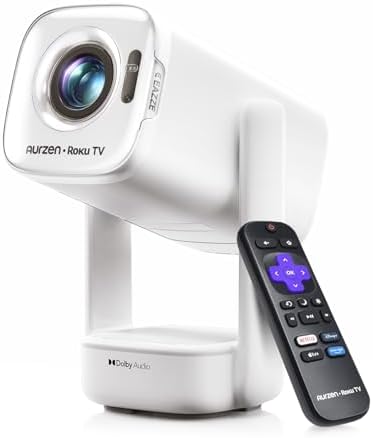
The D1R Air is designed to move between rooms and other viewing spots. It has Roku TV built in, so you can stream through its interface without a separate TV stick. Its compact size and gimbal stand are meant to make it easier to aim at a wall or ceiling, while the bottom power design helps keep the cable from interfering as you adjust the projector.
Unlike the other models here, it supports USB-C PD power input. The product details call for a compatible 65W-or-higher USB-C PD power source with 20V/3.25A output and a 5A E-Marker USB-C-to-USB-C cable. A compatible power bank or charger may allow more flexible placement, but check its specifications carefully. The PowerBase Stand is sold separately.
Dual 5W speakers sit in a separate audio base, and the projector also has Bluetooth 5.2, HDMI, USB, and audio output. Brightness and resolution are not stated in the supplied details, so it is difficult to compare its picture directly with the other picks. It makes the most sense if portability, Roku streaming, and flexible power are your priorities.
Pros:
- Roku TV is built in for direct streaming.
- Gimbal stand makes it easier to aim the projector.
- USB-C PD power supports flexible placement with a compatible source.
- Separate dual 5W speaker base and several connection options.
Cons:
- Brightness and resolution are not stated in the supplied details.
- USB-C power requires a compatible source and cable; the PowerBase Stand is sold separately.
Verdict: Choose the D1R Air for portability and USB-C power flexibility, but look elsewhere if you need clearly stated brightness and resolution figures.
How to Choose a Projector for Garage Movie Nights
Match brightness to the light in your garage
Projector brightness matters most when you cannot fully darken the room. Closing the garage door, turning off overhead lights, and blocking bright windows can help a picture look more vivid. Compare stated brightness figures carefully, since the product details may use different terms or measurement standards. In this group, the TOPTRO lists 920 ISO lumens, the HAPPRUN lists 1,500 ANSI lumens, and the WiMiUS lists 600 ANSI lumens; the Aurzen models do not provide a brightness figure in the supplied details.
Check native resolution, not just 4K wording
Native resolution describes the detail the projector can display. A projector that supports or decodes 4K video may still show it at a lower native resolution. The TOPTRO and WiMiUS are listed as native 1080p, while the HAPPRUN and D1R include 4K decoding or support wording. The supplied details for the D1R Air do not state its resolution. If sharpness is important to you, confirm the native resolution before choosing.
Measure your available throw distance
Before buying, measure the distance from your planned projector position to the wall or screen. Then check the product listing for supported image sizes and placement guidance. A projector that is too close or too far away may not create the screen size you want. Auto focus and keystone correction can make setup easier, but they do not replace checking whether the projector suits your garage layout.
Decide how you will stream or connect devices
Built-in streaming can simplify movie night, but it depends on your internet connection and the apps available on the projector. The Aurzen models include Roku TV, while the TOPTRO, HAPPRUN, and WiMiUS describe built-in app options. If you prefer a separate streaming device, connect a laptop, or use a game console, compare HDMI and USB ports as well as wireless options. The WiMiUS stands out for its two HDMI ports.
Plan for sound in a hard-walled room
Garage walls and floors can make sound feel echoey. Built-in speakers are convenient, but their power and design differ: the TOPTRO lists two 20W speakers, the HAPPRUN two 15W speakers, and the WiMiUS two 10W speakers. The Aurzen projectors list dual 5W speakers. You can also consider Bluetooth or a wired audio connection if you want to use external speakers or headphones.
Consider power and placement
Think about where the projector will sit and whether a power outlet is nearby. The D1R Air is the only option here with USB-C PD power input, and it requires a compatible power source and cable. Its gimbal design is intended to help with aiming. The other picks may be a better fit if you plan to leave a projector in one spot and use a standard power connection.
Protect the setup between movie nights
A garage can expose equipment to dust and changing conditions. Choose a stable spot away from foot traffic, tools, and anything that could block airflow or knock the projector over. Store it safely when it is not in use, and follow the manufacturer’s care guidance. A dedicated screen or a smooth, flat wall can also help create a more even viewing surface.
Frequently Asked Questions
Can I use a projector in a garage with the lights on?
You can, but ambient light can make the image look less vivid. A projector with a stated higher brightness may be a better fit if you cannot darken the garage. For movie viewing, turn off lights and block other light sources when possible.
Does 4K decoding mean a projector has native 4K resolution?
No. In the product details for the TOPTRO and WiMiUS, 4K video is displayed at native 1080p resolution. Check the native resolution specification to understand the projector’s display detail.
Do these projectors need a separate streaming device?
Each product describes built-in streaming options, including Roku TV on the Aurzen models. You can also connect supported external devices through available ports or wireless features. Streaming services may require an account and internet access.
Can I connect external speakers?
Several models support Bluetooth audio, and the WiMiUS and D1R Air also list wired audio connections. Check the exact connection options for the model and speaker you plan to use.
Which projector is best if I want to connect a game console?
The HAPPRUN lists HDMI connections and explicitly describes compatibility with game consoles. The WiMiUS has two HDMI ports, which can be handy if you want to keep more than one device connected. Confirm that your console and chosen projector support the connection you need.
Is the portable Aurzen D1R Air a good choice for a garage?
It can suit a garage if you value portability, Roku streaming, and USB-C PD power. Its brightness and resolution are not stated in the supplied details, so it is harder to compare directly with models that provide those figures.
Final Recommendation
For a garage where you want built-in streaming and a higher stated brightness figure, the HAPPRUN J7 is a strong option to consider, though its native resolution is not stated in the supplied details. The TOPTRO X9 Pro is a better fit if you want native 1080p, a stated brightness figure, and powerful built-in speakers. Choose the Aurzen D1R for Roku simplicity, the WiMiUS P62 Pro for multiple connections, or the D1R Air for portable USB-C-powered viewing. Before deciding, match brightness, resolution, and placement to your garage and how you plan to watch.