If you need to record an HDMI feed and monitor it on the same device, focus on capture boxes with a built-in screen—not ordinary on-camera monitors. The two capture boxes below are the closest matches: one has a 7-inch display and dual HDMI inputs, while the other adds HDMI and analog video capture. The remaining options are useful alternatives, but they are a camcorder or monitor-only products rather than external video recorders.
| Product | Type | Screen | Best for |
|---|---|---|---|
| UNISHEEN 4K60 Two-Input Video Capture Box | Recorder and monitor | 7 inches | Two HDMI sources and picture-in-picture viewing |
| SoundBeast 4K HD Video Capture Box | Recorder and monitor | 5 inches | HDMI or analog video capture without a computer |
| kimire Full HD Camcorder | Camcorder | 3 inches | Recording video directly with a compact camera |
| FEELWORLD F5 ProX Field Monitor | Camera monitor | 5.5 inches | Bright on-camera focus and exposure monitoring |
| FEELWORLD P6XL Field Monitor | Camera monitor | 6 inches | On-camera monitoring with a built-in battery |
Our Picks: Best External Video Recorders With Built In Monitors reviews
UNISHEEN 4K60 Capture Box: Best for Two HDMI Sources

This capture box is the closest fit for creators who want an external recorder and a large built-in preview screen in one unit. It has two HDMI inputs, a 7-inch display, and PIP, POP, and PMP viewing modes. Those multi-source tools can help when you need to monitor or switch between two connected devices.
The unit accepts HDMI input up to 4K at 60 frames per second, but its listed output and capture resolution is 1080p at 60 frames per second. That distinction matters: it can accept a high-resolution signal without recording that signal at 4K. It can save video to a USB flash or hard drive, or an SD card, with the storage device sold separately.
You can also connect it to a computer for streaming with OBS, and the product lists support for Windows, Mac, and Linux. It can run from the included power supply or a separately purchased F550, F750, or F970 battery. The large screen and flexible power options make it more suited to a small production setup than a tiny camera-top monitor.
One important limitation is that the device will not display, record, or stream HDMI sources that are copyrighted or content-protected; those feeds appear as a black screen. Choose it for compatible cameras, computers, or other unprotected sources—not for bypassing video protection. It is also larger than the dedicated FEELWORLD monitors, which are designed primarily to help frame and check camera footage rather than record it.
Pros:
- Large 7-inch built-in preview screen
- Two HDMI inputs with PIP, POP, and PMP modes
- Records to USB storage or an SD card
- Can use a power adapter or compatible optional battery
Cons:
- Records at up to 1080p60 despite accepting up to 4K60 HDMI input
- Storage media and optional batteries are not included
Verdict: Pick the UNISHEEN if you want a large-screen capture box with dual HDMI inputs and do not need 4K recording.
SoundBeast Capture Box: Best for HDMI and Analog Sources

The SoundBeast is a self-contained recorder with a 5-inch preview LCD and built-in speaker. It can capture HDMI video without a computer and can also digitize analog sources such as AV, RCA, VHS, VCR, and camcorder output. That broader input range makes it a useful choice if your projects include older video equipment as well as modern HDMI devices.
For HDMI, the product lists capture up to 4K at 30 frames per second or 1080p at 60 frames per second from sources up to 4K60. Analog capture is listed up to 480p. Recordings are saved as MP4 files to an SD card, USB flash drive, or USB hard drive; those storage devices are not included.
It can also send video to a computer for streaming with OBS, but the supplied product details specify Windows for USB streaming. The 5-inch screen is smaller than the UNISHEEN’s 7-inch display, but the SoundBeast includes a remote, charger, HDMI cable, AV adapter, and USB cable. Its listed two-year warranty and tech support are additional considerations.
As with the UNISHEEN, this unit does not handle copyrighted or content-protected HDMI sources; the screen will be black for those feeds. Its capture features are more extensive than a simple field monitor, but its smaller screen may be less comfortable for close focus checks than a dedicated camera monitor.
Pros:
- Captures both HDMI and analog video sources
- Built-in 5-inch screen and speaker for previewing footage
- Can record without a computer to SD or USB storage
- Includes a remote and key connection cables
Cons:
- USB streaming with OBS is specified for Windows only
- Storage media is sold separately, and protected HDMI sources are unsupported
Verdict: Choose the SoundBeast if you need an all-in-one recorder for a mix of HDMI and older analog video sources.
kimire Full HD Camcorder: A Compact Camera, Not an External Recorder
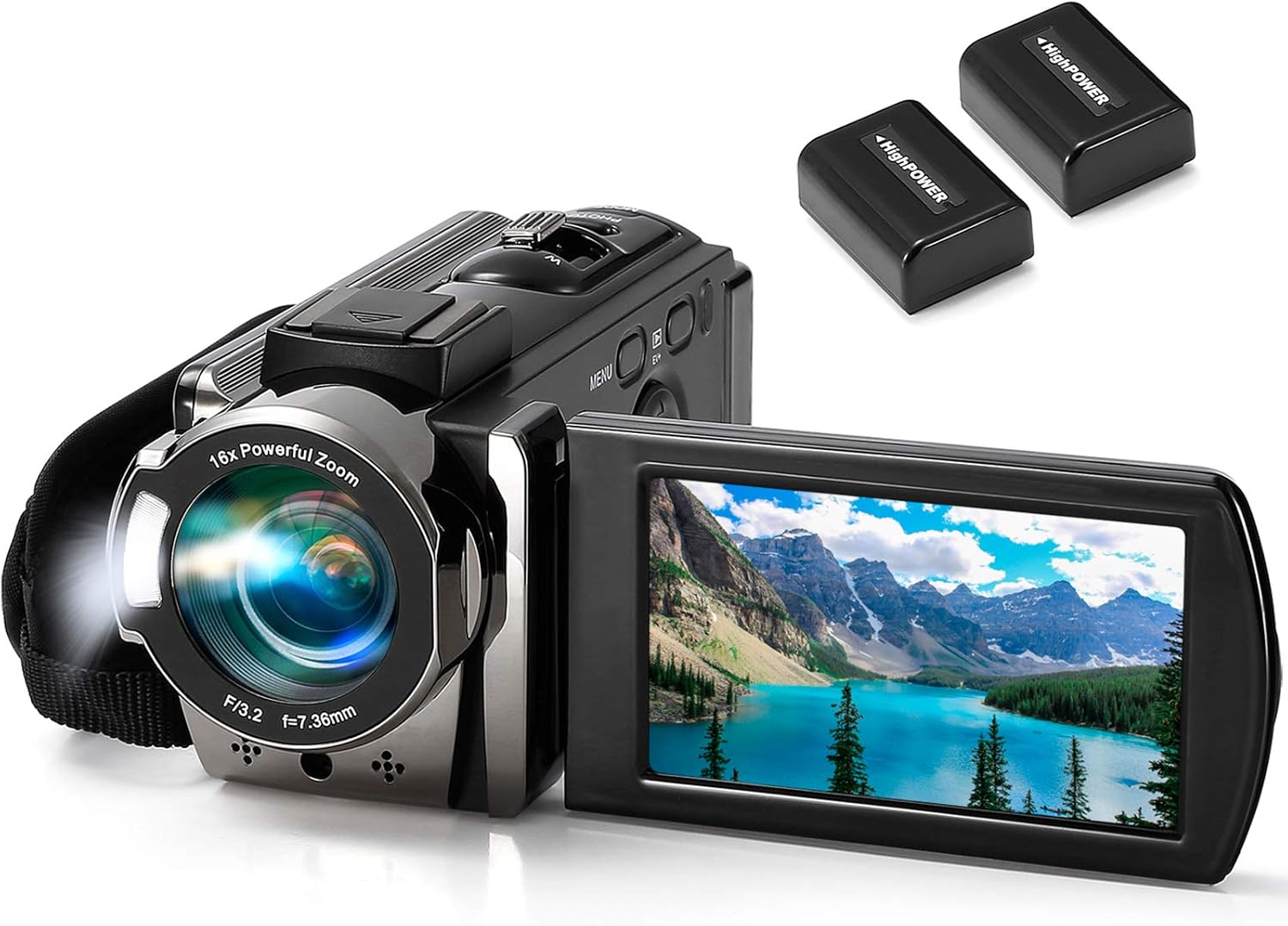
This kimire is a standalone camcorder, not an external recorder that captures a feed from another camera or HDMI source. It records video using its own camera and provides a 3-inch LCD that rotates up to 270 degrees. It may suit someone who wants a compact, self-contained camera for casual clips rather than a capture box for an existing video setup.
The listed video format is AVI, with 1080p recording at 15 frames per second. Other features include 16x digital zoom, a fill light, anti-shake, a pause function, and webcam mode. The product description says webcam use requires selecting PC CAM mode and downloading AMCAP software; it does not describe the unit as a stand-alone HDMI recorder.
The camcorder includes two batteries and supports recording while charging. It accepts SD or SDHC cards up to 128GB, which are not included, and can connect to a computer by USB or a TV by AV cable. In everyday use, the rotating screen and pause function can be convenient for basic personal videos, but the 15fps video specification is less suitable for smooth motion than the 60fps capture options on the two capture boxes above.
Its main advantage is that it can shoot footage without an external camera. If you already own a DSLR or mirrorless camera and need a larger display or a separate recorder, the FEELWORLD monitors or one of the capture boxes is a closer match to that job.
Pros:
- Standalone camera with a rotating 3-inch LCD
- Includes two batteries and supports recording while charging
- Has a pause function and webcam mode
- Connects to a computer by USB and a TV by AV cable
Cons:
- Not an external recorder for another camera or HDMI source
- Listed 1080p video runs at 15 frames per second
Verdict: Consider the kimire if you want an inexpensive-style feature set in a basic standalone camcorder, but skip it if you specifically need an external video recorder.
FEELWORLD F5 ProX: Best Bright Monitor for Camera Operators

The F5 ProX is an external camera monitor, not a video recorder. Its 5.5-inch screen is designed to give you a larger view than a camera’s built-in display, helping you check composition, focus, and exposure while shooting. The listed 1600-nit brightness is aimed at outdoor work where a standard camera screen can be hard to see.
Its monitoring tools include focus peaking, waveform, histogram, false color, and LUT preview for footage shot in Log. Those tools can help you judge focus and exposure on set, but they do not record the camera feed. You will still need to use your camera or a separate capture device to save footage.
The monitor is designed to mount on DSLR, mirrorless, and cinema camera setups, including rigs, cages, gimbals, and tripods. Some users find a larger screen helpful for keeping shots in focus, while others may want a sunshade in especially bright conditions. If your priority is recording without a computer, the UNISHEEN or SoundBeast is the more relevant pick.
Pros:
- Bright 5.5-inch screen for field monitoring
- Includes focus and exposure tools such as waveform and false color
- LUT preview supports checking the look of Log footage
- Designed for mounting on camera rigs and other common setups
Cons:
- Does not record video
- A sunshade may be useful in very bright outdoor conditions
Verdict: Choose the F5 ProX to improve camera-side viewing and exposure checks, not as a replacement for a recorder.
FEELWORLD P6XL: Best Monitor for a Cleaner Battery Setup

The P6XL is another camera monitor rather than a video recorder, but it stands out for its built-in rechargeable battery. Its 6-inch Full HD IPS touchscreen is designed to replace the small screen on a camera with a larger view. The product lists approximate run times of 2.2 hours at full brightness, 2.5 hours at 80% brightness, and 3 hours at 60% brightness.
For monitoring, it includes waveform, vectorscope, histogram, focus assist, and support for 3D LUT uploads. Its 1200-nit display is intended for outdoor use, and the aluminum housing is designed for field work. The monitor has 1/4-20 mounting points and is described as compatible with mainstream DSLR and mirrorless cameras.
The built-in battery can reduce the need for a separate monitor battery or battery plate, helping keep a camera setup simpler. Some users appreciate having the screen and battery together, particularly for location shoots. Keep in mind that run time varies with brightness, and this device only monitors the camera feed; it does not save a recording.
Compared with the F5 ProX, the P6XL offers a larger screen and a built-in battery, while the F5 ProX lists higher brightness. Compared with the capture boxes, neither FEELWORLD monitor is a substitute for a device that records HDMI input to storage.
Pros:
- 6-inch touchscreen with a built-in rechargeable battery
- Includes waveform, vectorscope, histogram, and focus assist
- Supports 3D LUT uploads for previewing a look
- Designed for outdoor monitoring and camera-rig mounting
Cons:
- Does not record video
- Listed battery life is limited to a few hours, depending on brightness
Verdict: Pick the P6XL if you want a larger camera monitor with its own battery, and choose a capture box instead if recording is essential.
How to Choose an External Video Recorder With a Built-In Monitor
Decide Whether You Need Recording or Just Monitoring
A field monitor enlarges the camera’s view, while a video recorder captures an incoming signal and saves it as a file. Some products do both, but many on-camera displays—including the FEELWORLD models here—are monitors only. Check that the device explicitly records to storage if you want to save video without relying on your camera or computer.
Match the Input to Your Video Source
Check the ports before you buy. HDMI capture boxes suit compatible cameras, computers, and other HDMI devices. If you need to digitize a VCR, VHS player, or older camcorder, look for analog AV or RCA capture as well. Also check the source device’s output settings and cables so you can connect it properly.
Understand Input Resolution and Recording Resolution
A device that accepts a 4K signal does not always record in 4K. For example, the UNISHEEN accepts up to 4K60 input but lists capture at up to 1080p60. The SoundBeast lists up to 4K30 or 1080p60 capture from HDMI sources. Compare the actual recording specification—not just the highest input signal—with the resolution and frame rate you need.
Choose a Screen Size That Fits Your Setup
A larger built-in screen can make previewing easier, especially if you are switching sources or checking a shot from a short distance. The UNISHEEN has a 7-inch screen, while the SoundBeast has a 5-inch preview display. A camera-top monitor may be smaller but more practical when space and weight matter on a rig.
Check Recording Media and File Needs
Find out which storage types the recorder accepts and whether a card or drive is included. The two capture boxes listed here record to separate SD or USB storage, so factor in a compatible device. Also check the stated file format and make sure it suits the way you plan to transfer and edit your footage.
Plan for Power and Portability
For shoots away from an outlet, check whether the unit has a built-in battery or supports optional batteries. The UNISHEEN can use certain separately purchased batteries, while the P6XL has a built-in battery but does not record video. Consider the complete setup—including cables, storage, mounting, and power—rather than judging portability by the screen alone.
Check Compatibility and Content Restrictions
Confirm the device works with your computer and streaming software if you plan to capture or stream through USB. The SoundBeast description specifies Windows for USB streaming with OBS, while the UNISHEEN lists Windows, Mac, and Linux support. Both capture boxes state that they do not display, record, or stream HDMI sources that are copyrighted or content-protected.
Frequently Asked Questions
What is the difference between a field monitor and an external video recorder?
A field monitor displays a video signal to help you check framing, focus, or exposure. An external recorder captures a signal and saves it to storage. Some capture boxes include a monitor, but a monitor-only product does not become a recorder just because it has a screen.
Which option here records video without a computer?
The UNISHEEN and SoundBeast capture boxes can record to separately purchased storage without a computer. The kimire is a standalone camcorder, but it records its own camera footage rather than an external video feed. The FEELWORLD models are monitors, not recorders.
Do these capture boxes record protected streaming video?
No. Both capture boxes state that they will not display, record, or stream copyrighted or content-protected HDMI sources. A protected source may appear as a black screen.
Does the UNISHEEN record in 4K?
The supplied specifications say it accepts HDMI input up to 4K60 and outputs or captures up to 1080p60. Do not assume that 4K input means a 4K recording file.
Can the FEELWORLD monitors save video?
The supplied details describe the F5 ProX and P6XL as camera monitors with focus and exposure tools, not recording devices. You need a camera or a separate recorder to save footage.
Which product is best for converting VHS or other analog footage?
The SoundBeast is the option in this list that specifically supports analog sources such as AV, RCA, VHS, VCR, and camcorder output. Its listed analog capture resolution is up to 480p.
What should I check before buying a capture box?
Confirm the source connection, capture resolution and frame rate, storage type, power options, computer compatibility, and any content-protection limits. These details determine whether the recorder will fit your actual workflow.
Final Recommendation
For a true external recorder with a built-in display, the UNISHEEN is the stronger match if you want a larger screen and two HDMI inputs. The SoundBeast is a better fit if you also need to capture analog video or prefer its included accessories. The kimire is a standalone camcorder, and the FEELWORLD products are camera monitors, so consider those only if you need their specific camera-side functions rather than external recording.
