
A 24-inch large-format inkjet printer can bring poster, blueprint, map, and CAD printing in-house, but the right model depends on how you work. Some focus on simple roll printing, while others add automatic sheet handling, faster output, or tools that help manage technical files. Below, we compare five options by their documented features so you can find a printer that fits your media, workflow, and workspace.
Quick Comparison
| Printer | Best For | Notable Features |
|---|---|---|
| HP DesignJet T210 | Small offices and general large-format work | 24-inch roll printing, included extra ink, HP Click software |
| Canon imagePROGRAF TC-21 | Posters and flexible sheet-or-roll printing | Automatic sheet feeder, Wi-Fi, USB, and Ethernet |
| HP DesignJet T650 | Busy technical and design workflows | Automatic media handling, HP Click, two-year onsite support |
| Canon imagePROGRAF TM-500 | Posters and varied media types | Five-color pigment ink, media detection, color calibration |
| HP DesignJet T630 | CAD and poster printing with a stand | Roll and sheet support, automatic cutter, media bin |
Our Picks: Best 24 Inch Large Format Inkjet Printers reviews
HP DesignJet T210: A Practical Pick for Everyday Posters and CAD Prints

The HP DesignJet T210 is a 24-inch printer for people who need to produce wide-format work without building a complicated print setup. It is aimed at posters, technical line drawings, blueprints, indoor signs, maps, and sewing patterns. It handles roll media up to 24 inches wide, and can print sheets up to 13 by 19 inches with the optional automatic sheet feeder.
HP includes an extra set of ink cartridges, described as providing up to a year of ink. Actual ink life will depend on what and how much you print. The printer also includes HP Click software, which can check PDFs for errors, provide alerts, and arrange prints to reduce wasted paper. Supported file types include PDF, JPEG, TIFF, DWF, HP-GL/2, and PNG.
At up to 45 seconds per A1/D-size page, it is not the fastest option in this group. Its 500MB of memory and automatic horizontal cutter should still suit many small offices and occasional large-format jobs. The ability to manage jobs through the HP Smart app may also help when you need to send a print from a phone, tablet, or computer.
Pros:
- Extra ink cartridges are included with the printer.
- HP Click provides file checks and auto-nesting tools.
- Supports roll media up to 24 inches wide.
- Works with common CAD and image file formats.
Cons:
- Automatic sheet feeding requires an optional accessory.
- Its listed print speed is lower than the T650’s.
Verdict: Choose the T210 if you want a flexible entry point for posters and technical prints, especially if the included extra ink and HP Click workflow are useful to you.
Canon imagePROGRAF TC-21: Flexible Sheet and Roll Printing

The Canon imagePROGRAF TC-21 is a 24-inch desktop printer designed for posters and other wide-format jobs. Its four-color ink system is intended to produce crisp text and colorful images on both roll and cut-sheet media. A key advantage is its automatic sheet feeder, which lets you use sheets as well as rolls without relying on a separate optional feeder.
Canon says the printer ships with 280 ml of ink in total, with 70 ml for each color. Setup and routine tasks are supported by a tilting touchscreen and animated installation guides. Top and front access make it easier to reach the ink and paper areas for refills and maintenance.
Connectivity is another strong point: you can connect by USB or Ethernet, or print wirelessly over built-in Wi-Fi from a computer, phone, or tablet. This model is a useful fit for a small office or studio that needs several ways to send jobs. The supplied information does not list print speeds, so it is harder to compare its throughput with the HP models on that measure.
Pros:
- Supports both roll media and cut sheets through its automatic sheet feeder.
- Ships with a full set of ink totaling 280 ml.
- Offers USB, Ethernet, and Wi-Fi connectivity.
- Touchscreen controls and animated setup guides support day-to-day use.
Cons:
- Its four-color system has fewer ink colors than the five-color TM-500.
- Print speed is not specified in the available product details.
Verdict: The TC-21 is a strong choice if you want a 24-inch printer that can switch between rolls and sheets and offers a range of wired and wireless connections.
HP DesignJet T650: A Faster Option for Technical Print Queues

The HP DesignJet T650 is built for teams that regularly print technical drawings, maps, posters, and renders where clear lines and text matter. It supports rolls up to 24 inches wide, plus sheets up to 13 by 19 inches through its included automatic sheet feeder. A media bin and automatic horizontal cutter are also part of its handling setup.
Speed is a notable difference from the T210: HP lists up to 26 seconds per A1/D-size page and up to 82 such prints per hour. It also has 1GB of memory. The automatic sheet-and-roll switching can help when a print queue includes different job sizes, while HP Click offers PDF checking, alerts, and auto-nesting.
Network options include Gigabit Ethernet, USB 2.0, and Wi-Fi. The package also includes two years of onsite and phone support for covered issues, a meaningful consideration for a workplace that relies on the printer. The trade-off is that its faster technical workflow may be more than a low-volume user needs; compare its feature set with the simpler T210 before deciding.
Pros:
- Listed output speed is faster than the T210’s.
- Includes an automatic sheet feeder, media bin, and cutter.
- Supports Ethernet, USB, and Wi-Fi connections.
- Includes two years of onsite and phone support for covered issues.
Cons:
- Its broader workflow features may be unnecessary for occasional printing.
- Uses HP 712 cartridges and an HP 713 printhead, so check ongoing supply needs before buying.
Verdict: Pick the T650 if print speed, automatic media handling, and included support matter more to your work than keeping the setup simple.
Canon imagePROGRAF TM-500: Five-Color Ink and Automatic Media Detection

The Canon imagePROGRAF TM-500 is a 24-inch poster and plotter printer that uses five-color pigment ink. Its black, cyan, magenta, yellow, and matte black inks are intended for sharp lines, clear text, and colorful images. The product details list 300 ml of included ink in total, with different amounts for the colors.
Automatic media selection is a central feature. After you load media, the printer can detect its type and width and estimate how much remains. That can reduce the amount of manual setup involved when you work with different media. Canon also lists color calibration to help keep print appearance consistent, along with a tilting touchscreen and animated instructions for setup and maintenance.
The TM-500 is a good fit for users who value media handling and a five-color pigment system. The available details do not specify print speed, paper capacity, or a full list of connection types, so compare those requirements with the TC-21 or HP models before choosing. It is also worth checking the seller listing for the exact configuration you plan to buy.
Pros:
- Five-color pigment ink system includes matte black.
- Detects media type and width and estimates remaining media.
- Color calibration is included for consistent output.
- Touchscreen controls and animated maintenance guidance are provided.
Cons:
- Print speed and detailed connectivity specifications are not provided here.
- Its more specialized media features may not be essential for basic poster printing.
Verdict: Consider the TM-500 if its five-color pigment ink and automatic media detection match your print needs, and verify that its connection options suit your setup.
HP DesignJet T630: A Stand-Included Setup for CAD and Posters
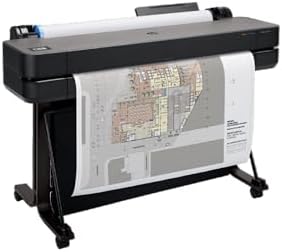
The HP DesignJet T630 is a 24-inch plotter for technical line drawings, maps, posters, and renders. This configuration includes a stand, media bin, and automatic sheet feeder, giving you a more complete floor-standing setup than a desktop-only printer. It supports rolls up to 24 inches wide and sheets up to 13 by 19 inches.
For mixed print jobs, the T630 can switch between sheet and roll media automatically and uses an automatic horizontal cutter. HP Click is included to help with file submission, PDF error checks, alerts, and auto-nesting. The printer supports common formats such as PDF, JPEG, TIFF, DWF, HP-GL/2, and PNG, and can be managed through the HP Smart app.
Its documented connections include Gigabit Ethernet, USB 2.0, and Wi-Fi. Compared with the T650, the T630 product details do not list the same print-speed figures or two-year onsite support, so the T650 may be a better match if those points are priorities. The T630’s stand and included media accessories, however, make it a convenient choice if you want those items in the package.
Pros:
- Includes a stand, media bin, and automatic sheet feeder.
- Supports both 24-inch rolls and sheets up to 13 by 19 inches.
- Offers automatic sheet-and-roll switching and a cutter.
- Includes HP Click and supports common CAD file formats.
Cons:
- Print speed and memory are not specified in the available details.
- Compared with the T650, the listed package does not mention two-year onsite support.
Verdict: The T630 is a sensible pick if you want a stand-equipped HP plotter with automatic media handling for regular CAD and poster work.
How to Choose a 24-Inch Large-Format Inkjet Printer
Match the Printer to Your Main Jobs
Start with what you plan to print most often. Posters and indoor signs call for broad media support and strong color output, while CAD plans and technical drawings put more emphasis on clear lines, legible text, and compatible file formats. The HP DesignJet models list support for HP-GL/2 and common design files, while both Canon models are positioned for posters and plotter work.
Decide Between Roll Media and Cut Sheets
All five options support 24-inch-wide roll printing, but sheet handling varies. The T210 needs an optional automatic sheet feeder for sheets up to 13 by 19 inches. The TC-21 includes an automatic sheet feeder, and the T650 and T630 list sheet feeding as part of their configurations. If you often switch between rolls and sheets, check exactly which accessories come with the specific package you are considering.
Consider How Much Automation You Need
Automation can save steps when several people use the printer or when print jobs vary in size. HP Click on the HP models includes features such as PDF error checking and auto-nesting. The T650 and T630 also list automatic switching between roll and sheet media. Canon’s TM-500 can identify media type and width and estimate the remaining length, while the TC-21 offers a touchscreen and animated setup guidance.
Compare Ink Systems and Included Ink
Included ink can help you get started, but it does not tell you how long a supply will last. The T210 includes an extra set of cartridges and describes this as up to a year of ink, while the TC-21 ships with 280 ml total. The TM-500 lists 300 ml across its five colors. Print coverage and job volume affect ink use, so consider the replacement ink system as well as the amount in the box.
Check Speed Against Your Print Volume
If you only print a few large jobs now and then, maximum speed may not be your main concern. For a busy office, the T650 lists up to 26 seconds per A1/D-size page and up to 82 prints per hour; the T210 lists up to 45 seconds per page and 59 prints per hour. The supplied details do not include comparable speed figures for the Canon models or the T630, so seek out full specifications if output time is critical.
Plan for Space, Setup, and Support
A 24-inch printer needs room for the printer itself and for long sheets or rolls as they feed and exit. A stand can make a floor-standing setup easier to arrange, and the T630 package specifically includes one. Also consider your network: the T210, T650, T630, and TC-21 list multiple connection options. The T650 includes two years of onsite and phone support for covered issues, which may matter if the printer is important to daily work.
Frequently Asked Questions
What can you print with a 24-inch large-format printer?
These printers can produce wide-format work such as posters, maps, technical line drawings, and other large prints. The HP models also list uses such as blueprints, indoor signage, and sewing patterns. The exact media and file support varies by model.
Can these printers use both roll paper and sheets?
Each model supports roll media up to 24 inches wide. Sheet support and included accessories differ: for example, the T210 requires an optional automatic sheet feeder for sheet printing, while the TC-21, T650, and T630 list sheet-feeding options in their supplied details.
Which printer is fastest based on the listed specifications?
The HP DesignJet T650 has the fastest listed figures in this selection: up to 26 seconds per A1/D-size page and up to 82 prints per hour. The T210 is listed at up to 45 seconds per page and 59 prints per hour. Comparable speed figures are not provided for the other three models here.
Is a 24-inch printer suitable for CAD drawings?
Yes. The HP DesignJet T210, T650, and T630 are described for technical line drawings and plotter work, and HP lists HP-GL/2 support for these models. Check your software, file formats, and required print width before choosing.
Which model includes a stand?
The listed HP DesignJet T630 configuration includes a stand and media bin. Check the package details for any printer you consider, since included accessories can vary by listing or configuration.
Do these printers print wirelessly?
The T210 and T650 list Wi-Fi, as does the Canon imagePROGRAF TC-21. The T630 also lists Wi-Fi. The supplied TM-500 details mention Mopria certification but do not give a full list of connection types, so confirm its connectivity requirements before purchase.
Final Recommendation
For a balanced mix of wide-format printing and file-management tools, the HP DesignJet T210 is a practical starting point, especially if the included extra ink appeals to you. Choose the Canon imagePROGRAF TC-21 for built-in sheet feeding and flexible connectivity, or the HP DesignJet T650 if faster listed output and included support matter most. The T630 stands out for a stand-equipped package, while the Canon TM-500 is worth considering for its five-color pigment system and automatic media detection. Compare the included accessories and ink requirements with your workflow before making a final choice.