
Choosing studio monitors for a large control room is a different job than picking a desktop pair. Bigger rooms need more output, stronger low-frequency extension, and careful placement. The five speakers below are compact active monitors built mainly for desks, home studios, and small production spaces. That makes them useful in smaller control rooms, as nearfield speakers in a larger setup, or as secondary monitors for checking your mixes on a second set of speakers. This guide covers what each model does well, where it falls short for bigger spaces, and how to decide which one fits your room, your workflow, and your ears.
Quick Comparison Table
| Model | Brand | Woofer Size | Standout Feature |
|---|---|---|---|
| Edifier MR3 Powered Studio Monitor | Edifier | 3.5 inch | Wide stated frequency range and ConneX app tuning |
| PreSonus Eris 3.5 Powered Studio Monitors, Pair | PreSonus | 3.5 inch | 50 watts of built-in amplification and room tuning controls |
| Ortizan C7 Powered Studio Monitors Pair with Bluetooth 5.3 | Ortizan | 3.5 inch | Bluetooth 5.3, USB audio input, and balanced TRS input |
| Edifier R1280T Powered Bookshelf Speakers | Edifier | 4 inch full range | Two simultaneous AUX inputs and a remote control |
| Pioneer DJ DM-40D 4-inch Active Desktop Monitor Speakers | Pioneer DJ | 4 inch | DSP tuning with DJ-focused low-end voicing |
Our Picks: Best Studio Monitor Speakers For Large Control Rooms reviews
Edifier MR3 Powered Studio Monitor: Strong Flexibility for Hi-Res Work

The Edifier MR3 is an active two-way monitor with a 3.5-inch mid-low driver, a 1-inch tweeter, and an MDF cabinet meant to limit distortion. The listing states a flat response from 52Hz to 40kHz and Hi-Res Audio certification, which puts it in a useful range for mixing, editing, and general listening. It also provides 18W x 2 RMS output with a peak SPL of 92.5dB. Those figures are modest for a large room, so this model fits best in a small to medium space, where it can serve as a clear nearfield reference.
Where the MR3 stands out is its flexibility. It includes balanced TRS, RCA, and AUX inputs, plus a headphone output, so you can connect an interface, a keyboard, a phone, or a second source without constantly swapping cables. Bluetooth with multi-point connection adds convenience for switching between a laptop and a phone. Music, Monitor, and Custom modes, along with the ConneX app for EQ adjustments, give you a practical way to shape the sound without buying outboard processing. Many owners appreciate that the app lets them dial in the tonal balance for their particular room, though room acoustics still matter more than any preset.
In everyday use, the MR3 works well as a clean, detailed desktop monitor that handles mixing, video editing, and casual listening with equal ease. The main limitation is physical scale. A 3.5-inch woofer can only move so much air, so low-end extension in a large space will feel thin unless you add a subwoofer and treat the room. Compared with the PreSonus Eris 3.5 on this list, the MR3 offers more connection flexibility and app-based tuning, while the Eris offers more stated power.
Pros:
- Stated flat response from 52Hz to 40kHz with Hi-Res Audio certification
- Balanced TRS, RCA, AUX, and headphone connections cover most studio sources
- Multi-point Bluetooth makes switching between devices simple
- ConneX app and Music, Monitor, and Custom modes allow detailed EQ control
Cons:
- The stated 18W x 2 RMS output is limited for filling a large room with accurate sound
Verdict: The Edifier MR3 is a versatile, well-connected pair for small to medium control rooms, especially if you value app-based tuning and multiple inputs. For a truly large room, pair it with a subwoofer or choose a model with more output.
PreSonus Eris 3.5 Powered Studio Monitors: The Most Capable Power Stage Here

The PreSonus Eris 3.5 is sold as a complete stereo pair, and its most important spec for a larger room is the 50 watts of built-in amplification. That headroom gives it more room to work than the other compact models on this list. Each speaker uses a 3.5-inch woven-composite woofer and a 1-inch silk-dome tweeter, with a stated frequency range of 80Hz to 20kHz. The lower limit is a clear signal that these monitors will not reproduce deep sub-bass on their own, so a subwoofer becomes a practical addition in a larger space.
What makes the Eris 3.5 more adaptable than many desktop pairs is its built-in high- and low-frequency acoustic tuning controls. These let you compensate for boundary effects and room shape without extra processing gear. That matters in a large room, where walls, corners, and hard surfaces can shift the balance more than most people expect. The rear-panel and front-panel connections also cover a wide range of gear, including balanced TRS, RCA, a front aux input, and a front headphone jack for private monitoring.
In day-to-day use, the Eris 3.5 suits people who need a dependable workhorse for production, gaming, and general listening. Buyers often note that it fills a room more convincingly than smaller desktop monitors, and that the tuning controls help with placement issues. The trade-off is that the cabinet is still a compact nearfield design. You will get clarity and useful power, but you will not get the low-frequency authority of larger studio monitors. For a bigger control room, treat the Eris 3.5 as a strong nearfield pair or a secondary reference rather than a full-range main system.
Pros:
- 50 watts of built-in amplification gives more headroom than the other compact models here
- Built-in high- and low-frequency tuning controls help adapt the sound to your space
- Balanced TRS, RCA, front aux, and headphone connections support a wide range of sources
- Sold as a complete stereo pair, which simplifies setup
Cons:
- The stated 80Hz lower limit means you will likely need a subwoofer for full low-end coverage in a large room
Verdict: Among these five, the Eris 3.5 is the strongest choice for a larger control room, thanks to its amplification and room-tuning controls. Plan on adding a subwoofer if your room is big or your mixes depend heavily on low-end detail.
Ortizan C7 Powered Studio Monitors: Compact Monitors with Wireless and USB Options

The Ortizan C7 is a compact pair of active monitors built around a 3.5-inch carbon fiber mid-bass driver and a 0.75-inch silk-dome tweeter. The listing describes an electronic two-way crossover and a flat response curve, and it lists a 6.35mm TRS balanced input, two AUX inputs, and a front headphone output. It also adds Bluetooth 5.3 and a 24-bit DAC for direct USB audio, which is a useful combination for people whose setups mix computers, phones, and instruments.
The C7 is most appealing for flexible home setups. A balanced input makes it suitable for connecting to a mixer or an instrument with a TRS output, and the USB DAC means you can send digital audio from a computer without relying on a separate interface for basic playback. Bluetooth is handy for casual listening, though it is rarely the best choice for critical mixing because wireless compression can alter detail. Many owners find the setup straightforward, which helps when the monitors live on a desk and get moved around often.
For a large control room, however, the C7 faces the same physical limits as other compact monitors. The supplied details do not clearly state a power output figure, which makes it harder to judge how loud or how full the sound will be in a bigger space. The product copy is also heavy on marketing language, so you should confirm the exact specifications you need before buying. Compared with the Eris 3.5, the C7 offers more wireless and USB convenience, while the Eris offers more clearly stated power and room-tuning controls.
Pros:
- Bluetooth 5.3 and a USB DAC provide convenient wireless and digital connection options
- A 6.35mm TRS balanced input supports mixers and instruments with TRS outputs
- The 3.5-inch mid-bass driver paired with a silk-dome tweeter suits compact setups
- Two AUX inputs and a front headphone output make switching sources easy
Cons:
- The supplied details do not clearly state a power output figure, which makes it harder to judge fit for a large room
Verdict: The Ortizan C7 is a good pick for home studios and mixed-use desks where wireless and USB convenience matter. For a large control room, it makes more sense as a secondary or nearfield option unless you can confirm its output meets your needs.
Edifier R1280T Powered Bookshelf Speakers: Simple Setup With a Warm Finish
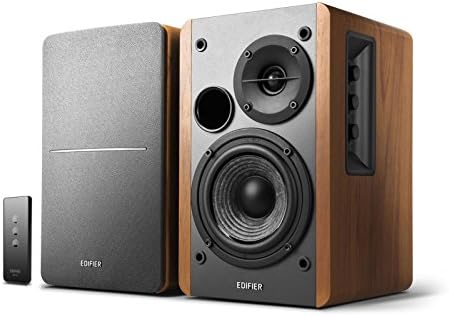
The Edifier R1280T is a powered bookshelf pair built with a 4-inch full-range driver and a 13mm silk-dome tweeter. It is designed more for general listening than for professional production, but its clean setup and practical controls make it a useful option in a shared space. The MDF cabinet has a wood-effect vinyl finish that blends into a living area or office better than most studio-style monitors.
The R1280T stands out for its connectivity. It offers two AUX inputs, so you can link two devices at once without plugging and unplugging. A remote control handles volume, and side-panel knobs adjust bass and treble. These features make it a convenient hub for a TV, a computer, and a phone, all of which can share one set of speakers. Some users value the simple layout, since it avoids the menus and apps that come with more advanced monitors.
The limitations are important for a large control room. This model lacks the balanced connections and detailed tuning options found on the other picks, and its full-range driver is not designed for critical, detailed mixing. The result is an enjoyable, easy-to-use speaker that suits background or casual listening better than professional production. If your main goal is accurate monitoring in a bigger space, the Edifier MR3 or PreSonus Eris 3.5 will serve you better.
Pros:
- Two AUX inputs allow simultaneous connection to two devices
- A remote control and side-panel knobs provide easy volume and tone adjustments
- The wood-effect MDF cabinet fits well in shared or home living spaces
- Simple setup makes it approachable for users who want minimal configuration
Cons:
- It lacks balanced inputs and detailed tuning, which limits its usefulness for serious production work
Verdict: The Edifier R1280T is best for casual listening and shared spaces rather than a professional control room. Choose it for convenience and styling, not for critical monitoring in a large room.
Pioneer DJ DM-40D Desktop Monitors: DJ-Focused Voicing for Desk Setups

The Pioneer DJ DM-40D is a pair of 4-inch active desktop monitors designed to fit on a home DJ or production desk. The product details highlight DSP tuning, a low end voiced by Pioneer DJ’s audio team, and a simple active design with built-in amplification that connects directly to your gear. It is intended as a natural companion to a DDJ controller or a home production setup, which tells you a lot about its intended character.
The main appeal is its punchy, defined low end at a compact size. For DJs and producers who want a clear sense of bass on a small desk, the DM-40D delivers a focused sound with minimal setup. The DSP tuning is designed to give you a balanced, accurate picture for mixing and monitoring, though the exact tonal goal is shaped by the DJ-oriented voicing. That voicing can be a strength for club-style material and a limitation if you need a neutral reference for other genres.
In a large control room, the DM-40D is best viewed as a compact desktop tool rather than a full monitoring system. The product details do not list output power, frequency range, or a full set of inputs, so you should verify those specs before building a system around it. Its 4-inch driver will also struggle to convey the same scale as the 3.5-inch and 4-inch options elsewhere in this list when the room gets large. It is a sensible pick for a dedicated DJ or production desk, but a less flexible choice for a broad control room environment.
Pros:
- DSP tuning is designed to provide a clear, balanced sound for mixing and monitoring
- Low end is voiced for punch and definition at a compact size
- Simple active design connects directly to your gear without a separate amplifier
- Pairs naturally with DDJ controllers and home production setups
Cons:
- The DJ-oriented voicing may not suit users who need a fully neutral reference for every genre
Verdict: The Pioneer DJ DM-40D is a solid desktop pair for DJs and producers working in a compact space. For a large control room or a neutral studio reference, the Eris 3.5 or Edifier MR3 is the more practical choice.
How to Choose Studio Monitors for a Large Control Room
Be Realistic About Room Size and Monitor Scale
The first question to answer is whether a compact nearfield monitor can do the job in your space. Nearfield monitors are designed to be placed close to your ears, where the direct sound from the speaker dominates the room’s reflections. That setup helps you hear detail even in a larger space. However, the speaker’s size still limits how much low-frequency energy it can produce. In a big room, a small woofer can sound polite and thin at the back of the room, so think of these models as tools for close listening rather than as full-range systems that fill a space on their own. If your room is large, plan on a nearfield pair plus a subwoofer, or consider larger main monitors.
Check Output Power and Driver Size
Amplifier power and driver size work together. A higher stated output gives the speaker more headroom, which matters when you need clean sound at higher volumes or in a bigger room. The PreSonus Eris 3.5, with its 50 watts of built-in amplification, has more stated power than the Edifier MR3 with its 18W x 2 RMS output. Driver size matters too. A 3.5-inch or 4-inch woofer will handle midrange and upper bass with clarity, but it cannot replace the low-end weight of a larger cabinet. When you compare models, look at both numbers, then decide whether they match the volume you need and the size of the space around you.
Look for Honest Frequency Specifications
A stated frequency range tells you how much of the audible spectrum a monitor reproduces. The Edifier MR3 lists a range from 52Hz to 40kHz, while the PreSonus Eris 3.5 lists 80Hz to 20kHz. Neither figure is inherently better, but they point to different expectations. A lower starting point means more bass extension, which can matter for electronic music, film, and mixing low-end content. Always check whether a model’s specifications are measured under specific conditions, and remember that a flat response claim is only a starting point. Room acoustics will shape what you actually hear.
Prioritize Connections That Match Your Gear
Connection options can make or break your workflow. Balanced TRS inputs are common on professional audio interfaces and mixers, and they help reduce noise over longer cable runs. RCA and AUX inputs are convenient for consumer devices, phones, and turntables. Some models, like the Edifier MR3 and PreSonus Eris 3.5, offer several connection types at once, which means you can keep your computer, interface, and phone connected without swapping cables. Think about the devices you use every day, then choose monitors that accept those signals without adapters or compromises.
Use Tuning Controls and Room Treatment Together
Built-in tuning controls can help compensate for the way your room affects sound. Options like high- and low-frequency adjustment on the Eris 3.5, EQ modes and app-based tuning on the Edifier MR3, and DSP tuning on the Pioneer DJ DM-40D all give you a way to shape the response. These features are valuable, but they work best when combined with sensible placement. Position the speakers at ear height, form an equilateral triangle with your listening position, and keep them away from walls and corners where possible. Acoustic treatment, such as absorptive panels at reflection points, will do more for accuracy than any single control. Tuning tools are a helpful refinement, not a complete fix.
Think About Your Workflow and Listening Habits
The right monitor depends on what you do most often. If you mix, edit video, or master audio, you need a speaker that reveals detail without exaggerating bass or treble. If you DJ or produce club-style music, a model with punchy low-end voicing may be more satisfying. If your room doubles as a living space, a model with a finish that fits the decor and simple controls may matter more than maximum technical performance. Be honest about the tasks you do every day, because a speaker that excels at one job can feel like a compromise for another.
Plan Your Budget Around the Whole System
Many buyers focus only on the speakers, but a complete monitoring setup often includes a subwoofer, stands, cables, an audio interface, and sometimes acoustic treatment. If you have a large control room, budget for these extras from the start. A well-chosen pair of nearfield monitors with a subwoofer and modest treatment will often outperform a more expensive pair placed in an untreated room. Build your setup in stages, starting with the monitors that best fit your room and workflow, then adding the components that address the limits you hear.
Frequently Asked Questions
Can these speakers work in a large control room?
They can work in small to medium control rooms and as nearfield monitors in larger spaces. In a big room, they are most effective when you sit close to them, because their compact drivers have limited low-frequency reach. The PreSonus Eris 3.5 is the strongest option here for larger spaces thanks to its 50 watts of built-in amplification.
Do I need a subwoofer with these monitors?
For a large room, a subwoofer is strongly recommended if you need reliable bass. The PreSonus Eris 3.5 lists a lower frequency limit of 80Hz, which means it will not produce deep bass on its own. Even monitors with a wider stated range can benefit from a subwoofer in bigger spaces, where the room itself can shape how bass is heard.
Is balanced TRS better than RCA or AUX?
Balanced TRS connections are generally preferred for professional gear because they can reduce noise over longer cable runs. RCA and AUX inputs are convenient for consumer devices and are perfectly usable for many setups. Choose a model whose inputs match your main sources, and use adapters only when necessary.
Are Bluetooth-enabled monitors good for mixing?
Bluetooth is convenient for casual listening and quick device switching, but wireless compression can affect detail. For critical mixing, use a wired connection through a balanced input or USB audio path whenever possible. Bluetooth is best treated as a secondary convenience rather than your main reference connection.
Which model is best for a beginner?
The Edifier MR3 is a practical starting point for beginners. It offers a wide range of inputs, app-based EQ, and clear modes that make it easy to experiment with different sounds. It is well suited to home studios and small rooms, and it gives you room to grow as your needs develop.
Do I need acoustic treatment for these speakers?
Acoustic treatment is not mandatory, but it can make a significant difference in accuracy, especially in larger or untreated rooms. Placing absorptive materials at the first reflection points on side walls and behind your listening position often helps more than any speaker upgrade. Combine treatment with sensible speaker placement for the best results.
Final Recommendation
For a large control room, the PreSonus Eris 3.5 is the most capable choice in this group, thanks to its stated 50 watts of amplification and its room-tuning controls. Pair it with a subwoofer for full low-end coverage. If you need the most flexible connections and app-based tuning in a small to medium room, the Edifier MR3 is an excellent option. The Ortizan C7 suits home studios that rely on wireless and USB convenience, while the Pioneer DJ DM-40D is a strong fit for DJs and producers with compact desks. The Edifier R1280T is best reserved for casual listening in shared spaces. Match your choice to your room size, your sources, and the work you do most, and you will get a monitoring setup that serves you well.