
For multicamera production, the right monitor helps you see several camera feeds at once and spot problems before they reach the audience. The best choice depends on your setup: a self-contained monitor-recorder-switcher, a portable multiview display, or a monitor designed to pair with an ATEM Mini. The options below differ in screen size, connections, and recording features, so match them to your cameras and workflow before you buy.
Quick Comparison
| Product | Best for | Screen | Key features |
|---|---|---|---|
| Atomos Sumo PRO-19 | Recording and monitoring multiple feeds | 19-inch 4K HDR | ISO recording, quad view, SDI and HDMI connections |
| FEELWORLD M101S | Portable multiview monitoring | 10.1-inch, 1920 × 1200 | Dual and quad views, dual SDI and HDMI inputs |
| FEELWORLD ATEM156 | Monitoring an ATEM Mini setup | 15.6-inch, 1920 × 1080 | Four HDMI inputs and outputs, quad view |
Our Picks: Best Video Production Monitors For Multicamera Switching reviews
Atomos Sumo PRO-19: Best for a recording and monitoring hub

The Sumo PRO-19 is the most feature-packed option here. It combines a 19-inch 4K HDR display with monitor, recorder, and switcher functions. Its quad-view monitoring is designed for multicamera work, while its recording features can capture up to four isolated camera feeds and a program output.
For a production that uses both SDI and HDMI gear, its mix of connections is a major advantage. The monitor has two 12G-SDI and two 3G-SDI inputs, a 12G-SDI output, and HDMI input and output. It can record in ProRes, ProRes RAW, and Avid DNx to CFexpress Type B or external USB-C storage. Those options make it a better fit for a larger production workflow than a monitor used only to view camera feeds.
Its technical tools include waveform, focus peaking, and EL Zone false color. NDI HX3 networking and AirGlu timecode are also listed features. This breadth comes with more workflow choices to manage than a straightforward HDMI monitor, and the 19-inch size is less suited to a small, highly mobile kit. The supplied listing data marks this model unavailable, so check the product page before building a plan around it.
Pros:
- Large 19-inch 4K HDR display for on-set and video-village viewing
- Supports quad view and recording of multiple isolated feeds plus a program output
- Offers SDI and HDMI connections, along with several recording formats
- Includes technical monitoring tools such as waveform and focus peaking
Cons:
- Its broad feature set may be more than a simple monitoring setup needs
- The supplied listing data marks it unavailable
Verdict: Choose the Sumo PRO-19 if you need a large, capable monitor that can also record multiple feeds and support a more advanced production workflow, and verify availability first.
FEELWORLD M101S: Best compact display for flexible multiview

The M101S is a smaller field monitor built for viewing several sources on one screen. Its 10.1-inch IPS panel has a 1920 × 1200 resolution, and the monitor supports dual-, triple-, and quad-view layouts as well as picture-in-picture. That makes it useful when you need to keep camera feeds visible without bringing a large display to a location.
Two 3G-SDI and two HDMI 2.0 ports give it a mix of connection options, and the product description specifies support for input signals up to 4K60p. The screen is rated at 1200 nits and has a 160-degree viewing angle. Its listed tools include waveform, HDR, 3D LUT, audio monitoring, and a touch screen. The CNC-machined aluminum body is intended for field use, though the screen is much smaller than the displays on the other two picks.
The M101S is a monitor, not a substitute for a dedicated production switcher. It can help you inspect and compare feeds, but you will need separate switching equipment if your workflow requires it. Its compact size makes it a more practical choice for location work than the 19-inch Sumo, while the ATEM156 offers a larger screen and four HDMI inputs for an HDMI-focused setup.
Pros:
- Supports dual, triple, and quad views as well as picture-in-picture
- Combines two SDI and two HDMI inputs
- Bright 1200-nit screen with a 1920 × 1200 resolution
- Includes waveform, 3D LUT, HDR, and audio monitoring tools
Cons:
- The 10.1-inch screen gives you less viewing space than the larger alternatives
- It monitors feeds but does not replace a separate switching system
Verdict: Pick the M101S if you need a compact multiview monitor with both SDI and HDMI connections, rather than an all-in-one recorder or a production switcher.
FEELWORLD ATEM156: Best for an ATEM Mini HDMI workflow
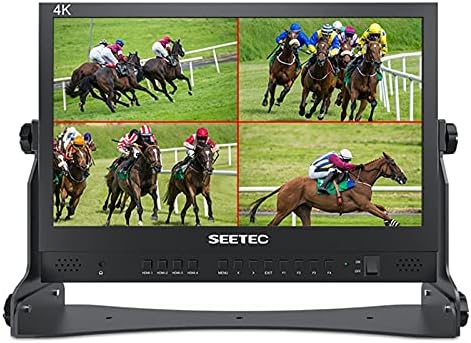
The ATEM156 is a 15.6-inch monitor designed for live production and multicamera setups, particularly those using an ATEM Mini video switcher. It has four 4K HDMI inputs and four HDMI outputs, with quad-, dual-, and single-view monitoring. The outputs can loop the HDMI signals through to other equipment, which can help when arranging a production desk or studio chain.
Its 1920 × 1080 IPS display has a 170-degree viewing angle. Focus peaking, false color, and pixel-to-pixel viewing are included to help with image checks. The monitor has a control panel with customizable shortcut keys, and its listed power options are a 12V DC input and a V-mount battery plate.
This model makes the most sense when your cameras and switching setup use HDMI. It is not an all-in-one recording solution like the Sumo PRO-19, and its listed connections are HDMI rather than SDI. Compared with the M101S, it gives you a larger screen and four HDMI inputs, but it is less flexible for a setup that depends on SDI sources. The supplied listing data marks it unavailable, so check the product page before choosing it.
Pros:
- Four HDMI inputs and four HDMI outputs for a multicamera chain
- Supports quad, dual, and single-view monitoring
- 15.6-inch IPS screen with a wide viewing angle
- Includes focus peaking, false color, and pixel-to-pixel tools
Cons:
- Its listed video connections are HDMI, not SDI
- The supplied listing data marks it unavailable
Verdict: Consider the ATEM156 if your production centers on an ATEM Mini and you want a larger screen with four HDMI inputs, but confirm that the listing is available before buying.
How to Choose a Video Production Monitor for Multicamera Switching
Check the number and type of inputs
Start with the connections on your cameras, switcher, and other production gear. HDMI inputs suit an HDMI-based setup, while SDI connections may be important for a system that uses SDI. Count the feeds you need to view at the same time, then confirm the monitor has enough inputs of the right type. A connector count alone does not guarantee compatibility, so check the exact signal formats your cameras send.
Choose a useful multiview layout
Quad view can show four feeds at once, while dual view or picture-in-picture may make it easier to focus on the sources that matter most. Think about how many cameras you operate and how far you will be from the screen. A compact monitor can fit a field kit, but a larger display may make individual feeds easier to inspect during a studio or event production.
Decide whether you need recording or only monitoring
A monitor helps you view and assess camera feeds, but it does not necessarily record them or switch the live program. If you need isolated recordings of each camera feed, look for a model with explicit ISO recording features, such as the Sumo PRO-19. If you only need to see multiple sources, a multiview monitor may be enough, paired with a separate switcher where needed.
Match screen size and brightness to the location
Consider where the monitor will sit and who needs to see it. A 10.1-inch screen takes less room, while a 15.6- or 19-inch display provides more viewing area. Brightness can also matter in a brighter location; among these choices, the M101S lists a 1200-nit rating. Compare screen size and brightness with your actual viewing distance and conditions.
Look for tools that support your work
Waveform, focus peaking, false color, and pixel-to-pixel viewing can help you check exposure or focus, depending on the tool and your workflow. Other features, such as 3D LUT support, audio monitoring, networking, and timecode, are useful only if they fit your production needs. Prioritize the tools you will use rather than choosing by feature count alone.
Plan for power, storage, and signal routing
For field work, check the monitor’s stated power options and consider how it will fit into your existing kit. For recording, confirm the supported media and formats. If you need to send signals onward to other equipment, look at the outputs and loop-through options. These details can affect setup just as much as screen size does.
Frequently Asked Questions
Do I need a monitor with a built-in switcher?
Not always. A multiview monitor lets you see multiple camera feeds, while a switcher selects which source becomes the program output. Some products combine monitoring and other production functions, but a monitor-only model may still need a separate switcher for live program selection.
Can the FEELWORLD ATEM156 replace an ATEM Mini?
The ATEM156 is described as a monitor for use with an ATEM Mini and other equipment. Its four HDMI inputs and outputs support monitoring and signal loop-through, but the supplied product information does not describe it as a replacement for the ATEM Mini switcher.
Which option supports SDI connections?
The Atomos Sumo PRO-19 lists 12G-SDI and 3G-SDI inputs, along with a 12G-SDI output. The FEELWORLD M101S lists two 3G-SDI inputs. The ATEM156 is listed with HDMI connections.
Which monitor is the most portable?
The M101S has the smallest listed screen at 10.1 inches, making it the most compact option by screen size. The supplied information does not provide product weights, so compare dimensions and weight on the product page if portability is a deciding factor.
Can these monitors record isolated camera feeds?
The Sumo PRO-19 is the model in this group that explicitly lists recording up to four isolated camera feeds, plus a program output. The supplied descriptions for the FEELWORLD monitors focus on monitoring rather than ISO recording.
What should I check before buying an unavailable model?
Check the product page for current availability and confirm that the version, connections, and included features match your setup. The supplied listing data marks the Sumo PRO-19 and ATEM156 unavailable, so do not rely on either being purchasable without checking first.
Final Recommendation
The Atomos Sumo PRO-19 is the strongest fit if you want a large display with multiview monitoring and explicit ISO recording features, provided it is available and suits your budget and workflow. For a smaller SDI-and-HDMI field monitor, choose the FEELWORLD M101S. If your setup is built around an ATEM Mini and uses HDMI, the FEELWORLD ATEM156 offers a larger dedicated monitoring display, but check its availability first. In every case, confirm your camera signals and switching needs before making a decision.