
A 240Hz refresh-rate claim can make a projector sound like a clear choice for gaming, but the supported resolution and input lag matter just as much. Many projectors reach their highest refresh rate at a lower resolution than 4K. The picks below include models advertised for 240Hz gaming, plus one 4K alternative whose supplied product details do not specify a 240Hz mode. Check the supported signal modes and your console or PC’s output before you buy.
Quick Comparison
| Projector | Refresh and gaming details | Brightness and standout features |
|---|---|---|
| ViewSonic LX700-4K | Advertised 240Hz; 4.2ms input lag; 1440p at 120Hz support | 4K UHD laser; brightness claims differ between the title and description; Golf Mode |
| Optoma UHD38x | 4.2ms response time at 1080p; supplied details do not specify 240Hz | True 4K UHD; listed at 4,000 lumens; HDR and HLG |
| ViewSonic PX749-4K | Advertised 240Hz; 4.2ms input lag; 1440p at 120Hz support | 4K UHD; 4,000 ANSI lumens; up to 300-inch image |
| BenQ TK710 | 4ms at 1080p/240Hz; 16ms input lag at 4K/60Hz | 4K HDR laser; 3,200 ANSI lumens; 95% Rec.709 color coverage |
| ViewSonic LX700-4K (Renewed) | Advertised 240Hz; 4.2ms input lag; 1440p at 120Hz support | Renewed laser model; listing supplied for this option is marked unavailable |
Our Picks: Best Gaming Projectors With 240Hz Refresh Rate reviews
1. ViewSonic LX700-4K: A Feature-Rich Laser Pick for Xbox Gaming

The LX700-4K combines 4K UHD home-theater projection with gaming features aimed at Xbox players. It advertises a 240Hz refresh rate and 4.2ms input lag, along with support for 1440p at 120Hz. Those figures make it worth considering for fast games, but the highest refresh rate should not be assumed to work at 4K. Confirm the projector’s supported input modes and your device’s output options before planning a setup around 240Hz.
This is a laser projector with HDR and HLG support, plus ViewSonic’s SuperColor technology. Its Golf Mode is a more specialized feature, intended to enhance greens and blues for golf simulator use. For room placement, the listed 1.3x optical zoom, horizontal and vertical keystone, and four-corner adjustment offer useful flexibility. The description says it can produce a 100-inch image from about 7.7 feet and supports image sizes from 80 to 150 inches.
One detail to check is brightness: the product title says 3,500 lumens, while the description claims 4,000 ANSI lumens. Treat that as a specification discrepancy and verify the exact listing before purchase. The LX700-4K looks like a strong fit for an Xbox-focused room that also needs a large-screen movie projector, but its brightness, placement, and refresh-mode details deserve a closer look.
Pros:
- Advertises 240Hz refresh and 4.2ms input lag.
- Supports 4K UHD, HDR, and HLG for movies and games.
- Offers 1.3x optical zoom and several image-adjustment tools.
- Includes a dedicated Golf Mode for simulator use.
Cons:
- Brightness information differs between the title and description.
- The 240Hz claim does not mean 4K gaming at 240Hz.
Verdict: Choose the LX700-4K if you want a versatile laser projector with Xbox-oriented features, but verify the brightness and supported refresh modes for your setup.
2. Optoma UHD38x: A Bright 4K Option With Fast 1080p Response

The Optoma UHD38x is a true 4K UHD projector described as a bright, lag-free gaming option. Its supplied product details list 4,000 lumens and a 4.2ms response time at 1080p, with HDR and HLG compatibility. That combination may appeal if you want one projector for big-screen gaming and movies, especially when brightness is a key part of your decision.
There is an important caveat for this roundup: the provided description does not state a 240Hz refresh rate. Its fast 1080p response-time figure is not the same as a confirmed 240Hz mode. If 240Hz is a must-have, check the manufacturer’s supported resolution and refresh-rate table before choosing this model. The supplied details also do not provide placement measurements or image-adjustment specifics, so compare those needs with your room before deciding.
Compared with the ViewSonic and BenQ options here, the UHD38x has less detail available about gaming modes. It may still suit players who prioritize 4K and a fast response at 1080p, but it is not the safest pick when you specifically need a confirmed 240Hz input mode.
Pros:
- True 4K UHD resolution.
- Listed at 4,000 lumens.
- 4.2ms response time at 1080p is specified.
- Supports HDR and HLG.
Cons:
- The supplied product details do not confirm a 240Hz refresh mode.
- Available information gives limited guidance on setup and placement.
Verdict: Consider the UHD38x for 4K projection and fast 1080p response, but choose a model with an explicitly confirmed 240Hz mode if that feature is essential.
3. ViewSonic PX749-4K: A Large-Screen Projector for Gaming and Simulators

The PX749-4K is a 4K UHD projector with a 240Hz refresh-rate claim, 4.2ms input lag, and support for 1440p at 120Hz. It is designed with Xbox compatibility in mind, while its HDR and HLG support also make it suitable for movie nights. The stated 4,000 ANSI lumens may help in rooms with some ambient light, though image quality still depends on the room, screen, and placement.
Its biggest distinction from the LX700-4K is the larger stated projection range: the PX749-4K can project images up to 300 inches, with a 100-inch picture listed at 13 feet. It also includes 1.3x optical zoom, horizontal and vertical keystone, auto-keystone correction, and four-corner adjustment. Those tools can help when the projector cannot sit perfectly square to the screen, though careful physical placement is still preferable for the cleanest image.
This model is a practical match for a dedicated theater room, a large gaming space, or a golf simulator setup where a very large image matters. The 300-inch maximum is a headline size, not a promise of equal brightness or clarity at every screen size and distance. Measure your room and check the supported refresh mode you plan to use.
Pros:
- Advertises 240Hz refresh and 4.2ms input lag.
- Supports 4K UHD, HDR, and HLG.
- Projects images up to a stated 300 inches.
- Includes zoom and several image-adjustment options.
Cons:
- The 100-inch image requires a listed distance of about 13 feet.
- The maximum image size may not suit smaller rooms.
Verdict: Pick the PX749-4K if you have room for a large projection setup and want a 4K gaming projector that advertises 240Hz support.
4. BenQ TK710: A 4K Laser Projector With a Clearly Stated 1080p/240Hz Mode
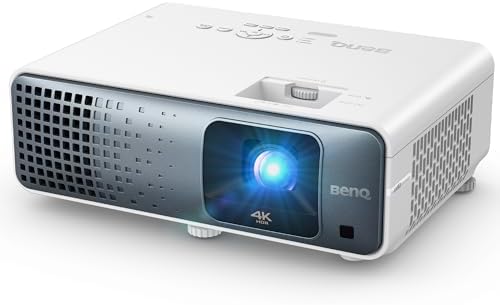
The BenQ TK710 is a 4K HDR laser projector for home entertainment and gaming. Its supplied specifications are especially clear about the relationship between resolution and speed: it lists 4ms response at 1080p/240Hz and 16ms input lag at 4K/60Hz. This makes it easier to understand the trade-off than a general 240Hz claim without a stated resolution.
BenQ lists a 3,200 ANSI-lumen laser light source, HDR10 and HLG support, and 95% Rec.709 color coverage. Its laser light source avoids the frequent lamp-replacement routine associated with traditional lamp projectors, according to the product description. For console players, the stated 4K/60Hz figure is a useful reference; PC players seeking higher refresh should check which input modes their graphics card and connection support.
Compared with the ViewSonic options, the TK710 has a lower listed brightness than their stated 4,000 ANSI lumens, but its 240Hz mode is specifically tied to 1080p. It is a compelling option if you value a clearly described high-refresh mode and want laser 4K projection for other content. It may be less appealing if you expect high refresh and full 4K resolution at the same time.
Pros:
- Specifies 4ms response at 1080p/240Hz.
- Lists 16ms input lag at 4K/60Hz.
- Uses a laser light source and supports HDR10 and HLG.
- Lists 95% Rec.709 color coverage.
Cons:
- The stated 240Hz mode is at 1080p, not 4K.
- Its listed 3,200 ANSI lumens are lower than the 4,000-lumen claims of some alternatives.
Verdict: Choose the TK710 if you want a laser 4K projector and a clearly specified 1080p/240Hz gaming mode, and you are comfortable switching to 4K/60Hz for higher-resolution play.
5. ViewSonic LX700-4K Renewed: A Renewed Alternative to the Standard Model

This renewed LX700-4K listing describes a laser projector with 4K UHD resolution, a 240Hz refresh-rate claim, 4.2ms input lag, and support for 1440p at 120Hz. It also lists HDR and HLG compatibility, SuperColor technology, Xbox-oriented features, and a Golf Mode. The feature set closely matches the standard LX700-4K, so its main distinction is its renewed condition rather than a different gaming design.
The listed setup features include 1.3x optical zoom, horizontal and vertical keystone, and four-corner adjustment. The description also mentions a 100-inch image from about 7.7 feet and projection sizes from 80 to 150 inches. As with the standard model, the supplied brightness figures conflict: the title says 3,500 lumens, while the description claims 4,000 ANSI lumens. Verify the exact specifications and what the renewed condition includes before ordering.
The listing supplied for this renewed option is marked unavailable, so it may not be a practical choice at the time you shop. Availability can change, but if it remains unavailable, the standard LX700-4K is the more straightforward alternative. Also compare the renewed listing’s condition and included coverage with your expectations before choosing it over a new model.
Pros:
- Advertises 240Hz refresh and 4.2ms input lag.
- Includes 4K UHD, HDR, and HLG support.
- Offers Golf Mode and flexible image adjustments.
- Provides an alternative listing for the LX700-4K feature set.
Cons:
- The supplied listing is marked unavailable.
- Brightness details differ between the title and description.
Verdict: Consider this renewed LX700-4K only if it becomes available and its condition and coverage meet your needs; otherwise, compare the standard model.
How to Choose a Gaming Projector With a 240Hz Refresh Rate
Confirm the resolution that supports 240Hz
A projector’s maximum refresh rate may apply only at a lower resolution. For example, the BenQ TK710 lists 240Hz at 1080p and 60Hz at 4K. ViewSonic’s listings advertise 240Hz and separately mention 1440p at 120Hz. Before you buy, check the supported input-mode table for the exact resolution and refresh rate you plan to use. Do not assume that a 240Hz label means 4K at 240Hz.
Match the projector to your console or PC
Your gaming device must be able to send the video mode you want, and the projector must accept it. Check your console or computer’s available resolution and refresh options, then compare them with the projector’s documented inputs. This is especially important if you want high-refresh gaming on a PC or plan to switch between 4K and a faster lower-resolution mode.
Compare input lag and response-time claims carefully
Input lag describes the delay between your device sending an image and the projector displaying it. Response-time figures are related to gaming responsiveness, but product listings may use different terms or tie the number to a specific resolution and refresh rate. Compare figures only when they refer to the same video mode. A low-lag claim at 1080p does not automatically describe performance at 4K.
Choose brightness for your room
Brightness can matter when you game with some room lighting, but a projector’s image also depends on screen size, screen surface, and ambient light. The models here list different brightness figures, and the LX700 listings contain conflicting claims between title and description. Check the exact product specifications and consider how much light you can control in your gaming space.
Measure throw distance and screen size
Before buying, measure the distance from the planned projector location to your screen or wall. The PX749-4K lists a 100-inch image at about 13 feet, while the LX700-4K description lists the same size from about 7.7 feet. These differences can affect which model fits your room. Also remember that a projector’s stated maximum image size may not be ideal for every space.
Look at setup adjustments and installation needs
Optical zoom helps you change image size without moving the projector, while keystone and corner adjustments can help square up an image when placement is less than ideal. These tools are useful, but they do not replace careful positioning. Check whether you need ceiling mounting, how the projector will connect to your devices, and whether the listed adjustment options suit your room.
Consider laser versus renewed options
The ViewSonic and BenQ models in this list use laser light sources. The BenQ description notes that its laser source avoids frequent lamp replacements. If you are considering the renewed LX700-4K, check its condition, included items, and coverage, and confirm that the listing is available. Compare those details with the standard model before making a decision.
Frequently Asked Questions
Does a 240Hz projector display 4K at 240Hz?
Not necessarily. A projector may support 240Hz only at a lower resolution. The BenQ TK710, for example, lists 240Hz at 1080p and 60Hz at 4K. Always check the supported resolution and refresh-rate combination.
Which projector here clearly specifies a 240Hz gaming mode?
The BenQ TK710 specifically lists 1080p at 240Hz with a 4ms response time. The ViewSonic LX700-4K and PX749-4K advertise 240Hz and also list 1440p at 120Hz support. Confirm the exact mode you need before purchasing.
Is the Optoma UHD38x a confirmed 240Hz projector?
The supplied UHD38x product details list a 4.2ms response time at 1080p but do not specify a 240Hz mode. If 240Hz is essential, check the manufacturer’s current mode specifications before treating it as a match.
Can I use these projectors with a gaming console?
The ViewSonic LX700-4K and PX749-4K are described as Xbox-oriented, and the BenQ TK710 is described for PS5, Xbox, and PC use. Check your device’s output options against the projector’s supported input modes, especially for high-refresh gaming.
Will a brighter projector always look better?
No. Brightness is only one part of the image. Room lighting, screen size, screen surface, placement, and image settings also affect what you see. Compare the projector’s brightness claims with the conditions in your room.
What should I measure before buying a projector?
Measure the distance from the planned projector position to the screen, the available screen width, and the mounting location. Then compare those measurements with the projector’s throw details, image-size range, and zoom options.
Conclusion
For a large gaming and entertainment setup, the ViewSonic PX749-4K stands out for its advertised 240Hz support, 4K resolution, adjustment tools, and stated image size up to 300 inches. The BenQ TK710 is a strong alternative if you want the 240Hz mode clearly tied to 1080p and also want 4K/60Hz projection. The LX700-4K offers Xbox-focused features and a more compact stated 100-inch projection distance, but its brightness information should be verified. Whichever model you choose, match its supported refresh mode to your gaming device and room before you buy.