
A gaming projector can make multiplayer nights and single-player adventures feel larger, but a big picture is only fun if controls still feel responsive. The models below pair 4K visuals with gaming-focused timing claims, though the numbers are not always measured or described the same way. Compare the stated input lag or response time, refresh rate, brightness, and setup features—and confirm which modes deliver them—before choosing.
Quick Comparison: Gaming Projectors With Low Input Lag
| Projector | Gaming timing claim | Brightness | Standout feature |
|---|---|---|---|
| Optoma UHD38x | 4.2ms response time at 1080p | 4,000 lumens | True 4K UHD |
| ViewSonic PX701-4K | 4.2ms input lag; 240Hz claim | 3,200 ANSI lumens | Auto keystone and four-corner adjustment |
| Valerion StreamMaster Plus2 | 4ms input lag; 240Hz claim | Not specified in the supplied details | Google TV and automatic setup features |
| BenQ TK710STi | 4ms response time at 1080p/240Hz | 3,200 ANSI lumens | Short-throw design and laser light source |
| XGIMI HORIZON 20 | 1ms response claim; 240Hz, VRR, and ALLM | 3,200 ISO lumens | RGB triple laser and flexible optics |
Timing figures are listed as stated in the supplied product details. Response time and input lag are not interchangeable measurements, and performance can depend on the selected resolution, refresh rate, and picture mode.
Our Picks: Best Gaming Projectors With Low Input Lag reviews
1. Optoma UHD38x: A Bright 4K Pick for Flexible Gaming

The Optoma UHD38x combines true 4K UHD resolution with a stated brightness of 4,000 lumens. That brightness figure makes it worth considering if your gaming space is not always fully dark, although room light, screen choice, and image size all affect the picture you see.
Optoma lists a 4.2ms response time at 1080p and describes the projector as suitable for lag-free gaming. That is promising for fast play, but the supplied details do not give a separate input-lag measurement or explain how the timing changes at 4K. Check the specifications for your preferred console or PC mode before buying, especially if competitive response is your main concern.
Its strongest case is the combination of high stated brightness and 4K resolution. Unlike the BenQ and XGIMI options here, the supplied details do not call out a laser light source or advanced placement features. It is a sensible option if you want a straightforward 4K gaming projector and value brightness, but its timing claim needs a closer mode-by-mode check.
Pros:
- True 4K UHD resolution
- Stated 4,000-lumen brightness
- 4.2ms response-time claim at 1080p
- HDR and HLG compatibility
Cons:
- The supplied details do not specify input lag at 4K
- Placement and lens-adjustment features are not listed in the supplied information
Verdict: Choose the UHD38x if brightness and true 4K matter most, but verify the exact gaming-mode latency before relying on it for competitive play.
2. ViewSonic PX701-4K: High Refresh Claims and Easy Image Adjustments

The ViewSonic PX701-4K is a 4K UHD projector with a stated 3,200 ANSI lumens of brightness. Its supplied specifications highlight 240Hz and 4.2ms input lag for responsive gaming. Those are appealing figures, but check which resolution and connection mode support them; the product details do not spell out every timing combination.
Setup flexibility is a notable advantage. The projector includes auto keystone, four-corner adjustment, a 1.1x optical zoom, and support for screens up to 150 inches. The supplied description also gives a reference point of a 100-inch image from 10.9 feet away. These features can help when a room does not allow a perfectly centered or fixed-distance installation.
It also supports HDR and HLG and has dual HDMI inputs and a powered USB-A port for a streaming device. One practical caveat: the supplied product data marks this model as unavailable, so check its listing before planning a purchase. If it is not available, the other projectors in this guide offer alternatives with their own trade-offs.
Pros:
- 4.2ms input-lag and 240Hz claims for gaming
- 3,200 ANSI lumens and 4K UHD resolution
- Auto keystone, four-corner adjustment, and optical zoom
- Two HDMI inputs and powered USB-A
Cons:
- The supplied listing data marks it unavailable
- The details do not identify the resolution tied to the 240Hz and 4.2ms claims
Verdict: The PX701-4K has a useful mix of gaming specifications and setup adjustments, but confirm availability and supported gaming modes before making it your shortlist favorite.
3. Valerion StreamMaster Plus2: A Feature-Rich 4K Laser Projector

The Valerion StreamMaster Plus2 is positioned as both a 4K laser projector and an all-in-one entertainment hub. Its stated gaming specs include 4ms input lag and a 240Hz refresh-rate claim. It also lists gaming modes for RPG and FPS play, plus a night-vision crosshair feature. As with any headline timing number, check the exact mode and resolution that support it.
For streaming and everyday use, it includes Google TV and support for AirPlay 2, Miracast, and Chromecast. The supplied details also list automatic focus, alignment, obstacle avoidance, and keystone correction, which may reduce manual setup work. Its stated maximum screen size is 300 inches, though a large image alone does not guarantee a bright, clear result in every room.
The projector’s listed image features include Dolby Vision, HDR10, dynamic tone mapping, and a 10,000:1 contrast ratio. However, the supplied description does not give a brightness figure. That makes it harder to judge how it will perform in a room with ambient light compared with models that list lumen output. Its broad feature set may appeal if you want gaming and streaming in one device, but verify brightness and mode-specific latency for your setup.
Pros:
- Stated 4ms input lag and 240Hz refresh-rate claim
- Google TV and several wireless casting options
- Automatic focus, alignment, and keystone features
- Lists Dolby Vision, HDR10, and a 10,000:1 contrast ratio
Cons:
- No brightness figure is provided in the supplied details
- The resolution associated with the 240Hz gaming claim is not specified
Verdict: The StreamMaster Plus2 is a compelling option if you want a feature-rich 4K gaming and streaming hub, provided its brightness and supported latency modes fit your room and gaming system.
4. BenQ TK710STi: Short-Throw 4K Gaming for Tighter Spaces

The BenQ TK710STi is a 4K HDR short-throw projector with a laser light source and a stated brightness of 3,200 ANSI lumens. A short-throw design can be useful when you want a large projected image without placing the projector far across the room. Confirm the throw distance for your screen size and room before settling on a mounting spot.
BenQ lists quick 4ms response times at 1080p and 240Hz, along with low-latency gaming. The wording does not give a separate input-lag figure, so treat the response-time number as a stated response claim rather than a direct comparison with models that explicitly list input lag. The supplied details also mention 95% Rec.709 color coverage and Google-certified Android TV for streaming.
The laser light source avoids the need for frequent lamp replacement, according to the product details. The trade-off is that the supplied information does not explain how its gaming timing changes at 4K, so players who want both 4K resolution and the fastest available mode should confirm the supported settings. Compared with the Optoma, it gives you a clearer placement angle through its short-throw design but has lower stated brightness.
Pros:
- Short-throw design for more flexible placement in a room
- 3,200 ANSI lumens and 4K HDR support
- Laser light source
- 4ms response-time claim at 1080p/240Hz
Cons:
- The supplied details do not give a separate input-lag measurement
- Confirm the gaming modes available at 4K before buying
Verdict: Consider the TK710STi if short-throw placement and a laser light source suit your room; verify its exact timing and resolution modes if competitive gaming is the priority.
5. XGIMI HORIZON 20: Flexible Optics and Advanced Gaming Features
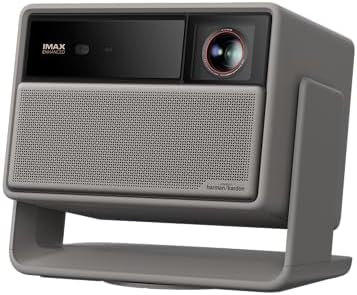
The XGIMI HORIZON 20 pairs 4K resolution with an RGB triple-laser light source. Its listed brightness is 3,200 ISO lumens, and the product details claim 1ms response, 240Hz, variable refresh rate (VRR), and auto low latency mode (ALLM). These features could suit players who want smooth, responsive play, but confirm which resolution and connection settings support the timing claims.
Its gaming feature list stands out from the other options here because it includes both VRR and ALLM. The projector also offers lens shift and optical zoom, which can give you more placement flexibility without relying only on digital image correction. The supplied details state support for images up to 200 inches, but the right size depends on your room and viewing distance.
For other entertainment, it includes Google TV with licensed Netflix, Harman Kardon speakers, and support for IMAX Enhanced, Dolby Vision, HDR10+, and Filmmaker Mode. The extensive feature list is a plus if you want one unit for games and streaming. The key caveat is that the 1ms figure is described as a response claim, not explicitly as input lag, so compare the exact latency mode with your gaming needs.
Pros:
- 1ms response-time claim and 240Hz gaming feature
- VRR and ALLM support are listed
- RGB triple-laser light source with 3,200 ISO lumens
- Lens shift, optical zoom, and built-in Google TV
Cons:
- The supplied details do not clarify the resolution tied to the 1ms claim
- Its many features make it important to check the exact modes and setup requirements
Verdict: The HORIZON 20 is a strong choice to investigate if you value VRR, ALLM, and optical placement flexibility, but confirm that its 1ms response claim matches the gaming mode you plan to use.
How to Choose a Gaming Projector With Low Input Lag
Check whether the timing figure is input lag or response time
Input lag describes the delay between a signal from your controller and the image appearing on screen. Response time is a different measurement, and product listings do not always use the terms consistently. For a fair comparison, look for an input-lag figure and check the resolution, refresh rate, and picture mode tied to it. Do not assume a number listed for 1080p also applies to 4K.
Match refresh rate and resolution to your games
A projector may advertise a high refresh rate without supporting that rate in every resolution or mode. Check the specifications for the exact combination you plan to use, such as 4K for detailed single-player games or a higher refresh rate for faster competitive play. Also confirm that your console or PC can output the selected mode.
Choose brightness for your room
Brightness can affect how practical a projector is outside a fully dark room. Compare the stated lumen figures carefully: the product data here uses both ANSI and ISO lumens, so the numbers should not be treated as direct, like-for-like measurements. Room lighting, screen size, and screen material also affect the image. If you plan to play with lights on, prioritize models that provide a clear brightness specification and consider how much light you can control.
Measure your throw distance and placement options
Before buying, measure the distance available between the projector and the screen. A short-throw model may fit a room with limited space, while optical zoom or lens shift can help with placement in other layouts. Keystone correction can adjust a tilted image, but it is useful to check the available optical adjustments and installation guidance before deciding where the projector will sit.
Review ports and connected devices
Consider how many devices you plan to connect, such as a console, PC, or streaming device. Check the projector’s available HDMI inputs and confirm that the port specifications support your desired resolution and refresh rate. Built-in streaming features can reduce the need for a separate streaming device, but they do not replace checking the gaming connections you need.
Think about the whole entertainment setup
Some projectors in this list include streaming platforms, wireless casting, or built-in speakers. Those features may simplify everyday use, while others may matter less if you already use a separate media device or sound system. Choose the extras that fit your setup, but do not let a long feature list distract from the two key checks for gaming: mode-specific latency and the resolution or refresh rate you will actually use.
Frequently Asked Questions
Is input lag the same as response time?
No. Input lag refers to the delay from a control input to the on-screen result, while response time is a separate timing measure. Product listings may present one or the other, so check the wording and the conditions attached to the figure.
Can a projector deliver 4K and a high refresh rate at the same time?
It depends on the projector and its supported modes. A listing that mentions 4K and 240Hz does not necessarily mean both are available together. Confirm the exact resolution and refresh-rate combinations for the model you are considering.
Which projector in this list states an input-lag figure?
The ViewSonic PX701-4K and Valerion StreamMaster Plus2 list input-lag claims in the supplied details. The Optoma, BenQ, and XGIMI listings use response-time wording. Because specifications can vary by mode, check the full product details before comparing their numbers directly.
Is more brightness always better for gaming?
Not always. Higher stated brightness can be helpful in a room with some ambient light, but your screen size, screen material, and control over room lighting matter too. The figures here also use different lumen standards, so avoid treating them as perfectly comparable.
What is the advantage of VRR and ALLM?
VRR can help a display adjust its refresh behavior to match changing game output, while ALLM is designed to switch a compatible display into a lower-latency mode. The XGIMI HORIZON 20 lists both features. Check compatibility with your console or PC and the projector’s specific connection modes.
Is the ViewSonic PX701-4K available?
The supplied product data marks the ViewSonic listing as unavailable. Availability can change, so check the product link for its current status before making plans around it.
Final Recommendation
For the clearest stated input-lag claims among the available options in this list, start with the Valerion StreamMaster Plus2 and verify its brightness and supported gaming modes for your room. The Optoma UHD38x is worth considering if its 4,000-lumen claim and 4K resolution are your main priorities, while the BenQ TK710STi may suit a space where short-throw placement is important. If VRR, ALLM, and optical setup flexibility matter most, compare the XGIMI HORIZON 20’s mode-specific specifications with your console or PC. Whichever you choose, confirm the timing, resolution, and refresh rate you will actually use before buying.