
A dark room gives a projector a better chance to show rich color and shadow detail, but brightness alone does not guarantee a cinematic picture. Resolution, placement options, sound, and the ability to manage a large image all matter too. The picks below range from simple Full HD home cinema models to bright, app-equipped projectors; compare their stated features with your room and screen before choosing.
Quick Comparison
| Projector | Stated resolution | Notable features | Best suited for |
|---|---|---|---|
| NexAurea Smart Projector | Native 1080p; 4K decoding | Built-in apps, auto focus, 6D keystone, eARC | Streaming and flexible placement |
| ViewSonic LS740HD | 1080p Full HD | 5,500 ANSI lumens, laser light source, optical zoom | Fixed installations and multipurpose rooms |
| WiMiUS K14 Smart Projector | Native 1080p; 4K decoding | VIDAA smart system, 1,450 ISO lumens, Dolby Audio | Streaming with built-in sound |
| Optoma HD146X | 1080p Full HD | Home cinema and game display modes | A straightforward home theater setup |
| VISSPL Smart Projector | Native 1080p; 4K HDR support | Advertised 6,500 ANSI lumens, autofocus, Dolby audio | Flexible indoor and outdoor use |
Our Picks: Best Home Theater Projectors For Dark Rooms reviews
1. NexAurea Smart Projector: A Flexible All-in-One Streaming Pick

The NexAurea combines a native 1080p picture with 4K decoding, so it can accept compatible 4K sources while displaying at Full HD resolution. Its built-in smart system is designed for streaming without a separate stick, and the product description lists Netflix, YouTube, Prime Video, and an app store.
Auto focus and 6D keystone correction are useful if you move the projector between rooms or cannot place it straight in front of the screen. Electronic zoom can resize the picture without moving the unit, while obstacle avoidance is intended to keep objects out of the projected image. The stated screen size reaches up to 300 inches, though your room, throw distance, and screen will determine what size works well in practice.
For a dark home theater, its resolution and built-in streaming are appealing, but the supplied details do not give a specific brightness figure or measured contrast. The dual 25W speakers, Dolby Audio, DTS decoding, and eARC support offer several sound options, including connecting a compatible soundbar or receiver. It is a practical fit if convenience matters more to you than a verified brightness or contrast specification.
Pros:
- Native 1080p resolution with 4K decoding
- Built-in streaming apps and app store
- Auto focus, keystone correction, and electronic zoom
- eARC makes it easier to connect compatible external audio
Cons:
- The supplied product details do not state a brightness figure
- 4K decoding does not mean the projector displays a native 4K image
Verdict: Choose the NexAurea if you want an app-equipped Full HD projector with helpful automatic setup features and flexible audio connections.
2. ViewSonic LS740HD: A High-Output Laser Projector for Fixed Setups

The ViewSonic LS740HD is a 1080p laser projector rated at 5,500 ANSI lumens. Its stated 1.13–1.47 throw ratio and 1.3x optical zoom give you some flexibility when choosing where to mount it and how large to make the picture. The description lists an image range from 30 to 300 inches.
This model is designed for more than movie nights: its listed uses include classrooms, lecture halls, boardrooms, and golf simulators. Installation features include horizontal and vertical keystone correction, four-corner adjustment, portrait mode, and 360-degree projection. Dual HDMI inputs, USB Type-A, RS232, audio out, and a built-in 15W speaker support a range of connected setups.
Its high stated brightness may be useful in a multipurpose space, but a dark room often does not need maximum output. Brightness by itself does not tell you how well a projector renders dark scenes, and the supplied details do not provide a contrast figure. The laser light source is rated for up to 30,000 hours in Dynamic Eco mode. The listing data provided for this article indicates that the product is currently unavailable, so check the listing before planning a purchase.
Pros:
- Full HD resolution with a stated 5,500 ANSI lumens
- Optical zoom supports more flexible placement
- Multiple image adjustments for permanent or unusual installations
- Laser light source rated for up to 30,000 hours in Dynamic Eco mode
Cons:
- Its high-output, installation-focused design may be more than a dedicated dark room needs
- Product availability is listed as unavailable in the supplied data
Verdict: Consider the LS740HD if you need a bright, installation-friendly projector for several types of spaces, but verify availability and decide whether its output suits your room.
3. WiMiUS K14: Smart Streaming with a Clear Brightness Specification

The WiMiUS K14 pairs native 1080p resolution with 4K decoding and HDR10 enhancement. Its listed brightness is 1,450 ISO lumens, giving shoppers a stated figure to compare with other models, though brightness standards can differ and do not describe contrast or black-level performance.
The VIDAA smart system provides access to streaming services and built-in live TV channels, according to the product description. Automatic focus, 6D keystone correction, screen fit, and obstacle avoidance are designed to reduce setup work. These features could be useful if your projector sits on a table or needs to be repositioned rather than permanently mounted.
For sound, the K14 lists Dolby Audio, dual 30W speakers, Bluetooth 5.4, and HDMI ARC and CEC. That gives you the option to use its built-in audio or connect compatible external equipment. In a dark room, its moderate stated brightness may be a more relevant starting point than the much higher figures claimed by some competing models, but the supplied specifications do not establish how it handles dark-scene detail.
Pros:
- Native 1080p with 4K decoding and HDR10 enhancement
- VIDAA system includes streaming apps and live TV channels
- Auto focus and image correction features simplify placement
- Built-in speakers plus Bluetooth and HDMI ARC options
Cons:
- Its native resolution is 1080p, not 4K
- The supplied details do not include a contrast specification
Verdict: The K14 is a good match if you want built-in streaming, automatic setup, and integrated sound in a Full HD projector.
4. Optoma HD146X: A Simple Full HD Home Cinema Option
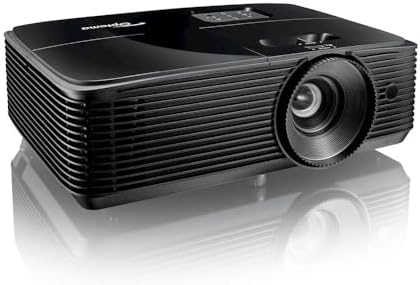
The Optoma HD146X is described as a 1080p Full HD projector made for home cinema and gaming. Its product details mention a game display mode and easy installation, making it a comparatively straightforward option for shoppers who do not need a built-in streaming platform or an extensive list of automated setup tools.
Its simple feature set may suit a dedicated dark room where you plan to connect a streaming device, game console, or other source separately. However, the information supplied here does not state brightness, throw ratio, speaker details, or image-adjustment options. Those missing specifications make it harder to judge screen size, mounting distance, and performance relative to the more fully specified models above.
The HD146X may be worth comparing if you want a Full HD home theater projector from a named projector brand and prefer a separate source device. Before buying, confirm that its installation requirements and connections match your room and equipment. Do not assume that a game mode or Full HD label alone guarantees a particular gaming response or dark-scene performance.
Pros:
- 1080p Full HD resolution
- Product details identify home cinema and gaming uses
- Game display mode is listed
Cons:
- The supplied details do not state brightness or throw ratio
- Streaming and other setup features are not specified
Verdict: Consider the HD146X if you want a basic Full HD projector and are comfortable confirming its installation and connection details before buying.
5. VISSPL Smart Projector: A Feature-Packed Choice for Flexible Use

The VISSPL is a smart projector with native 1080p resolution and 4K HDR support. Its listing advertises 6,500 ANSI lumens, but that figure is a manufacturer claim, not an independent measurement included in the information provided. For a dark room, it is wise to treat a very high brightness claim as only one part of the decision; the supplied details do not provide a measured contrast figure.
The product description lists licensed Prime Video and YouTube apps, an 80W Dolby Audio system, and a stand with 360-degree rotation and 180-degree tilt. It also describes TOF autofocus, keystone correction, and placement options for ceiling, wall, or floor projection. Those features suggest a flexible design for people who may move the projector between indoor and outdoor viewing areas.
The wide range of advertised features is appealing, but some claims—especially the brightness and sound descriptions—should be weighed against the lack of independent measurements in the supplied product information. A dark-room buyer may not need a projector marketed around daylight use. Check the listing for the details that matter most to your setup, including connections, image adjustment, and the streaming apps you plan to use.
Pros:
- Native 1080p resolution with 4K HDR support
- Lists built-in Prime Video and YouTube apps
- Autofocus and keystone features are designed to ease setup
- Articulating stand offers flexible projection angles
Cons:
- The stated 6,500 ANSI lumens is an advertised claim, not an independent measurement supplied here
- The supplied details do not include measured contrast performance
Verdict: Pick the VISSPL if you value built-in apps, an adjustable stand, and flexible placement, but approach its headline performance claims with care.
How to Choose a Home Theater Projector for a Dark Room
Prioritize image quality, not just brightness
A dark room reduces the need for a very bright projector, but it does not guarantee deep blacks or strong shadow detail. Look for clear information about native resolution and contrast when available. Brightness figures can use different measurement standards, so compare like with like and treat unusually large advertised numbers as claims rather than proof of better picture quality.
Understand native resolution and 4K support
Native resolution describes the image the projector displays. A 1080p projector that accepts or decodes 4K content is not the same as a projector with a native 4K display. If you sit close to a large screen or want the finest detail, check the native resolution carefully rather than relying on “4K” wording alone.
Measure the room and screen before you buy
Projector placement determines the image size you can get. Check the throw ratio, zoom range, and any stated installation distance against your room dimensions. Optical zoom changes the image size through the lens; electronic zoom can resize the image digitally. If a product does not provide enough placement information, confirm it with the manufacturer or seller before planning a permanent mount.
Choose the right setup and image adjustments
Auto focus and keystone correction can make setup easier, especially if the projector is moved often. For a fixed home theater, a level position in front of the screen is usually preferable to relying on heavy image correction. Optical zoom and flexible lens placement can be especially useful when you need to fit a particular screen and mounting location.
Plan your sound system
Built-in speakers can be convenient, but an external soundbar or receiver may better suit a dedicated movie room. Check which audio connections are listed, such as HDMI ARC or eARC, Bluetooth, or an audio output. Make sure your projector and audio equipment support the same connection before you buy.
Decide whether built-in streaming matters
A projector with its own smart system can reduce the need for an external streaming stick. Check that the apps you use are listed and that the projector has the connections you need for game consoles, players, or other devices. A separate streaming device may be the better fit if you prefer to keep apps and updates off the projector.
Consider the light source and intended use
Some models are designed for permanent installations or multipurpose venues, while others emphasize portability and built-in entertainment features. Check the stated light-source life and the conditions tied to that figure. Match the projector to how often you will use it and whether it will stay in one room or move between spaces.
Frequently Asked Questions
Is a very bright projector better for a dark room?
Not necessarily. A dark room usually reduces the need for high brightness. Picture quality also depends on factors such as resolution, contrast, screen size, and setup. A brightness number alone cannot tell you how well a projector shows dark scenes.
Does “4K decoding” mean a projector has native 4K resolution?
No. A projector with native 1080p resolution and 4K decoding can accept compatible 4K content, but its display resolution remains 1080p. Check the native resolution in the product specifications.
Are built-in projector speakers enough for movies?
They may be convenient for casual viewing, but your room and sound preferences matter. For a more complete home theater setup, check for compatible audio connections such as HDMI ARC or eARC, Bluetooth, or an audio output.
What does keystone correction do?
Keystone correction adjusts a picture that appears slanted or trapezoid-shaped when the projector is not square to the screen. It can help with flexible placement, though positioning the projector straight-on is a good starting point when possible.
Should I choose a smart projector or use a streaming stick?
A smart projector can offer direct access to supported streaming apps without a separate device. A streaming stick may be preferable if you want a familiar interface or an app that is not supported by the projector. Check app compatibility before deciding.
Which projector in this list is best for a dedicated dark room?
The NexAurea and WiMiUS K14 offer native 1080p resolution, built-in streaming features, and automatic setup tools. The supplied specifications do not provide measured contrast data for either, so your choice should come down to the features and connections that best fit your setup.
Final Recommendation
For a dark room, start with the picture and installation details rather than the biggest brightness claim. The NexAurea is a well-rounded option if you want built-in streaming, automatic setup, and eARC. The WiMiUS K14 is a strong alternative with a stated brightness figure and integrated sound. If you need a projector for a fixed installation or a space that serves several purposes, the ViewSonic LS740HD offers more installation flexibility, though the supplied listing data indicates it is unavailable. Confirm current availability and compatibility before making your choice.