
A sharp webcam can make a podcast look more polished, but resolution is only part of the picture. Frame rate, lighting controls, camera movement, and how you handle audio all affect the final result. These 4K webcams offer different strengths, from studio-style image adjustments to automatic tracking. For podcast audio, plan on using a separate microphone unless a webcam’s built-in mics suit your setup.
Quick Comparison
| Webcam | Video highlights | Best suited for |
|---|---|---|
| Elgato Facecam 4K | 4K at 60 fps, Sony STARVIS 2 sensor, 49mm filter support | Creators who want detailed image controls |
| Logitech Brio Ultra HD 4K | 4K sensor, HDR, autofocus, adjustable field of view | Video calls and straightforward recording |
| Insta360 Link 2 Pro | 4K, large sensor, AI tracking, pan and tilt | Hosts who move or present in a wider space |
| NexiGo N990 (Gen 2) | 4K at 30 fps, motorized pan and tilt, remote | Remote-controlled framing and multi-person setups |
| Logitech MX Brio | 4K at 30 fps, 1080p at 60 fps, Show Mode | Creators who want manual controls and desk sharing |
Our Picks: Best 4K Webcams For Podcast Recording reviews
1. Elgato Facecam 4K: Best for Studio-Style Image Control

The Elgato Facecam 4K is aimed at streamers and creators who want more control over their on-camera look. Its Sony STARVIS 2 sensor and Prime Lens are designed to capture detailed 4K video, and it can record at up to 60 frames per second. That higher frame rate can be useful if you want smoother movement or plan to use slow-motion footage in a production workflow.
Camera Hub software gives you settings and visual effects to fine-tune the image. The webcam also supports standard 49mm lens filters, which opens up options for changing the look of your shot. Its built-in flash memory saves settings, so your preferred setup can carry over between sessions.
For a seated podcast host with a fixed camera position, the Facecam’s strength is image control rather than automation. It does not list a built-in microphone among its highlighted features, so pair it with a dedicated podcast mic. The filter support and 4K60 capture may be more than a simple interview setup needs, but they are useful if you want room to shape your image.
Pros:
- Captures 4K video at up to 60 fps
- Sony STARVIS 2 sensor and Prime Lens are geared toward detailed imaging
- Camera Hub provides visual settings and effects
- Supports standard 49mm lens filters and saves settings in built-in flash memory
Cons:
- Does not highlight built-in microphone features
- Advanced image controls may be unnecessary for a basic, fixed-camera podcast
Verdict: Choose the Facecam 4K if image customization and 4K60 capture matter more to you than camera tracking or built-in audio.
2. Logitech Brio Ultra HD 4K: Best for Flexible Video Calls and Recording
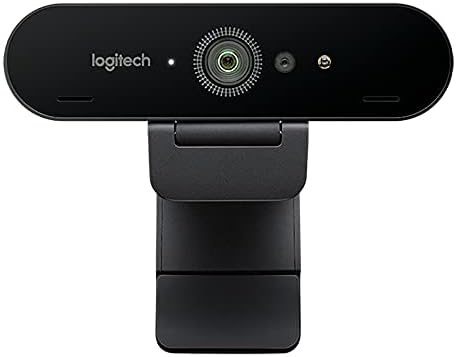
The Logitech Brio is a versatile webcam for recording, streaming, and video conferencing. Its 4K image sensor works with a glass lens, HDR, and autofocus. RightLight 3 is designed to adjust exposure and contrast in challenging light, which can help when a podcast desk has bright areas or backlighting.
The camera supports several fields of view and up to 5x digital zoom while maintaining HD resolution. That makes it easier to adjust framing without moving the webcam, though digital zoom is not the same as optical zoom. It connects through USB 2.0 Type-A or USB 3.0 Type-A and Type-C ports, according to the product information.
The Brio’s broad compatibility and automatic image features suit a host who wants a flexible camera for both recording and meetings. The supplied listing data marks it as unavailable, so check the listing before planning a purchase. Its feature set is less focused on physical movement than the PTZ models below, and the supplied specifications do not state a recording frame rate.
Pros:
- 4K sensor with HDR and autofocus
- RightLight 3 adjusts exposure and contrast
- Offers multiple fields of view and 5x digital zoom at HD resolution
- Works with several common operating systems and video platforms
Cons:
- Supplied availability information lists it as unavailable; availability can change
- Product details do not specify its frame rate
Verdict: Consider the Brio if its automatic lighting features and flexible framing fit your workflow, but verify availability and recording requirements first.
3. Insta360 Link 2 Pro: Best for Hosts Who Move Around

The Insta360 Link 2 Pro combines 4K capture with a large 1/1.3-inch sensor and a motorized pan-and-tilt design. Its AI tracking can follow a host around a room, making it a better fit for an active presentation or a podcast format where the speaker moves than for a typical fixed-seat recording.
The webcam also includes a dual-microphone system with directional pickup and software features for natural-looking background blur. Its special modes include DeskView, Whiteboard, and 4K Portrait Mode. You can adjust settings with the Link Controller software, use gestures, or control some functions from a smartphone.
These features add flexibility, but they may be unnecessary if you sit in one position and frame every episode the same way. The microphones may be useful for calls or casual recording, but podcast hosts who need consistent, close-up voice capture should still consider a separate microphone. The product information also notes that it is not compatible with ARM-based Windows systems.
Pros:
- 4K video and a large sensor designed for low-light performance
- Motorized pan and tilt with AI tracking
- Includes DeskView, Whiteboard, and portrait modes
- Offers software, gesture, and smartphone controls
Cons:
- Tracking and special modes may add little value to a stationary podcast setup
- Not compatible with ARM-based Windows systems, according to the supplied information
Verdict: Pick the Link 2 Pro if you want a camera that can follow movement and switch between several recording modes.
4. NexiGo N990 (Gen 2): Best for Remote-Controlled Framing

The NexiGo N990 (Gen 2) is a motorized PTZ webcam with a Sony 8.5-megapixel sensor. It captures up to 4K at 30 frames per second, and its pan-and-tilt movement lets you adjust framing without reaching for the camera. Two position presets can save PTZ settings and move between them at the touch of a button.
A remote controls camera movement and other functions, including its 5x digital zoom at 1080p. The webcam also has dual stereo microphones with noise cancellation and automatic low-light correction. Its threaded base and wall-mount option give you more placement choices than a camera designed only to sit on a monitor.
This model could suit a podcast with more than one speaker or a room where the camera needs to cover different positions. Keep in mind that its 4K capture tops out at 30 fps, while its digital zoom is specified for 1080p. The built-in microphones can be convenient, but they are not a substitute for dedicated microphones in a carefully produced podcast.
Pros:
- Captures 4K at 30 fps with a Sony sensor
- Motorized pan and tilt with two position presets
- Remote includes controls for framing and 5x digital zoom at 1080p
- Offers multiple mounting options and built-in stereo microphones
Cons:
- Digital zoom is specified for 1080p, not 4K
- 4K recording is limited to 30 fps
Verdict: Choose the N990 (Gen 2) if remote-controlled pan, tilt, and presets are more important to your show than 4K60 video.
5. Logitech MX Brio: Best for Manual Adjustments and Desk Sharing

The Logitech MX Brio records in 4K at 30 frames per second or 1080p at 60 frames per second. Its image controls let you adjust settings such as ISO, shutter speed, tint, and vibrance, or use automatic adjustments for exposure, white balance, and focus. Those options give a podcast host more ways to tune the image to the room and lighting.
Show Mode lets you tilt the webcam down to display notes or sketches on a desk, which can help with a show that includes demonstrations. The camera also has dual beamforming microphones with noise reduction and a built-in privacy cover. It connects over USB-C and is listed as compatible with Windows, macOS, Chrome OS, and Linux.
The MX Brio is a strong option if you want manual image controls and occasional desk views, but it is not a PTZ camera and does not offer automatic subject tracking in the supplied details. Its built-in microphones may work for basic calls; for a polished podcast sound, a separate mic is usually the more suitable choice.
Pros:
- Offers 4K at 30 fps or 1080p at 60 fps
- Includes manual image controls and automatic image adjustments
- Show Mode can display a desk surface or notes
- Has a privacy cover and dual noise-reducing microphones
Cons:
- Does not list motorized pan-and-tilt tracking
- 4K capture is limited to 30 fps
Verdict: The MX Brio is a good match if you want hands-on image adjustments and a webcam that can also show what is on your desk.
How to Choose a 4K Webcam for Podcast Recording
Match the frame rate to your recording style
4K describes image resolution, not how smoothly motion appears. The Facecam 4K supports up to 60 fps, while the Link 2 Pro, N990, and MX Brio list 4K at 30 fps. The MX Brio also offers 1080p at 60 fps. If you mostly record a seated host, 4K at 30 fps may be enough; if smoother movement matters, compare the frame-rate options closely.
Think about the camera’s position and movement
A fixed camera can work well when the host stays in one spot. If you move around, present to a group, or want to change framing remotely, consider a PTZ model such as the Insta360 Link 2 Pro or NexiGo N990. The Link 2 Pro adds AI tracking, while the N990 includes a remote and saved position presets.
Plan for your lighting
Webcam image quality depends on the room as well as the camera. The Logitech Brio lists HDR and RightLight 3 for exposure and contrast adjustments. The MX Brio offers automatic image adjustments and manual controls, while the Facecam 4K provides Camera Hub settings and filter support. Even with these tools, a steady, well-lit recording space can make it easier to get a consistent image.
Choose audio separately from video
A webcam’s built-in microphones can be useful for calls, but a podcast often benefits from a dedicated microphone placed near the speaker. The Link 2 Pro, N990, and MX Brio list built-in microphones; the Facecam 4K product details emphasize video and image controls instead. Before buying, decide whether you will record audio through a separate mic and confirm that your recording software can use your chosen camera and audio devices together.
Check software and device compatibility
Confirm that the webcam works with your computer’s operating system and the recording or streaming software you plan to use. The supplied details list compatibility for several common systems, but the Link 2 Pro specifically notes that it is not compatible with ARM-based Windows systems. Also check your available USB connection and any software needed to access the camera’s extra controls.
Decide which controls you will actually use
Manual settings, filters, tracking, zoom, presets, and desk-view modes can all help with certain production styles. They can also add setup steps. A host who records in one position may prefer a simpler fixed setup, while a show with movement, demonstrations, or changing camera angles may benefit from the extra controls on a PTZ model.
Frequently Asked Questions
Is a 4K webcam worth it for podcast recording?
It can be worthwhile if you want detailed video, plan to crop or reframe footage, or publish in 4K. If your audience mostly watches in lower resolutions, lighting, framing, and clear audio may matter more than the highest available resolution.
Is 4K at 30 fps enough for a podcast?
For a mostly stationary host, 4K at 30 fps can be a practical choice. If your recording includes more movement or you prefer smoother motion, consider a model with 60 fps capture, such as the Elgato Facecam 4K at 4K or the Logitech MX Brio at 1080p.
Can I use a webcam’s built-in microphone for a podcast?
You can, but a dedicated microphone is generally a better starting point for controlled podcast audio. The Link 2 Pro, N990, and MX Brio list built-in microphones, but their presence does not guarantee the sound will suit your room or production needs.
Should I choose a PTZ webcam for a podcast?
Choose a PTZ webcam if you need to change framing remotely, cover more than one position, or follow a host who moves. For a single host sitting in a fixed position, a webcam without motorized movement may be simpler.
Which webcam is best for a moving presenter?
The Insta360 Link 2 Pro is the clearest fit among these options for a moving presenter because its AI tracking uses motorized pan and tilt to follow movement. The NexiGo N990 also offers motorized pan and tilt, with remote control and saved presets.
Do these webcams work with every computer?
No. Compatibility depends on the webcam, your operating system, and your computer’s connection. Check the product details before buying; the Link 2 Pro, for example, is listed as incompatible with ARM-based Windows systems.
Final Recommendation
For the most flexible image control and 4K60 capture, the Elgato Facecam 4K is the strongest match in this group. If your podcast involves movement, the Insta360 Link 2 Pro adds AI tracking and flexible shooting modes. For a fixed-seat show, compare the Facecam 4K and Logitech MX Brio based on whether you value 4K60 or hands-on controls and Show Mode more. Whichever you choose, plan your lighting and audio as part of the recording setup, not as afterthoughts.