
Choosing a BenQ projector for gaming means balancing image size, room brightness, resolution, and input lag. A short-throw model can make a big screen work in a smaller room, while a 4K laser projector offers more detail and avoids regular lamp replacement. Below, we compare five BenQ options and explain which one makes the most sense for different gaming setups.
Quick Comparison
| Projector | Resolution and brightness | Gaming details | Best suited for |
|---|---|---|---|
| BenQ TH671ST | 1080p; 3000 lumens | Low input lag; short throw | Big-screen play in a smaller room |
| BenQ TK710 | 4K UHD; 3200 ANSI lumens | 4ms at 1080p/240Hz; 16ms at 4K/60Hz | 4K gaming and brighter rooms |
| BenQ TH575 | 1080p; 3800 ANSI lumens | 16ms at 1080p/60Hz | Bright rooms and straightforward gaming |
| BenQ TH671ST with ceiling mount | 1080p; 3000 ANSI lumens | 16.7ms input lag; short throw | Short-throw installation with a mount included |
| BenQ HT2050A | 1080p; 2200 lumens | 16ms input lag; game modes | Color-focused gaming in a dimmer room |
Our Picks: Best Benq Home Theater Projectors For Gaming reviews
BenQ TH671ST: Best Short-Throw Pick for Smaller Rooms

The TH671ST pairs Full HD 1080p resolution with a short-throw design, making it a strong option when you want a large image but cannot place the projector far from the screen. BenQ says it can project a 100-inch image from about five feet away, with images up to 300 inches under suitable conditions.
Its 3000-lumen output and 92% Rec. 709 color accuracy are aimed at both games and home entertainment. The listing also highlights low input lag and a refresh rate suited to the maximum output of the Xbox One X and PS4 Pro. The title notes automatic vertical adjustment, which may help with setup, though you should still plan the projector position around your screen and room.
This is the most compelling pick here if space is tight and responsive 1080p gaming matters more to you than 4K resolution. Its short-throw design can also help keep players from casting shadows across the image. On the other hand, it does not offer the 4K detail or laser light source of the TK710.
Pros:
- Short-throw design can create a large image from close range.
- Full HD resolution and 3000-lumen brightness.
- Gaming-focused low input lag.
- Includes a three-year limited parts-and-labor warranty, according to the listing.
Cons:
- Does not provide 4K resolution.
- Its brightness and contrast may not replace a TV in every brightly lit room.
Verdict: Choose the TH671ST if a short throw and responsive 1080p gaming are your top priorities.
BenQ TK710: Best 4K Laser Option for Gaming
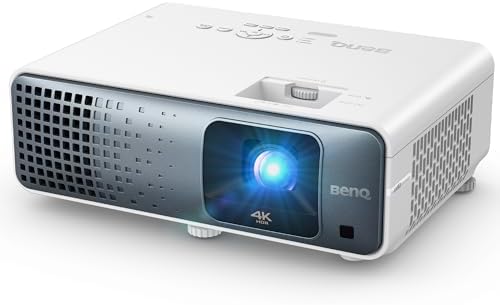
The TK710 is the most feature-rich gaming choice in this group. It combines 4K UHD resolution, HDR10 and HLG support, and a 3200-ANSI-lumen laser light source. The laser design avoids the regular lamp replacement associated with lamp-based projectors, which is useful if you expect to use the projector often.
Its gaming figures depend on the resolution and refresh rate: the listing specifies 4ms at 1080p and 240Hz, or 16ms at 4K and 60Hz. That gives you a choice between prioritizing high refresh rates and keeping the image at 4K. Your console or PC, cable, and selected mode also need to support the format you want to use.
With 95% Rec. 709 color coverage and brightness intended for living-room use, the TK710 is a flexible pick for games, movies, and sports. It costs more to consider than a basic 1080p model, and its fastest listed response mode is not the same as playing at 4K. The listing does not provide a throw ratio, so check the installation distance before buying.
Pros:
- 4K UHD resolution with HDR10 and HLG support.
- Laser light source with no frequent lamp replacements.
- Fast 1080p gaming mode and a separate 4K/60Hz mode.
- 3200 ANSI lumens for a brighter living-room setup.
Cons:
- The fastest listed response mode is 1080p, not 4K.
- The supplied product details do not specify throw distance or lens adjustment features.
Verdict: Pick the TK710 if you want 4K detail, a laser light source, and the option to switch to a high-refresh 1080p gaming mode.
BenQ TH575: Bright 1080p Gaming for Shared Spaces

The TH575 is a Full HD projector with a stated brightness of 3800 ANSI lumens and a 15,000:1 full-on/full-off contrast ratio. Its brightness makes it worth considering if you cannot always make the room completely dark. A brighter projector can help an image remain visible with some ambient light, though picture quality still depends on the screen and room conditions.
For gaming, BenQ lists 16ms of input lag at 1080p and 60Hz. That is a useful target for responsive play at that setting, but it is not the high-refresh option in this lineup. The listing gives a 100-inch image at about 10.8 feet, so measure your room before choosing a mount location.
Compared with the TH671ST, the TH575 trades a shorter stated projection distance for higher listed brightness. It is not a 4K model, and the supplied listing is marked unavailable. Check whether it can be purchased before planning a setup around it.
Pros:
- High stated brightness for a 1080p projector.
- 16ms input lag at 1080p/60Hz.
- Full HD image with a stated 15,000:1 contrast ratio.
- Listed 100-inch projection distance can help with room planning.
Cons:
- Does not offer 4K resolution or a listed high-refresh gaming mode.
- The supplied listing is marked unavailable.
Verdict: Consider the TH575 for a bright 1080p setup if you can confirm availability and have enough distance for its listed screen size.
BenQ TH671ST Bundle: Short Throw with a Ceiling Mount

This listing pairs the TH671ST projector with an H&A ceiling mount. The projector offers Full HD 1080p resolution, 3000 ANSI lumens, and a stated 16.7ms input lag. Its 0.69–0.83 throw ratio is designed to produce a large image from a shorter distance, which can be useful in compact rooms.
The listing also names two HDMI ports, VGA, USB, and audio connections. That gives you options for connecting consoles, a PC, and other devices, although you should check your equipment’s output and the projector’s input requirements before settling on a setup. The included mount may be convenient if you already plan to ceiling-mount the projector, but mounting still requires careful placement and installation.
This bundle has similar core gaming and short-throw strengths to the standard TH671ST. Its main distinction is the included mount, not a jump to a higher resolution or a faster listed input lag. The supplied listing is marked unavailable, so confirm it is offered before choosing it over the standard model.
Pros:
- Short-throw design for large images in smaller rooms.
- Includes a ceiling mount, remote, and listed accessories.
- Full HD resolution with 3000 ANSI lumens.
- Two HDMI ports plus VGA, USB, and audio connections.
Cons:
- Does not add 4K resolution over the standard TH671ST.
- The supplied listing is marked unavailable.
Verdict: This bundle is a practical fit if you want a short-throw TH671ST and the included mount suits your installation, provided the listing is available.
BenQ HT2050A: Color-Focused 1080p Home Theater Pick

The HT2050A is a Full HD home theater projector with 2200 lumens and 96% Rec. 709 color accuracy. That color coverage makes it a reasonable option if you watch movies as well as play games and value color reproduction alongside responsiveness.
BenQ lists 16ms input lag and dedicated game modes. The projector can create a 100-inch image from about eight feet, according to the supplied details, so it needs more room than the TH671ST’s stated five-foot distance for the same screen size. Its lower listed brightness also makes a dimmer viewing space a sensible match.
Compared with the newer, brighter choices in this list, the HT2050A is less suited to a room with substantial ambient light and does not offer 4K resolution. The supplied listing is marked unavailable. If it becomes available, compare its placement needs and brightness with the TH671ST before deciding.
Pros:
- Full HD resolution with 96% Rec. 709 color accuracy.
- 16ms input lag and dedicated game modes.
- Can project a 100-inch image from a stated distance of about eight feet.
- Supports a range of gaming consoles, computers, and media players.
Cons:
- Lower listed brightness than the other models here.
- The supplied listing is marked unavailable.
Verdict: The HT2050A is worth considering for color-focused 1080p gaming in a dim room if you can find the listing available.
How to Choose a BenQ Home Theater Projector for Gaming
Match Resolution to Your Console or PC
A 1080p projector can deliver a clear, large image for many gaming setups, and it may be all you need if your priority is a big screen rather than 4K detail. The TH671ST, TH575, and HT2050A are Full HD models. The TK710 is the 4K choice, but its listed gaming modes differ: it supports 4ms at 1080p/240Hz and 16ms at 4K/60Hz. Check which resolution and refresh rate your console or PC can output before choosing.
Understand Input Lag and Refresh Rate Together
Input lag is the delay between a command and the image appearing on screen. For fast games, a lower figure can help play feel more responsive. However, compare figures only when they refer to the same resolution and refresh rate. For example, the TK710’s 1080p/240Hz figure is not directly comparable to a 4K/60Hz mode. The TH575’s listed 16ms figure applies to 1080p/60Hz, while the TH671ST bundle specifies 16.7ms.
Measure Throw Distance Before You Buy
Throw distance is the space between the projector and screen. A short-throw projector can make a large image in a small room, but it still needs to be placed at the right distance and angle. BenQ lists a 100-inch image from about five feet for the TH671ST, about 10.8 feet for the TH575, and about eight feet for the HT2050A. Measure your room and confirm the screen size you want before installing a mount.
Choose Brightness for Your Room
More brightness can help when some room light is present, but it does not guarantee a bright, high-contrast picture in every space. The TH575 has the highest listed brightness at 3800 ANSI lumens, followed by the TK710 at 3200 ANSI lumens. The TH671ST is listed at 3000 lumens, while the HT2050A is listed at 2200 lumens. For the best contrast, control light in the room and consider how your screen affects the image.
Consider Light Source and Long-Term Upkeep
The TK710 uses a laser light source, which the supplied description says avoids frequent lamp replacements. The other supplied product details do not identify a laser light source. If you expect long or frequent gaming sessions, consider how much maintenance you are comfortable with and check the product documentation for light-source details before buying.
Check Inputs, Mounting, and Included Accessories
Make sure the projector has the connections your console, computer, and audio setup need. The TH671ST bundle lists two HDMI ports, VGA, USB, and audio ports, and includes a ceiling mount. The standard TH671ST listing also describes multiple entertainment uses, but check the exact product listing for included accessories and ports. Verify that any mount works with your chosen location and that cables can reach your devices.
Confirm Availability and Compare the Exact Listing
Availability can change, and the supplied product data marks the TH575, TH671ST bundle, and HT2050A listings unavailable. Check the listing before making plans around one of these models. Also confirm that the exact listing includes the features or accessories you need, especially when comparing a projector by itself with a bundle.
Frequently Asked Questions
Which BenQ projector in this list is best for competitive gaming?
The TK710 has the fastest listed mode: 4ms at 1080p/240Hz. That mode requires compatible equipment and settings. If you want 4K instead, the listing specifies 16ms at 4K/60Hz.
Which model is best for a small room?
The TH671ST is the clearest fit for a smaller room because it is a short-throw model and is listed as producing a 100-inch image from about five feet. The TH671ST bundle also has a short-throw design, but includes a ceiling mount.
Can these projectors be used with a game console?
The product descriptions identify gaming use and list support for consoles or common gaming connections. Before buying, confirm that your console’s output settings, the projector’s inputs, and any cables you need are compatible.
Is 4K necessary for gaming on a projector?
No. A 1080p projector can be a sensible choice if you want a large image and responsive play without prioritizing 4K detail. Choose 4K if you want finer image detail and your gaming equipment can output it.
Which projector is the brightest?
The TH575 has the highest stated brightness in this group at 3800 ANSI lumens. The TK710 is listed at 3200 ANSI lumens, and the other models have lower listed figures. Actual results depend on room light, screen size, and screen surface.
Do any of these models use a laser light source?
The TK710 is the laser model in the supplied product information. Its description says the laser light source avoids frequent lamp replacements. The other product details do not identify a laser source.
Conclusion
For most gaming setups where room space is limited, the BenQ TH671ST is the strongest all-around 1080p pick because of its short-throw design and gaming-focused features. Choose the TK710 if you want 4K resolution, a laser light source, and the option of a high-refresh 1080p mode. The TH575 makes sense for a brighter 1080p setup if it is available, while the TH671ST bundle and HT2050A are more specialized alternatives. Before you buy, confirm listing availability, measure your throw distance, and match the projector’s gaming mode to your console or PC.