
Blackmagic Design’s capture cards are built for different live-streaming setups, from a single camera feed to several SDI or HDMI sources in one computer. The right choice depends on your source connections, the formats you need to capture, and the PCIe slot available in your system. Below, we compare four options and explain where each one fits best.
Quick Comparison
| Product | Inputs | Best suited for | Key consideration |
|---|---|---|---|
| DeckLink Quad HDMI | 4 HDMI 2.0b | Multi-camera HDMI setups | Requires an 8-lane PCIe Gen 3 slot |
| DeckLink Duo 2 | 4 3G-SDI | Multi-camera SDI workflows | Supports formats up to 1080p60 |
| DeckLink Mini Recorder 4K | 1 SDI and 1 HDMI | A single-source setup with either connection type | Check which input and format your workflow needs |
| Intensity Pro 4K | HDMI and RCA stereo connections | Capture and playback with analog audio connections | Listing details are less complete than for the other cards |
Our Picks: Best Blackmagic Capture Cards For Live Streaming reviews
Best for Multiple HDMI Cameras: DeckLink Quad HDMI

The DeckLink Quad HDMI is the most direct fit if your streaming setup uses several HDMI cameras, computers, or other video sources. It has four HDMI 2.0b inputs, letting a compatible system work with multiple feeds through one PCIe card.
It supports a wide range of SD, HD, and 4K standards, as well as HDR and several color spaces. The listed format details matter: the card supports 8-, 10-, and 12-bit RGB 4:4:4 up to 4Kp30 DCI, and 8- and 10-bit YUV 4:2:2 in all modes. Although the product title advertises up to 4K60, check the specific format and color-depth requirements for your sources before buying.
This is a card for a desktop system with an available 8-lane PCIe Gen 3 slot; it also works in compatible 8- and 16-lane slots. It is listed as compatible with Windows, macOS, and Linux, and it works with software including OBS, Wirecast, and vMix. HDMI inputs cannot capture copy-protected sources, so it is not a solution for recording protected video content.
Compared with the SDI-focused Duo 2, the Quad HDMI makes more sense when your gear outputs HDMI and you want four inputs. Its main trade-off is the system requirement: it needs more PCIe lanes than the Duo 2 or Mini Recorder 4K.
Pros:
- Four HDMI inputs for multi-source setups
- Supports SD, HD, and 4K formats, plus HDR
- Compatible with major streaming applications, including OBS, Wirecast, and vMix
- Supports embedded audio and multiple color spaces
Cons:
- Requires an 8-lane PCIe Gen 3 slot
- Cannot capture copy-protected HDMI sources
Verdict: Choose the DeckLink Quad HDMI if you need four HDMI inputs and have a desktop with the required PCIe slot; skip it if your cameras use SDI or your computer cannot meet that requirement.
Best for Multi-Camera SDI: DeckLink Duo 2

The DeckLink Duo 2 is designed for setups built around SDI equipment. Its four independent 3G-SDI connections can capture and play back up to four video streams, with support for formats up to 1080p60. That makes it a practical option for multi-camera productions that do not need 4K capture.
The card uses a PCIe Gen 2 interface and requires a 4-lane slot, while also fitting compatible 4-, 8-, and 16-lane PCIe slots. A reference input supports synchronization with external genlock signals, including blackburst and tri-sync. That feature can matter when several sources need coordinated timing.
Unlike the Quad HDMI, the Duo 2 is aimed at SDI sources rather than HDMI cameras. It also has a lower stated maximum resolution, so it is best viewed as a multi-channel HD card, not a 4K option. The product information describes compatibility with a range of editing, visual-effects, and streaming applications.
Pros:
- Four independent 3G-SDI connections
- Can capture and play back up to four streams
- Supports video formats up to 1080p60
- Includes a reference input for external synchronization
Cons:
- Does not provide HDMI inputs
- Its listed format support tops out at 1080p60
Verdict: The DeckLink Duo 2 is a strong match for multi-camera SDI streaming in HD, especially when synchronization is important; look elsewhere if you need HDMI inputs or 4K capture.
Best for One HDMI or SDI Source: DeckLink Mini Recorder 4K
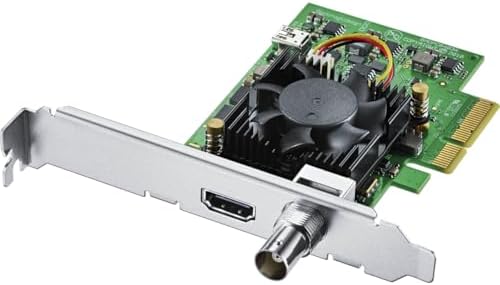
The DeckLink Mini Recorder 4K is a compact option for a streaming computer that needs to bring in a single video source. It has one SDI input and one HDMI 2.0a input, giving you a choice of connection types when planning your setup.
Its PCIe Gen 2 interface requires a 4-lane slot and is compatible with 4-, 8-, and 16-lane slots. The SDI input is listed for SD, HD, and Ultra HD video, with 16 channels of embedded audio. The supplied product details do not clearly state whether the HDMI and SDI inputs can be used at the same time, so treat this as a single-source choice unless you confirm otherwise for your intended setup.
Compared with the four-input Quad HDMI and Duo 2, this card is a simpler fit when you only need one source. It can be useful if you work with either HDMI or SDI equipment, but it does not offer the multi-camera capacity of those cards.
Pros:
- Provides both HDMI and SDI input connections
- SDI input supports SD, HD, and Ultra HD video
- Includes 16 channels of embedded SDI audio
- Fits compatible 4-, 8-, and 16-lane PCIe slots
Cons:
- Designed for a single-source workflow, not multiple simultaneous feeds
- Requires an available 4-lane PCIe slot
Verdict: Pick the Mini Recorder 4K if you need one HDMI or SDI input in a PCIe-equipped computer; choose a multi-input card if your stream needs several live sources.
Best for HDMI and Analog Audio Connections: Intensity Pro 4K

The Intensity Pro 4K is a capture and playback card with HDMI input and output, plus RCA stereo audio input and output. Those connections may suit a setup that needs both video capture and playback, or one that uses analog stereo audio connections.
The available product description lists Windows, Mac OS X, and Linux compatibility, but it provides fewer technical details than the listings for the other cards. It does not specify the number of simultaneous inputs, supported formats, or PCIe slot requirements. Confirm those details with the manufacturer and your streaming software before choosing it for a demanding live production.
Compared with the Mini Recorder 4K, the Intensity Pro 4K adds HDMI output and RCA stereo connections according to the listing, while the Mini Recorder has a clearly stated SDI input. The Quad HDMI and Duo 2 are easier to assess for multi-source streaming because their input counts and format limits are spelled out.
Pros:
- Provides HDMI input and output
- Includes RCA stereo audio input and output
- Listed as compatible with Windows, Mac OS X, and Linux
- Supports both capture and playback use
Cons:
- Available specifications do not clearly state input count or format limits
- PCIe slot requirements are not detailed in the supplied information
Verdict: Consider the Intensity Pro 4K if its HDMI and RCA stereo connections match your setup, but verify the supported formats and system requirements before buying.
How to Choose a Blackmagic Capture Card for Live Streaming
Match the card to your camera connections
Start by checking the video outputs on your cameras and other sources. The DeckLink Quad HDMI accepts HDMI, while the DeckLink Duo 2 is built around 3G-SDI. The Mini Recorder 4K lists one input of each type, and the Intensity Pro 4K lists HDMI connections. A card cannot directly accept a source connection it does not have, so match the input type before comparing other features.
Count how many sources you need at once
A single-camera stream has different needs from a production that switches between several cameras or computers. The Quad HDMI has four HDMI inputs, and the Duo 2 has four independent SDI connections. The Mini Recorder 4K is the simpler single-source choice. For the Intensity Pro 4K, confirm the number of inputs and how they work before planning a multi-source setup.
Check your resolution and format needs
Choose a card based on the formats your sources actually output, not just the resolution mentioned in a product name. The Duo 2 supports formats up to 1080p60, while the Mini Recorder 4K lists SD, HD, and Ultra HD support on its SDI input. The Quad HDMI supports a wide range of SD, HD, and 4K standards, but the supported bit depth and color format vary by mode. Verify that the exact format you plan to stream is supported.
Confirm your computer has the right PCIe slot
These are internal PCIe cards, so your computer needs a compatible open slot. The Quad HDMI requires an 8-lane PCIe Gen 3 slot and is compatible with 8- and 16-lane slots. The Duo 2 requires a 4-lane Gen 2 slot, and the Mini Recorder 4K requires a 4-lane Gen 2 slot; both are also listed as compatible with wider slots. The available Intensity Pro 4K details do not specify its slot requirement, so check before purchase.
Consider audio and synchronization
Audio connections can affect how you build your signal path. The Quad HDMI supports embedded audio, and the Mini Recorder 4K lists 16 channels of embedded audio on SDI. The Intensity Pro 4K includes RCA stereo audio input and output. If you are coordinating multiple cameras, the Duo 2’s reference input supports external genlock signals. Make sure the card’s audio and timing features match the rest of your equipment.
Check software and source restrictions
Confirm that your chosen capture software supports the card and the formats you intend to use. The Quad HDMI is listed as working with OBS, Wirecast, vMix, and Blackmagic Design’s Media Express. Also note that the Quad HDMI cannot capture copy-protected HDMI sources. For any card, check the software and system requirements for your computer before building a live workflow around it.
Frequently Asked Questions
Which Blackmagic capture card is best for multiple HDMI cameras?
The DeckLink Quad HDMI is the clearest match because it has four HDMI 2.0b inputs. Confirm your computer has the required PCIe slot and that your sources use supported formats.
Which option is best for several SDI cameras?
The DeckLink Duo 2 has four independent 3G-SDI connections and can capture and play back up to four streams. Its listed format support goes up to 1080p60.
Can the DeckLink Mini Recorder 4K capture from HDMI and SDI at the same time?
The product information lists one HDMI input and one SDI input, but does not clearly say whether both can be used at once. Confirm this with Blackmagic Design or your software documentation before relying on simultaneous capture.
Do these cards connect to a computer over USB?
No. The DeckLink Quad HDMI, DeckLink Duo 2, and DeckLink Mini Recorder 4K are described as PCIe cards. The available Intensity Pro 4K information also identifies it as an internal capture and playback card but does not specify its PCIe requirements.
Can the DeckLink Quad HDMI capture protected video?
No. Its listed HDMI inputs cannot capture from copy-protected HDMI sources.
Which card should I choose for a single streaming source?
The DeckLink Mini Recorder 4K is a straightforward option if you need one source and want either an HDMI or SDI connection. Check the exact input behavior and supported format for your setup before buying.
Final Recommendation
For a multi-camera HDMI setup, the DeckLink Quad HDMI offers the most inputs, while the DeckLink Duo 2 is the better fit for several SDI sources in an HD workflow. The DeckLink Mini Recorder 4K is a simpler choice for one HDMI or SDI source. The Intensity Pro 4K may suit a setup that needs HDMI and RCA stereo connections, but its listed specifications leave more questions to verify. Choose based on your source connections, required formats, and available PCIe slot.