
The best cubicle workstation for an open-plan office gives each person enough room to work while making it easier to manage visual distractions, cords, and limited floor space. The options below are designed for shared use, but they differ in layout, stated capacity, panel type, and how much detail they provide about their dimensions and construction. Compare those details with your room and team needs before choosing.
Quick Comparison
| Workstation | Stated layout | Notable features | Best fit |
|---|---|---|---|
| Usosidam 94.5-Inch Four-Person Workstation | Four people | Privacy panels, cable management, walnut-finished desktop | Teams needing a long shared desk |
| rzoizwko Modular Cubicle Desk | Modular layouts for one to six people | Frosted acrylic panels, stated 25 mm top, cable channels | Offices that may change their layout |
| Vlemkk 94.5-Inch Four-Person Desk | Four people | Privacy partitions, wiring holes, hidden cable routing | Teams prioritizing a tidy, space-conscious setup |
| Usosidam 59-Inch Modular Workstation | Title says four people; description details a two-seat layout | Compact face-to-face design, cable routing, leveling feet | Smaller rooms, after confirming the configuration |
| Usosidam Four-Person Desk with Mute Panels | Four people | Frosted panels, cable routing, adjustable leveling feet | Shared offices needing defined individual spaces |
Our Picks: Best Cubicle Workstations For Open Plan Offices reviews
Usosidam 94.5-Inch Workstation for Four-Person Teams

This Usosidam workstation is a long, face-to-face desk designed for four people. Its 94.5-inch overall length and privacy panels make it a practical option for teams that want shared seating without leaving every workstation completely open to view.
The listing describes a metal frame, a walnut-finished wood desktop, and a scratch-resistant surface. Built-in cable management is intended to route cords away from the work surface. The panels are described as sound-dampening, but they should be treated as partitions for reducing some distractions—not as a way to make a noisy office silent.
The shared layout can make it easier to use floor space efficiently and talk with nearby teammates. Before ordering, check the product listing for the exact desk depth, panel dimensions, and included hardware, then compare those measurements with your room and the equipment each person uses. A four-person desk can feel crowded if everyone needs several monitors or extensive paperwork space.
Pros:
- Long, face-to-face layout designed for four people
- Privacy panels help define individual work areas
- Built-in cable management helps keep cords organized
- Metal frame and scratch-resistant desktop are described for daily office use
Cons:
- Its long footprint may not suit small rooms
- Paneling can reduce distractions but should not be expected to block all office noise
Verdict: Choose this model if you need a straightforward four-person workstation with privacy panels and a long shared surface, and have enough room for its stated length.
rzoizwko Modular Desk with Frosted Acrylic Panels

The rzoizwko workstation stands out for its stated modular design. The product description says it can be arranged for one, two, four, or six people, which may appeal to an office that expects team sizes or floor plans to change. Confirm what parts are included and how the chosen configuration is assembled before relying on that flexibility.
The listing specifies a 25 mm desktop, an aluminum frame, frosted acrylic dividers, dual cord grommets, cable channels, and leveling feet. It also claims a 700-pound load capacity. Treat that as a manufacturer-stated figure, not a reason to overload the desk; follow the product instructions and confirm whether the capacity applies to the whole unit or a particular configuration.
This option offers more explicit construction and configuration details than several alternatives in this roundup. However, its flexibility may come with more planning: a modular unit still needs a suitable room layout, and the final footprint depends on how it is arranged. The listing gives a standard desk height, but check the full dimensions and panel setup to make sure they work for your chairs and monitors.
Pros:
- Stated configurations range from one to six people
- Frosted acrylic panels provide visual separation
- Includes grommets, cable channels, and leveling feet
- Listing gives specific desktop thickness and load-capacity details
Cons:
- Exact footprint varies by configuration, so planning is important
- Assembly may require more coordination for a larger modular setup
Verdict: This is a strong option to investigate if your office needs a reconfigurable workstation, provided you verify the included parts and the dimensions of your intended layout.
Vlemkk 94.5-Inch Workstation with Hidden Cable Routing

This Vlemkk desk is described as a 94.5-inch, four-person workstation with partitions and a double-row layout. It is intended to use office floor space efficiently while giving each person a more defined area. That layout may be useful for open offices, training rooms, or shared work areas, but measure carefully before deciding how it will fit alongside walkways and other furniture.
The description highlights a reinforced metal frame, a scratch-resistant board surface, wiring holes, and hidden cable routing. It also describes the partitions as helping limit visual interference and reduce the impact of noise. As with other desktop dividers, the panels offer separation rather than full sound isolation. The product description mentions a built-in power supply, but verify the listing’s details for what is included and how it is configured before planning your electrical setup.
Compared with the more clearly specified modular rzoizwko, this model is presented as a fixed four-person workstation and gives fewer precise construction measurements in the supplied details. Its claimed hidden wiring setup may be appealing if you want a tidy appearance, but ask how the routing works for your monitor, computer, and charging needs.
Pros:
- Stated 94.5-inch design for four people
- Partitions help create separate work areas
- Hidden cable routing is intended to reduce visible cord clutter
- Reinforced metal frame and wear-resistant desktop are described
Cons:
- Fewer specific size and load details are provided in the description
- Confirm power-supply and wiring details before planning device placement
Verdict: Consider the Vlemkk if a four-person layout and concealed cable routing are priorities, but verify the exact measurements and power details before ordering.
Usosidam 59-Inch Modular Desk for Compact Offices

This Usosidam model could suit a smaller office that needs a face-to-face workstation, with cable routing and panels built into the design. There is an important detail to check: the product title calls it a four-person workstation, while the description explains a compact two-seat face-to-face layout. Confirm the actual configuration and dimensions on the product page before buying.
The listing describes a reinforced metal frame, a thick tabletop, integrated cable grommets, and leveling feet. The surface is described as water-, stain-, and scratch-resistant, and the adjustable feet are intended to help stabilize the desk on uneven floors. Those features could be useful in a busy workspace, but they do not replace checking the desk’s stated weight limit and care instructions.
At 59 inches, the listed length is shorter than the 94.5-inch options in this selection, which may make it easier to consider for a compact room. The shorter length also means you should pay close attention to usable surface area, especially if the intended setup needs multiple monitors or shared equipment.
Pros:
- Shorter stated length may work in more compact spaces
- Includes cable grommets and a cable-management system
- Leveling feet are designed to help with uneven floors
- Panels provide visual separation in a shared layout
Cons:
- Title and description differ on whether the setup is for two or four people
- Less desk length may limit space for large or multi-monitor setups
Verdict: This is worth considering for a compact office only after you confirm how many workstations the package actually provides and whether the 59-inch layout fits your equipment.
Usosidam Four-Person Desk with Frosted Mute Panels
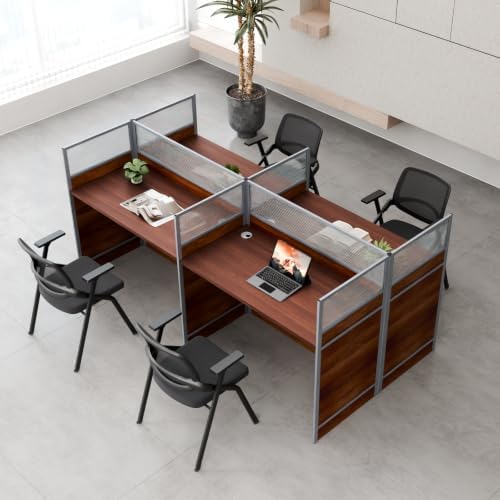
This Usosidam workstation is designed for four people and uses frosted panels to mark off individual work areas. The face-to-face arrangement keeps teammates close enough for communication while providing a visual boundary between desks. It may suit a call center or shared commercial office, though panels should not be expected to eliminate conversations or other office sounds.
The description lists a heavy-duty metal frame, a thickened wood desktop, integrated cable-routing holes, and adjustable leveling feet. It also describes the surface as scratch-resistant and waterproof. These are useful features to compare for everyday office use, but the supplied details do not give an overall desk length or a specific load capacity. Check the product page for those measurements before planning a layout.
Compared with the first Usosidam option, this model emphasizes frosted privacy panels and leveling feet but does not provide a stated 94.5-inch length in the supplied description. If floor planning is tight, that missing measurement matters. Make sure you have room for the whole frame, chairs, and comfortable access behind each workstation.
Pros:
- Designed as a four-person face-to-face workstation
- Frosted panels create visual boundaries between users
- Integrated cable-routing holes help organize cords
- Adjustable feet can help stabilize the desk on uneven floors
Cons:
- Overall dimensions and stated load capacity are not provided in the supplied details
- Privacy panels cannot fully isolate users from office noise
Verdict: Choose this model if you want a four-person setup with frosted panels and leveling feet, but confirm the footprint and weight limit first.
How to Choose a Cubicle Workstation for an Open-Plan Office
Measure the room and the complete workstation
Start with the room, not the product photo. Check the desk’s full width, depth, and height, along with the space needed for chairs, walkways, and nearby furniture. A long shared desk may make good use of a large open area but can crowd a smaller office. If a product description gives conflicting capacity or layout information, confirm the exact configuration before ordering.
Match the layout to your team
Decide how many people need to sit at the workstation and whether a face-to-face arrangement suits their work. A fixed four-person desk may be simple to plan around, while a modular design may offer more choices as a team changes. Check which layouts the product supports and whether the parts for your preferred configuration are included.
Choose panels for the kind of privacy you need
Desk dividers can give each person a clearer visual boundary and may help reduce some distractions. They are not a substitute for a quiet room or full soundproofing, so consider the type of work happening nearby. For calls or tasks that require strong acoustic privacy, plan for additional measures rather than relying on desktop panels alone.
Check the work surface and weight details
Think about what each person will place on the desk: a laptop, monitors, keyboard, paperwork, or shared equipment. Compare the usable desktop space and the manufacturer’s stated weight limit with those needs. A specific desktop thickness or load claim can help you compare options, but read the product details to understand what the stated capacity applies to.
Plan cables, power, and device placement
Look for grommets, cable channels, or other routing features, then map where computers, monitors, and chargers will sit. Cable management can make a shared workstation tidier, but it does not necessarily mean that outlets or power strips are included. Check the listing for power components and make sure your planned setup can reach suitable outlets safely.
Consider assembly and floor stability
Shared workstations have more parts than a basic desk, so review the assembly information and plan for enough space to put the unit together. If the floor is uneven, leveling feet may help with stability. For modular systems, check how the pieces connect and whether you can reconfigure the desk later without needing additional components.
Frequently Asked Questions
Do cubicle workstations reduce office noise?
Panels may reduce some visual distractions and soften the sense of an open workspace, but they do not fully block office sound. If your team needs strong sound isolation, consider the room, placement, and other acoustic treatments as well.
How many people can use these workstations?
Most options here are described as four-person workstations. The rzoizwko model is described as supporting one-, two-, four-, and six-person layouts. The 59-inch Usosidam product has a mismatch between its four-person title and two-seat description, so confirm its actual configuration before purchase.
Are these desks suitable for a small office?
It depends on the workstation’s full footprint and the room layout. The 59-inch Usosidam model is the shortest by the stated length in this selection, while two options are listed at 94.5 inches. Measure the desk, chair clearance, and walkways before choosing.
Do the workstations include power outlets?
The product descriptions mention cable routing across several models. The Vlemkk description also refers to a built-in power supply, but you should verify exactly what is included and how it works on the product page. Do not assume that cable-management features include outlets or power strips.
Can I use these desks for multiple monitors?
Possibly, but the right choice depends on each workstation’s usable surface area and stated weight limit. Check the product dimensions and your monitor footprint before ordering, especially for a shorter or compact desk.
What should I check before ordering a modular workstation?
Confirm the layout options, included parts, full dimensions, assembly details, and whether the desk can be reconfigured later. Also check the weight capacity and cable-routing setup for the specific configuration you plan to use.
Final Recommendation
For a clearly specified long, four-person layout, the 94.5-inch Usosidam workstation is a practical place to start. The rzoizwko is the more flexible choice to investigate if you may need different team configurations. If your office is compact, the 59-inch Usosidam could be a fit, but resolve the two-seat versus four-person discrepancy first. Whichever option you choose, verify the full dimensions, configuration, and power details against your workspace before buying.