
A curved monitor can give your MacBook Pro more room for work, media, or gaming, but the right choice depends on how you plan to connect it and how much desk space you have. These five options range from straightforward 27-inch Full HD screens to an expansive 49-inch ultrawide. Pay close attention to resolution and connectivity: some models list USB-C, while others will need an HDMI connection or an adapter.
| Monitor | Screen and resolution | Notable features | Best fit |
|---|---|---|---|
| Samsung 27-inch Essential S3 | 27-inch, Full HD | 1800R curve, 100Hz, eye comfort features | Everyday work and entertainment |
| LG 34-inch QHD Smart Monitor | 34-inch, 3440 × 1440 | 21:9 ultrawide, webOS, AirPlay 2 | Multitasking and streaming |
| CRUA 27-inch FHD Curved Monitor | 27-inch, Full HD | 1800R curve, 100Hz, 120% sRGB claim | Basic work and general use |
| SANSUI 27-inch Curved Monitor | 27-inch, 1080p | USB-C, 120Hz, built-in speakers | Users who want a USB-C port and speakers |
| INNOCN 49-inch Curved Ultrawide | 49-inch, 5120 × 1440 | 32:9 screen, USB-C with 65W power delivery | Extensive multitasking and a one-cable setup |
Our Picks: Best Curved Monitor For Macbook Pro reviews
Samsung 27-inch Essential S3: A Simple Everyday Curved Display

The Samsung Essential S3 is a 27-inch Full HD monitor with an 1800R curve and a 100Hz refresh rate. It is a straightforward choice if you want a curved screen for everyday MacBook Pro tasks, video, and casual gaming without stepping up to an ultrawide display.
The 100Hz refresh rate can make motion look smoother than on a standard 60Hz screen. Samsung also lists TÜV-certified eye comfort features that reduce blue light and screen flicker. These may be useful during long sessions, though comfort still depends on your brightness, room lighting, and breaks.
The main MacBook Pro consideration is connectivity. The supplied specifications mention connecting devices to the monitor but do not identify a USB-C port. Check the monitor’s available inputs before buying, and plan to use a compatible adapter or dock if your MacBook Pro connection requires one. Its Full HD resolution is also less detailed than the QHD options here, especially noticeable when you want extra workspace or sharp text.
Pros:
- 27-inch curved screen fits more desks than a large ultrawide.
- 100Hz refresh rate supports smoother motion.
- Eye comfort features target blue light and flicker.
- Game Mode offers adjustable picture settings for games.
Cons:
- Full HD provides less desktop detail than the QHD and 5K2K-class options.
- USB-C connectivity is not specified in the supplied product details.
Verdict: Choose the Samsung if you want a compact, uncomplicated curved monitor for everyday use and are comfortable checking your adapter needs before purchase.
LG 34-inch QHD Smart Monitor: An Ultrawide for Work and Streaming

LG’s 34-inch monitor combines a 3440 × 1440 QHD resolution with a 21:9 curved screen. The wider format gives you room to place multiple windows side by side, which can be handy for editing documents, comparing information, or keeping a meeting visible while you work.
This is also a smart monitor, not just a screen for your MacBook Pro. Its webOS platform provides access to supported streaming apps, and the listing includes AirPlay 2 and HomeKit compatibility for wireless control and casting from compatible Apple devices. For a direct computer connection, it has two HDMI ports and three USB ports. USB-C video or laptop charging is not listed, so check your cable and adapter setup if you want to connect your MacBook Pro by wire.
The larger QHD workspace is a meaningful step up from the 27-inch Full HD choices. Still, a 34-inch ultrawide takes more desk width, and its smart features may be less valuable if you only want a computer display. LG lists HDR10 and up to 99% sRGB color gamut expression; that specification is useful context, but it does not by itself establish professional color accuracy.
Pros:
- 34-inch 21:9 screen offers ample room for side-by-side windows.
- 3440 × 1440 resolution gives more workspace than Full HD models.
- Built-in webOS supports streaming apps without relying on the MacBook Pro.
- AirPlay 2 and HomeKit compatibility add Apple-device features.
Cons:
- USB-C video and power delivery are not specified.
- The wide screen needs more desk space than a 27-inch monitor.
Verdict: The LG is a strong fit if you want an ultrawide for multitasking plus built-in streaming, and you are prepared to connect your MacBook Pro through a compatible HDMI setup or wireless casting.
CRUA 27-inch FHD: A White Curved Monitor for Basic Setups

The CRUA is a 27-inch Full HD curved monitor with a white finish, narrow bezels on three sides, and an 1800R curve. Its look may suit a light-colored desk setup, and the slim bezels can be useful if you later place another display beside it.
It lists a 100Hz refresh rate, a 5ms response time, flicker-free operation, and blue-light filtering. The product also specifies HDMI 1.4 and VGA inputs, plus 100 × 100mm VESA mounting support. Since USB-C is not listed, a MacBook Pro may need a compatible HDMI adapter or dock for a wired connection. VGA is an older connection type and is unlikely to be the first choice for a modern laptop setup.
CRUA claims 120% sRGB color gamut, but that figure alone does not guarantee color accuracy for photography or design work. The bigger trade-off is resolution: Full HD on a 27-inch screen gives you less fine detail and workspace than the LG or INNOCN. This model makes more sense for general computing than for detail-heavy creative tasks.
Pros:
- White design and three-sided narrow bezels suit a clean desk setup.
- 100Hz refresh rate and 1800R curve support smooth, immersive viewing.
- Flicker-free and blue-light filtering features are listed.
- Supports VESA mounting and offers HDMI and VGA inputs.
Cons:
- Full HD is less detailed than the higher-resolution alternatives.
- No USB-C port is listed, so a MacBook Pro may need an adapter.
Verdict: Consider the CRUA if its white design and basic curved-screen features matter more to you than high resolution or direct USB-C connectivity.
SANSUI 27-inch Curved Monitor: A Fast Screen with Built-In Speakers
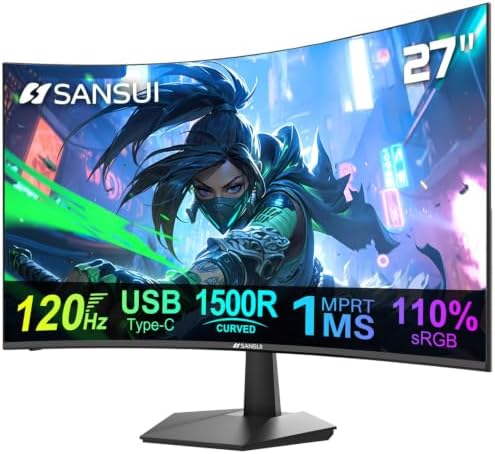
This SANSUI is a 27-inch curved 1080p monitor with a listed 120Hz refresh rate and built-in 2W speakers. It also includes a USB Type-C port and an HDMI 1.4 port. Those connections make it worth considering for a MacBook Pro setup, but the supplied details do not say whether USB-C provides video, laptop charging, or both. Confirm its USB-C capabilities before counting on a single-cable connection.
The monitor lists a 1ms MPRT response time, HDR, anti-glare treatment, anti-flicker, and low-blue-light features. Its 110% sRGB color claim and 4000:1 contrast ratio are also listed by the manufacturer. The built-in speakers can keep a basic setup simple, though their 2W rating suggests they are best viewed as a convenience rather than a replacement for dedicated audio gear.
Compared with the Samsung and CRUA, the SANSUI offers a higher listed refresh rate and a USB-C port. It does not match the LG’s QHD workspace or the INNOCN’s high-resolution ultrawide format. Its Full HD resolution is best suited to everyday tasks and entertainment rather than work that needs a large, highly detailed desktop.
Pros:
- USB Type-C and HDMI 1.4 are listed as connection options.
- 120Hz refresh rate and 1ms MPRT response time are specified.
- Built-in speakers can reduce the need for separate basic audio equipment.
- Includes anti-glare, anti-flicker, and low-blue-light features.
Cons:
- The USB-C port’s video and power-delivery capabilities are not specified.
- 1080p offers less workspace and detail than the QHD ultrawide models.
Verdict: Pick the SANSUI if you want a 27-inch curved screen with a USB-C port, speakers, and a higher refresh rate, but verify the USB-C behavior for your MacBook Pro first.
INNOCN 49-inch Ultrawide: A Large Workspace with USB-C Power Delivery

The INNOCN 49-inch monitor is the largest option here, with a 32:9 aspect ratio and 5120 × 1440 resolution. That gives you a very wide desktop for arranging several windows, and its picture-by-picture and picture-in-picture features can show content from two input sources at once.
For a MacBook Pro, its listed USB-C connection with 65W power delivery is a key advantage: it can support a simpler cable setup for compatible laptops. The monitor also includes DisplayPort, HDMI 2.1, USB-A, USB-B, an Ethernet port, and a 3.5mm audio jack. Check your MacBook Pro’s power needs and the monitor’s connection details before relying on it as your only charger.
The 1800R curve is intended to make the broad screen easier to view, and the stand offers tilt, swivel, and height adjustment. Still, a 49-inch display needs substantial desk space and may feel excessive if you only work in one or two windows. The product lists 99% sRGB, HDR 400, and Adaptive-Sync; those features add flexibility, but the size and desk fit should be your first considerations.
Pros:
- 5120 × 1440 resolution and 32:9 aspect ratio provide extensive workspace.
- USB-C offers 65W power delivery for a more convenient compatible setup.
- Picture-by-picture and picture-in-picture support two input sources.
- Stand offers height, tilt, and swivel adjustments.
Cons:
- The 49-inch width requires a large desk and careful workspace planning.
- Its expansive screen may be unnecessary for simple laptop tasks.
Verdict: The INNOCN is the best match in this group if you want a huge multitasking canvas and USB-C power delivery, provided your desk and charging needs suit the setup.
How to Choose a Curved Monitor for MacBook Pro
Choose a Resolution That Fits Your Work
Resolution affects how much detail and workspace you get. The 27-inch Samsung, CRUA, and SANSUI models are Full HD, which can work for browsing, documents, and general use. The LG’s 3440 × 1440 resolution gives you more room for side-by-side windows, while the INNOCN’s 5120 × 1440 resolution spreads that workspace across a much wider screen. If you work with detailed images or want sharper text, prioritize resolution as well as screen size.
Check the MacBook Pro Connection Before Buying
Do not assume that every USB-C port supports the same features. The INNOCN specifically lists USB-C with 65W power delivery. SANSUI lists a USB Type-C port, but the supplied information does not confirm video or charging support. The LG lists HDMI and USB ports, while the Samsung and CRUA details do not specify USB-C. Check the exact monitor inputs and your MacBook Pro’s ports, then choose any required cable, adapter, or dock accordingly.
Think About Screen Width and Desk Space
A curved screen can make a wide display feel more natural to view, but it does not make a large monitor take up less space. A 27-inch model is easier to fit on a smaller desk. The LG’s 34-inch screen is a middle ground for wider multitasking, while the 49-inch INNOCN is designed for a very broad workspace. Measure your desk and consider where the monitor stand, keyboard, and other equipment will sit.
Match the Refresh Rate to Your Tasks
A higher refresh rate can make scrolling and moving images look smoother. The options here list refresh rates from 100Hz to 120Hz. For everyday office work, the screen’s size, resolution, and connection may matter more than the difference between those rates. If you play games or watch fast-moving content, compare refresh rate and response-time details alongside the MacBook Pro’s connection requirements.
Separate Useful Extras from Must-Haves
Consider which added features you will actually use. The LG includes webOS streaming features and AirPlay 2 compatibility, the SANSUI has built-in speakers, and the INNOCN offers picture-by-picture and picture-in-picture modes. These can add convenience, but they should not outweigh more basic needs such as resolution, connectivity, desk fit, and whether the display suits your daily tasks.
Frequently Asked Questions
Can I connect a MacBook Pro to any of these curved monitors?
Each model can be considered for a MacBook Pro setup, but the connection method depends on its inputs and your laptop. Some options list HDMI, and the INNOCN lists USB-C with 65W power delivery. The SANSUI has a USB-C port, but the supplied information does not confirm its full capabilities. Check the monitor’s connection details and use a compatible cable, adapter, or dock.
Which monitor offers the most workspace?
The INNOCN has the widest screen and the highest listed resolution at 5120 × 1440 across a 32:9 display. It is the strongest choice for extensive side-by-side multitasking, if you have enough desk space.
Which option is best for a smaller desk?
The 27-inch Samsung, CRUA, and SANSUI are the more compact choices in this group. They all have Full HD resolution, so you trade some detail and workspace for a screen that is easier to fit than a 34- or 49-inch ultrawide.
Does a curved monitor charge a MacBook Pro?
Only choose a monitor for charging if its specifications clearly list power delivery and enough power for your needs. The INNOCN lists USB-C with 65W power delivery. The SANSUI lists USB Type-C but does not specify charging support in the supplied details. The other products do not list USB-C power delivery.
Is Full HD enough for a MacBook Pro monitor?
Full HD can be suitable for general tasks such as browsing, documents, and video. If you want more room for multiple windows or more detail on screen, the LG’s QHD ultrawide or the INNOCN’s 5120 × 1440 display offers a higher-resolution option.
Do I need a curved monitor for work?
No. Curvature is a design choice, not a requirement. It may suit people who prefer the feel of a curved screen, especially on a wide display, but you should also weigh resolution, screen size, connection options, and desk fit.
Final Recommendation
For a large workspace and the clearest listed USB-C charging details, the INNOCN 49-inch ultrawide is the most feature-rich choice, as long as you have room for it. The LG 34-inch QHD Smart Monitor is a more moderate ultrawide pick if you value multitasking and built-in streaming. If you prefer a smaller screen, compare the 27-inch models based on refresh rate, design, and confirmed connection needs rather than choosing by curvature alone.