
A good desktop charging station can replace a stack of wall adapters and keep your phone, tablet, and laptop within reach. The key is matching the station’s total power and port mix to the devices you plan to charge: a high port count does not always mean every port can deliver its fastest speed at once. These picks range from powerful laptop-ready chargers to lower-output hubs for phones and accessories.
| Charging station | Total output | Ports | Best for |
|---|---|---|---|
| Anker Prime 200W 6-Port Charger | 200W | 6 | Laptops and a compact desk setup |
| VHBW 35W 6-Port Charging Station | 35W | 6 | Phones, tablets, and a built-in stand |
| SABRENT VOLTIK 252W 8-Port Station | 252W | 8 | Monitoring power across many devices |
| UGREEN Nexode 200W 8-Port Charger | 200W | 8 | Charging a mix of devices at one desk |
| Ziwodiv 60W 8-Port USB-A Station | 60W | 8 | USB-A devices and shared charging |
Our Picks: Best Desktop Charging Stations For Fast Charging reviews
Anker Prime: A compact, powerful pick for laptop charging
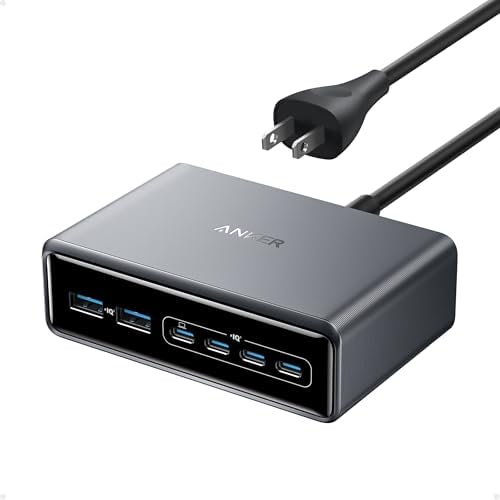
The Anker Prime is a six-port GaN desktop charger built for people who need to power more than phones. Its 200W total output and USB-C ports rated for up to 100W each make it a strong fit for compatible laptops, tablets, and phones. When two USB-C ports are used together, each can provide up to 100W, according to the product information.
The unit measures 4.4 by 3.0 by 1.4 inches and weighs 1.24 pounds. That sturdy build can help it stay put on a desk, but it is not meant to be a lightweight travel charger. An included five-foot AC cord gives you some flexibility when placing it near a work area.
This is the most compelling choice here if laptop charging speed matters more than having the largest number of ports. Its six-port limit is lower than the eight-port options, and its overall power still needs to be shared across connected devices. For a desk with several power-hungry devices, plan which devices need the USB-C ports rather than expecting every connection to deliver maximum output simultaneously.
Pros:
- 200W total output for a range of devices, including compatible laptops
- Up to 100W from each of two USB-C ports when both are in use
- Six ports in a compact, stable desktop design
- Temperature monitoring and a five-foot AC power cord
Cons:
- Has fewer ports than the eight-port alternatives
- Its weight and desktop-focused design make it less suitable for travel
Verdict: Choose the Anker Prime if you want a tidy, laptop-ready charging station and can work with six ports.
VHBW: A simple charging hub with a phone stand

VHBW’s six-port station is a lower-power option for charging phones, earbuds, and other USB devices in one place. It has three USB-C ports and three USB-A ports, with 35W of total output. One USB-C port supports PD up to 20W; the other ports are described as standard-speed charging ports.
A built-in stand gives you a place to prop up a phone or tablet while it charges. That can be useful on a nightstand or desk if you want to view a screen without holding the device. The station also comes with a six-foot AC cord, and the product description lists over-current, over-voltage, short-circuit, over-charge, and over-heat protections.
The main limitation is its modest power budget. The fastest charging is available when using the single PD USB-C port on its own; using two USB-C ports at once changes the charging speed to normal, according to the listing. It is not the right pick for a laptop or anyone expecting several devices to charge at high speed together. Compared with the Anker and UGREEN options, it is better suited to a phone-focused charging spot than a laptop workstation.
Pros:
- Six ports with both USB-C and USB-A connections
- One USB-C port supports PD charging up to 20W
- Built-in stand for a phone or tablet
- Six-foot cord and listed electrical protections
Cons:
- 35W total output is limited for fast charging several devices
- Charging speed changes when multiple USB-C ports are used
Verdict: Pick the VHBW if you want an affordable-style, phone-centered station with a stand, not a high-output laptop charger.
SABRENT VOLTIK: High output with a useful power display

The SABRENT VOLTIK combines four USB-C ports and four USB-A ports with a 252W shared power budget. A single USB-C port can reach 100W, while each USB-C pair shares up to 125W. USB-A ports are rated for up to 18W each. Those figures describe port limits, not power that can be delivered to every port at once.
Its color LCD cycles through the wattage, voltage, amperage, and internal temperature for each port. That extra information can help you see how connected devices are drawing power instead of guessing why one is charging more slowly. The station supports PD 3.0, PPS, QC 4.0, and QC 3.0 on compatible devices, and the product description lists UL certification and several built-in protections.
The trade-off is size and specialization: this is a substantial desk or nightstand unit, not a travel charger. Its listing also warns that some very low-draw accessories may not draw power reliably from a high-wattage port, so check an accessory’s charging needs before connecting it. The supplied listing marks this model as unavailable, so check its current listing status before planning to buy it.
Pros:
- Eight ports and a 252W shared power budget
- LCD shows live charging information for each port
- Supports several fast-charging standards on compatible devices
- Includes a mounting kit, removable power cord, and Kensington lock slot
Cons:
- Power is shared, so every port cannot deliver its maximum at once
- Some low-draw accessories may not charge reliably from a high-wattage port
Verdict: The VOLTIK is worth considering if you need many ports and want to monitor power closely, but verify availability and accessory compatibility first.
UGREEN Nexode: Eight ports for a busy shared desk

The UGREEN Nexode offers eight ports—six USB-C and two USB-A—with up to 200W of total output. Its USB-C output can reach 100W from a single port, making it a more practical choice for compatible laptops than low-wattage phone hubs. The station is designed to charge a mix of laptops, phones, tablets, and other devices from one desktop unit.
GaN technology, a six-foot extension cord, and built-in protection and temperature control are part of the listed design. With six USB-C ports, it offers more USB-C connections than the Anker, while also adding two more total ports. That flexibility is useful for a shared desk, but the 200W total remains a shared budget: multiple devices charging together divide the available power.
The product information does not provide a detailed port-by-port power breakdown for every multi-device combination. If you need to know exactly how much power each port receives when several devices are connected, the SABRENT’s display may be more helpful. The UGREEN is a better fit if you prefer more ports and a clean desktop setup without needing an LCD readout.
Pros:
- Eight ports, including six USB-C connections
- 200W total output and up to 100W from a single USB-C port
- Six-foot extension cord helps with desk placement
- GaN design with listed protection and temperature control
Cons:
- 200W is shared among connected devices
- The listing does not spell out every port’s output in multi-device setups
Verdict: Choose the UGREEN Nexode if you need eight ports, especially several USB-C connections, for a mixed-device desk.
Ziwodiv: An eight-port USB-A hub for everyday devices

Ziwodiv’s eight-port station is an all-USB-A hub with a stated maximum output of 60W. It is designed for phones, tablets, Kindles, and other USB-powered devices that use USB-A charging cables. A built-in LED display shows current and voltage information, while the station’s smart chip is described as adjusting current to connected devices.
The compact design and four-foot cord can help keep a charging area organized, and the product description says it is suitable for home, office, or travel use. Listed protections include safeguards against overheating, overcharging, overcurrent, overload, surges, and short circuits.
This is not a strong match for newer devices that need USB-C Power Delivery for their fastest charging, and its 60W total must be shared across all connected devices. It can be a practical choice for a collection of USB-A accessories, but the Anker, SABRENT, or UGREEN stations are better suited to laptop charging and USB-C-heavy setups.
Pros:
- Eight USB-A ports for charging multiple compatible devices
- LED display shows current and voltage information
- Compact design with a four-foot cord
- Listed protection features for connected devices
Cons:
- No USB-C ports
- 60W total output is shared across the connected devices
Verdict: The Ziwodiv makes sense if your devices use USB-A cables and you want several charging connections, but it is not the best pick for fast USB-C laptop charging.
How to Choose a Desktop Charging Station for Fast Charging
Match the power output to your most demanding device
Start with the device you most want to charge quickly. A laptop often needs more power than a phone or pair of earbuds, so check its charging requirements and compare them with the station’s USB-C output. A station’s maximum single-port output matters, but so does its total output when several devices are connected.
Check how power is shared across ports
Port ratings can be easy to misread. A charger may advertise a high maximum for one port, while its total output is divided among multiple devices. If you plan to charge a laptop and several phones at once, look for clear information about multi-port power allocation. A display that shows live output can also help you understand how the station is distributing power.
Choose the right mix of USB-C and USB-A ports
USB-C is important for many newer phones, tablets, and laptops, while USB-A remains useful for older cables and accessories. Count the ports you will actually use, not just the total number. A station with many USB-A ports may be less useful than one with fewer ports if most of your devices rely on USB-C fast charging.
Confirm compatibility with your devices and cables
Fast charging depends on the device, charger, cable, and supported charging standards working together. Check whether your devices support the listed standards, such as USB Power Delivery, PPS, or Quick Charge, and use compatible cables. If an accessory has unusually low power needs, check the station’s guidance before plugging it into a high-wattage port.
Think about desk space, cord length, and placement
A desktop station needs a steady place near the devices you charge. Consider the unit’s footprint, weight, cord length, and whether you want to mount or move it. A heavier model may stay in place better on a desk, while a smaller, lighter hub may be easier to pack away or carry.
Look for clear safety information
Charging equipment should include safeguards against problems such as overheating, overcurrent, and short circuits. Check the product information for stated protections or certification details, and follow its instructions for placement and use. Keep the power station in a suitable area with room around it rather than covering it with items.
Frequently Asked Questions
Can a desktop charging station fast-charge several devices at once?
Sometimes, but the speed depends on each device’s needs and the station’s shared power budget. A high total wattage does not mean every port can supply its maximum output at the same time. Check the station’s multi-port power details before connecting several demanding devices.
Is a higher wattage always better?
Not necessarily. Higher output can be useful for laptops and several devices, but the charger also needs the right ports and charging standards for your devices. For a phone-and-earbuds setup, a lower-output hub may be enough; for laptops, look for a suitable USB-C output and enough shared power.
Can I charge a laptop from any USB-C port?
No. The port must provide enough power, and your laptop must support charging through USB-C. Check the laptop’s power requirements and the charger’s port ratings. Also consider how much power remains when other devices are connected.
What does a charging station’s total wattage mean?
Total wattage is the station’s overall power budget. It does not necessarily describe what one device receives, or what every connected device receives at once. Individual port limits and the way power is allocated between ports also matter.
Should I choose a station with a display?
A display can be useful if you want to see how much power each connected device is drawing. It is not essential for everyone, but it can make it easier to spot when the station is dividing power or when a device is drawing less than expected.
Is a USB-A charging station suitable for newer devices?
It can charge many devices that use USB-A cables, but it may not offer the fastest charging method for devices that support USB-C Power Delivery or other USB-C fast-charging standards. Choose the port type that matches your devices and the speeds you want.
Final Recommendation
For a mix of laptop and phone charging in a compact desktop unit, the Anker Prime is the strongest all-around choice in this group. Choose the UGREEN Nexode if having eight ports—especially six USB-C ports—is more important. The SABRENT VOLTIK adds useful power monitoring, but its listed availability should be checked. For simpler phone and accessory charging, the VHBW or Ziwodiv may fit better, depending on whether you need a built-in stand or USB-A ports.