
A desktop charging station can turn a tangle of adapters and cables into one organized spot for your phones, tablets, earbuds, and laptops. The right choice depends on how many devices you charge, whether any need laptop-level power, and whether you want a simple USB hub or a station with AC outlets and built-in cables. These picks range from a 10-port organizer to compact chargers and a modular power hub, with important differences in port output and cable setup.
Quick Comparison
| Charging Station | Ports or Outlets | Best For | Key Detail |
|---|---|---|---|
| Zobirez 10-Port Charging Station | 5 USB-C, 5 USB-A | Shared charging and device organization | Includes device slots and a cable kit |
| Anker 112W 6-Port Desktop Charger | 3 USB-C, 3 USB-A | Compact everyday charging | Small footprint; cables not included |
| Anker Prime 200W 6-Port Charger | 6 USB ports | Higher-power desk charging | Up to 200W total output |
| WINKAURA 6-Port Charging Station | 6 USB ports | Charging phones and tablets in one place | Removable device dividers |
| Gitryin 12-in-1 Desktop Charging Station | 4 AC outlets, USB-C ports, retractable chargers | Mixed power and charging needs | Modular design with built-in retractable cables |
Our Picks: Best Desktop Charging Stations For Multiple Devices reviews
1. Zobirez 10-Port Station: Best for a Shared Charging Area

The Zobirez combines five USB-C ports and five USB-A ports with built-in slots for holding devices upright. That mix makes it a flexible option for a household or work area where newer USB-C devices share space with older gear. Its listing describes a 750W total output and rates each USB-C port for up to 120W and each USB-A port for up to 30W.
Those individual port figures should not be read as power available from every port at once: the stated total output is shared across the station. Actual charging speed also depends on your device, cable, and charging protocol. The included cable kit has several short cables for common devices, plus a longer USB-C cable rated for 100W, though you may still need other cables for your setup.
The one-piece ABS slot design avoids removable dividers, and the listing says the center bays are wide enough for a laptop or a tablet with a thick case. This is a good fit if you want both charging and a defined place for devices to sit. It is less compelling if you only need a compact block of USB ports or expect all ten devices to charge at their maximum rates simultaneously.
Pros:
- Ten ports split evenly between USB-C and USB-A
- Device slots help keep a shared charging area organized
- Includes a power cord and a selection of charging cables
- Listing describes multiple built-in electrical protections
Cons:
- Total output is shared, so maximum port ratings do not apply to every device at once
- Its organizer format takes more desk space than a compact charger
Verdict: Choose the Zobirez if you need many mixed USB ports and upright slots for a family or office charging station.
2. Anker 112W 6-Port Charger: Best for a Compact Desk Setup

This Anker charger is a compact six-port unit with three USB-C ports and three USB-A ports. Its listed combined output is 112W, with a maximum of 30W from a single USB-C port and 18W from a single USB-A port. That makes it a practical desk hub for phones, earbuds, tablets, and some lighter charging needs without taking up much room.
The charger measures about 3 by 3.2 by 1.3 inches and weighs about 10.65 ounces, according to the product details. It also comes with a silicone cable organizer to help manage loose leads. USB-C charging cables are not included, so factor in the cables you already own or will need to add.
This is the simplest choice here for everyday devices and a tidy workstation. Its 30W maximum on one USB-C port is more limited than the higher-output Anker Prime, and the product notes that 30W charging for a MacBook Air is limited to the USB-C1 port. It is not the pick for someone who needs a high-wattage laptop charger or a stand that holds devices upright.
Pros:
- Small footprint suits crowded desks
- Three USB-C and three USB-A ports support a mix of devices
- Includes a cable organizer
- Light enough to move between work areas
Cons:
- USB-C charging cables are not included
- Lower maximum output per port than the Anker Prime option
Verdict: Pick this Anker if you want a space-saving multiport charger for phones and everyday accessories, rather than a high-power laptop hub.
3. Anker Prime 200W: Best for Higher-Power USB-C Charging
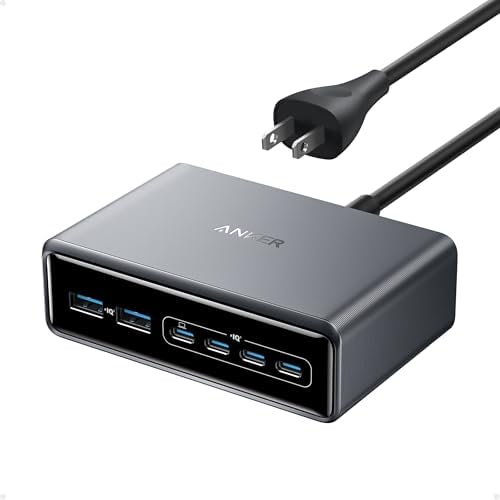
The Anker Prime is a six-port GaN desktop charger with a listed total output of 200W. Its product details say each USB-C port supports up to 100W, and that two USB-C ports can each provide up to 100W when used together. This gives it a stronger case for a desk with power-hungry USB-C devices than the smaller 112W Anker.
The unit measures about 4.4 by 3 by 1.4 inches and weighs about 1.24 pounds. Its compact but relatively heavy build is intended to stay stable on a desk, and it comes with a five-foot AC power cord. The product description says it is not intended for travel, so it is better treated as a stationary desk charger than a portable accessory.
Power is still distributed across the charger when several devices are connected; the 200W total is not the same as 200W to every port. Anker also describes temperature monitoring as part of its protection system. Consider this model if you regularly charge multiple devices, including USB-C laptops, but check the charging requirements of your specific devices before relying on it as a laptop power source.
Pros:
- Up to 200W total output across six devices
- USB-C ports support up to 100W each under the stated conditions
- Includes a five-foot AC power cord
- Compact footprint for a desk-focused charger
Cons:
- Heavier than a small travel charger and not intended for travel
- Its total output is shared among connected devices
Verdict: Choose the Anker Prime if you want a compact desktop charger with more power headroom for USB-C laptops and several other devices.
4. WINKAURA 6-Port Station: Best for Phones and Tablets with Cases

The WINKAURA is a six-port USB charging station designed to keep phones, tablets, e-readers, and other USB-powered devices together. It has removable dividers, which let you adjust the space between devices. That flexibility can be useful when you need room for larger tablets or devices in protective cases.
The product title describes it as a 300W fast charging station, but the supplied details do not specify the output for each port or explain how power is shared between ports. The description also claims charging up to 80% faster than traditional chargers, but real charging speed depends on the device, cable, and charging protocol. If you need a specific power level for a laptop, check the product details and your device requirements before choosing it.
Its main appeal is organization and adjustable spacing, not clearly documented high-power charging. The listing says the unit includes overcharge, short-circuit, and overheat protection. Compared with the Zobirez, it has fewer ports and removable dividers; compared with the Anker Prime, it provides less detail about USB-C output.
Pros:
- Six ports for charging several USB-powered devices
- Removable dividers can accommodate larger devices and cases
- Designed to reduce cable clutter on a desk
- Listing describes overcharge, short-circuit, and overheat protection
Cons:
- Per-port output and power sharing are not specified in the supplied details
- Removable dividers may be less sturdy than a fixed-slot design
Verdict: Consider the WINKAURA for organizing several phones or tablets, but look elsewhere if clear laptop-charging specifications are essential.
5. Gitryin 12-in-1 Station: Best for Built-In Cables and AC Outlets

The Gitryin combines four AC outlets, four USB-C ports, and four built-in retractable USB-C chargers in one modular hub. Each retractable charger is listed at up to 40W and has a 33.5-inch cable. This layout can suit a busy desk where you need both regular outlets and charging access without keeping a pile of separate adapters nearby.
The product details describe a slim design, a 45-degree angled plug, ETL certification, and 1020J surge protection. Its modular setup also comes with a two-year warranty and component-level repair support, according to the listing. The retractable leads can help cut down on loose cables, though their reach may not work for every desk layout.
One important limitation is that the listing says its USB-C ports may not wake for low-power devices, such as some flashlights, toy drones, or walkie-talkies. It is also a more specialized setup than a straightforward USB charging dock. Choose it if the mix of AC outlets and built-in cables matches your desk; for a simple, clearly specified multiport USB charger, the Anker options are easier to compare.
Pros:
- Combines four AC outlets with USB-C charging options
- Retractable cables reduce the need for loose charging leads
- Listing describes ETL certification and 1020J surge protection
- Includes a two-year warranty and modular repair support
Cons:
- USB-C ports may not work with some low-power devices
- Retractable cable length may not suit every desk arrangement
Verdict: Pick the Gitryin if your desk needs a mix of AC outlets and convenient built-in USB-C cables, and your devices are compatible with its charging ports.
How to Choose a Desktop Charging Station
Count the Devices You Charge at the Same Time
Start with the number of devices you expect to connect at once, not just the number you own. A station with more ports can be useful for a shared desk or family charging area, while a smaller six-port charger may be enough for a phone, tablet, earbuds, and a laptop. Remember that open ports do not always mean every device can charge at its maximum speed at the same time.
Match Port Types to Your Devices
USB-C is common on newer phones, tablets, and laptops, while USB-A remains useful for older cables and accessories. If your devices use both types, a mixed-port charger such as the Zobirez or the 112W Anker may simplify your setup. Check whether the station includes cables; the Anker 112W model does not include USB-C charging cables, while the Zobirez includes a selection of cables.
Check Per-Port Output and Total Output
Look beyond a large total-wattage figure. A charger’s total output is shared across connected devices, and individual port limits can affect whether it is suitable for a laptop. The Anker Prime lists up to 100W from a USB-C port under stated conditions, while the 112W Anker tops out at 30W from a single USB-C port. For products without clear per-port details, verify compatibility with your device before buying.
Decide Whether You Need Device Slots
Charging stations with slots can hold phones and tablets upright, keep screens visible, and reduce the chance of devices sliding into each other. A fixed-slot design offers a set layout, while removable dividers can give you more control over spacing. If you charge larger tablets or devices with thick cases, check that the slot dimensions will fit your gear.
Choose Between a USB Hub and a Power Hub
A USB-only station keeps the setup focused on charging phones, tablets, and other USB devices. A hub with AC outlets, such as the Gitryin, can also power equipment that uses a standard plug. Think about where the station will sit, how far its power cord or retractable leads will reach, and whether you need surge protection or device organization built into the unit.
Consider Safety and Device Compatibility
Check the manufacturer’s stated protections, certifications, and compatibility notes. Features such as overcurrent, overvoltage, overheating, and short-circuit protection can matter when several devices share one charger, but they do not replace using suitable cables or following device instructions. Also check for special limitations, such as the Gitryin’s note that some low-power devices may not wake when connected.
Frequently Asked Questions
Can one charging station charge a laptop and a phone at the same time?
Yes, if the station has a USB-C port with enough output for the laptop and can share power with the other connected devices. Check the laptop’s charging needs and the station’s per-port limits. A high total-output number alone does not confirm that a particular port can charge your laptop.
Does a charger’s total wattage go to every port?
No. The stated total output is generally shared across the connected devices. Individual ports may also have their own output limits, and the available power can depend on which ports are in use. Check the product’s port-level specifications for the combination of devices you plan to charge.
Are built-in device slots necessary?
No. Slots are helpful if you want phones or tablets to stand upright and stay organized while charging. If you only need extra charging ports and already have a way to hold your devices, a compact desktop charger may be a better fit.
Will any USB-C charging station work with every USB-C device?
Not always. Devices may need different power levels or charging protocols, and some stations have limits for certain ports or low-power accessories. Use a suitable cable and check the charger’s compatibility details before relying on it for a particular device.
Do I need a charging station with USB-A ports?
USB-A can be useful if you still own cables or accessories that use that connector. If all your current devices use USB-C, a station with more USB-C ports may be a better match. A mixed-port option offers more flexibility when you charge both newer and older devices.
Which option is best for a family or shared workspace?
The Zobirez offers the most USB ports in this group and includes slots to organize devices, making it a natural fit for a shared charging area. If you need fewer ports and a smaller footprint, the six-port Anker chargers may be easier to place on a crowded desk.
Final Recommendation
For a shared charging spot with a mix of USB-C and USB-A devices, the Zobirez stands out for its ten ports, device slots, and included cable kit. If laptop charging is the priority, the Anker Prime offers clearer high-power USB-C specifications. For a compact setup focused on everyday devices, the Anker 112W is a simpler choice. Match the port details, cable setup, and physical layout to your actual devices before deciding.