
For handwritten notes, meeting records, and PDF markup, an E Ink tablet can offer a calmer alternative to a standard tablet screen. The right choice depends on how you take notes: some models focus on a large writing area, while others add voice transcription, translation, color, or support for third-party apps. Here are five options compared by their listed features, plus the key trade-offs to consider before choosing one.
Quick Comparison
| E Ink tablet | Screen | Standout feature | Best fit |
|---|---|---|---|
| VIWOODS AiPaper | 10.65-inch monochrome | Included stylus and 128GB storage | Reading and handwritten notes on a large screen |
| BOOX Go Color 7 Gen II | 7-inch color | Android 13 and third-party app support | Portable reading and app flexibility |
| iFLYTEK AINOTE Air 2 | 8.2-inch | Voice transcription and handwriting recognition | Meetings and multilingual notes |
| iFLYTEK AINOTE Air 2 with Folio | 8.2-inch | AI meeting summaries and note Q&A | Turning meeting notes into follow-up tasks |
| iFLYTEK AINOTE 2 | 10.65-inch, no frontlight | Slim design and AI-assisted notes | Large-screen writing in well-lit spaces |
Our Picks: Best E Ink Tablets For Note Taking reviews
VIWOODS AiPaper: A Large, Reading-Friendly Notebook

The VIWOODS AiPaper combines a 10.65-inch monochrome E Ink display with a stylus, folio cover, and note-focused tools. Its 2560 x 1920 resolution is designed to make text and document details clear, so it can serve as both a digital notebook and a reader for PDFs, research papers, contracts, and manuals.
The included W2 Stylus Pro supports 4,096 pressure levels. The product listing also specifies a 750-micron pen gap, a detail aimed at keeping the digital writing experience responsive. You can use the pen for handwritten notes, document markup, sketches, and signatures. The bundle includes replacement nibs and a USB-C cable, while 128GB of built-in storage provides room for documents and notes.
AI tools are intended to help with tasks such as summarizing or translating reading material, organizing ideas, and converting handwritten meeting notes into documents. These tools may suit people who want more than a blank digital page, though they also make this a more feature-rich choice than a simple writing slate. As with other E Ink screens, refresh behavior differs from an LCD tablet, so this is better suited to reading and writing than fast-moving content.
Pros:
- Large, high-resolution E Ink display for notes and long documents
- Stylus, folio, replacement nibs, and charging cable are included
- 128GB of built-in storage
- AI features support reading, planning, and organizing notes
Cons:
- The 10.65-inch size is less compact than the smaller options here
- E Ink refresh behavior is not suited to fast, fluid screen activity
Verdict: Choose the AiPaper if a large screen, included writing accessories, and document-focused tools matter more to you than pocketable size.
BOOX Go Color 7 Gen II: A Compact E Ink Tablet with App Support

The BOOX Go Color 7 Gen II is the smallest tablet in this selection. Its 7-inch Kaleido 3 display shows color, and the device runs Android 13 with support for third-party apps. That gives it a different emphasis from the dedicated notebook-style models: it is a compact reader and app-based E Ink tablet that can also support digital note-taking.
The screen is listed at 300 ppi for black-and-white content and 150 ppi for color. The manufacturer notes that color E Ink can look darker or grayer than an LCD or LED display. Adjustable warm and cool front lighting can help you tune the screen for your surroundings, and several refresh modes are provided for different kinds of content.
There is an important accessory detail to check before buying: this model supports the active InkSense stylus, but the stylus is not included. It does not support EMR styluses. Its page-turn buttons, auto-rotation, microSD card slot, built-in speaker, and microphone add to its reading and media features. The compact screen is convenient to carry, but it leaves less room for handwriting than the 8.2- and 10.65-inch choices.
Pros:
- Compact 7-inch color E Ink screen
- Android 13 supports third-party apps
- Warm and cool front-light settings
- MicroSD card slot, page-turn buttons, and auto-rotation
Cons:
- InkSense stylus is sold separately, according to the listing
- Small display offers less writing space than the larger tablets
Verdict: The Go Color 7 Gen II is a good fit if portability, color reading, and app support are priorities; factor in the separate stylus if you plan to write by hand.
iFLYTEK AINOTE Air 2: A Compact Tablet for Voice and Handwritten Notes

This 8.2-inch AINOTE Air 2 is designed to bring handwritten notes and spoken meeting content into one device. Its E Ink screen is paired with a stylus, and the listing describes a paper-like writing feel with low-latency handwriting. The smaller format is easier to carry than a 10.65-inch tablet, though the writing area is more limited.
Its main draw is its voice and language toolkit. The product information lists real-time voice-to-text transcription in 18 languages, translation across 14 languages, and handwriting recognition for 113 languages. It can also create AI meeting summaries and manage schedules. The listing describes these productivity tools as available without a subscription, a useful distinction for people who expect to use transcription often.
The device has 32GB of local storage and 100GB of cloud storage, as well as OneDrive support. Its 24-level adjustable reading light offers both warm and cool color temperatures. Symbol-triggered task features can use marks such as a star or triangle to help create to-do lists or identify schedule information. If your main use is long-form handwritten notes rather than meetings, these extra tools may matter less than the screen size and writing feel.
Pros:
- Voice transcription, meeting summaries, and schedule tools
- Handwriting recognition and translation support multiple languages
- Adjustable warm and cool reading light
- Local and cloud storage options, with OneDrive support
Cons:
- The 8.2-inch screen provides less writing room than larger models
- Its broad AI and language feature set may be more than a basic note-taker needs
Verdict: Pick this AINOTE Air 2 if you want a portable notebook with extensive voice and language features, especially for meetings or multilingual work.
iFLYTEK AINOTE Air 2 with Folio: A Meeting Notebook with Note Q&A

This AINOTE Air 2 listing emphasizes meeting workflows and includes a black folio case. It pairs an 8.2-inch E Ink screen with a writing surface described as matte-textured, plus a stylus with 4,096 pressure levels and eight pen styles. Those options give you ways to tailor notes for different tasks, while the compact screen keeps the device more portable than larger digital notebooks.
Along with voice transcription in 18 languages and translation across 14, its AI tools can create structured meeting summaries. The listing also describes a note Q&A feature, which lets you ask questions about the current note to revisit key details and follow-ups. Handwriting-to-text conversion supports more than 100 languages. Voice transcription and handwriting conversion cannot run at the same time, so consider whether you need both processes at once in your workflow.
This model is a strong match for people who want to capture discussions and organize next steps, rather than simply digitize handwritten pages. The listing mentions warm and cool reading lights, but this particular product description does not specify the number of brightness levels. It is worth checking the current product details if a particular light adjustment range is important to you.
Pros:
- AI meeting summaries and questions based on the current note
- Stylus supports 4,096 pressure levels and eight pen styles
- Voice transcription and handwriting recognition support multiple languages
- Black folio case is included
Cons:
- Voice transcription and handwriting-to-text cannot run simultaneously
- The 8.2-inch screen is less spacious than a large-format tablet
Verdict: Choose this version if meeting summaries and asking questions about captured notes are central to your workflow, and you prefer a compact device with a folio case.
iFLYTEK AINOTE 2: A Slim, Large-Screen Notebook for Bright Spaces
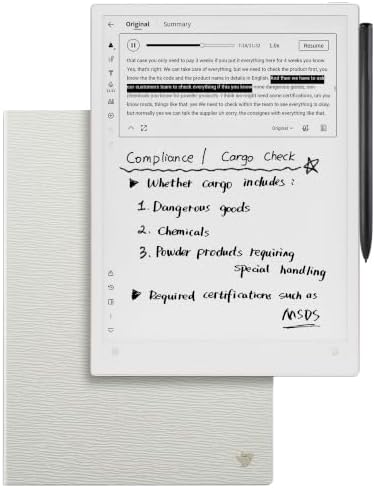
The AINOTE 2 offers a 10.65-inch writing area in a slim design listed at about 4.2 mm thick. Its larger screen can suit people who write at length, work with documents, or want more room for diagrams than an 8.2-inch tablet provides. The package includes a stylus, a protective folio case, a USB cable, and a manual.
This model has a frontlight-free E Ink display. That can be a plus if you prefer a simple screen in normally lit rooms, but it is not intended for writing in a dark space without an external light. It offers eight brush styles, and the listing describes handwriting as low-latency. The device can also support AI assistance for selected text and multilingual transcription, but these features require Wi-Fi or an active internet connection.
The listing estimates up to 14 days of use when used for about 30 minutes per day, with the rest of the time in standby or powered off; it also lists up to 113 days of standby. Those figures depend on the stated usage pattern, so they should not be read as a promise of the same runtime for every workflow. The AI features may also be a poor fit for fully offline work or confidential meetings.
Pros:
- Large 10.65-inch screen provides ample room for writing and documents
- Slim design and included folio, stylus, and USB cable
- Eight brush styles for different kinds of notes
- AI assistance and transcription tools are available with an internet connection
Cons:
- No frontlight, so you need external light in dim settings
- Transcription and AI features require an internet connection
Verdict: The AINOTE 2 makes sense if you want a large, slim writing tablet for well-lit environments, but look elsewhere if frontlighting or offline AI tools are essential.
How to Choose an E Ink Tablet for Note Taking
Choose a screen size that fits your notes
A larger screen gives you more room for handwriting, diagrams, and document markup. The 10.65-inch choices are better suited to long notes or reading full-sized documents, while an 8.2-inch model is a more compact middle ground. A 7-inch screen is easier to carry, but it leaves the least room for writing.
Decide whether you need a frontlight
Some E Ink tablets have adjustable warm and cool lighting, which can help when you read in changing conditions. The AINOTE 2 is frontlight-free, so it relies on ambient or external light. Think about where you plan to write and read before choosing; screen lighting is especially relevant if you often work in dim rooms.
Check what comes in the box
Included writing accessories can affect the total setup you need. The VIWOODS AiPaper comes with a stylus, folio, replacement nibs, and a charging cable. The BOOX Go Color 7 Gen II supports an active stylus, but its listing says the stylus is not included. If handwriting is your main reason for buying, confirm the pen is included and compatible before ordering.
Match the software to your note-taking habits
If you mainly write by hand and mark up documents, focus on the writing tools, storage, and screen size. If you want to install other apps, the BOOX runs Android 13 and supports third-party apps. For meeting-heavy work, the iFLYTEK models list transcription and AI summaries. Features that need Wi-Fi or an internet connection may not suit offline or sensitive workflows.
Understand language and transcription limits
Multilingual transcription, translation, and handwriting recognition can help with lectures and international meetings, but the listed capabilities differ by model. The AINOTE Air 2 listings also state that voice transcription and handwriting-to-text conversion cannot run simultaneously. Consider the languages you use and whether you need these tools at the same time.
Think about storage and file access
Storage matters if you keep many notebooks, PDFs, or other documents on the device. The AiPaper lists 128GB of built-in storage, while the compact BOOX lists 64GB and includes a microSD card slot. One AINOTE Air 2 listing specifies 32GB local storage plus 100GB cloud storage and OneDrive support. Compare local storage, cloud options, and the services you already use.
Frequently Asked Questions
Are E Ink tablets good for handwritten notes?
They can be a good fit if you want a digital notebook with a paper-like reading and writing focus. Look closely at stylus support, writing latency, screen size, and whether the pen is included. E Ink refresh behavior is different from a conventional tablet screen, so these devices are not designed to feel exactly like fast LCD tablets.
Which option has the largest screen?
The VIWOODS AiPaper and iFLYTEK AINOTE 2 both list 10.65-inch displays. The AiPaper emphasizes reading, document markup, and included accessories, while the AINOTE 2 is frontlight-free and focuses on a slim design and AI-assisted notes.
Does the BOOX Go Color 7 Gen II include a stylus?
No. Its listing says the tablet supports the active InkSense stylus, but the stylus is not included. It also says the device does not support EMR styluses.
Which tablets offer meeting transcription?
The two iFLYTEK AINOTE Air 2 listings describe voice transcription and meeting-related AI features. The AINOTE 2 also lists multilingual transcription, which requires an active internet connection. Check each product’s feature details and connection requirements for your intended use.
Can these tablets replace a regular tablet?
That depends on what you do. The BOOX model supports third-party apps, but E Ink displays are primarily suited to reading and writing. If your work depends on fast animation or other fluid screen activity, a standard tablet may be a better fit.
Can I use an E Ink tablet in a dark room?
It depends on the model. The BOOX Go Color 7 Gen II and the listed AINOTE Air 2 models have adjustable reading lights. The AINOTE 2 is frontlight-free and is not intended for use in low light without an external light source.
Final Recommendation
For a large digital notebook that includes its writing accessories and has ample built-in storage, consider the VIWOODS AiPaper. If meetings, transcription, and multilingual tools are your main priorities, compare the two iFLYTEK AINOTE Air 2 configurations closely. Choose the BOOX Go Color 7 Gen II for a compact color E Ink device with third-party app support, keeping in mind that its stylus is separate. For a large, slim writing area in well-lit settings, the frontlight-free AINOTE 2 is the more suitable option.