
A church streaming monitor should make it easier to see camera feeds, check focus and exposure, and keep an eye on the program without crowding your production desk. The right choice depends on your setup: a multi-view monitor can help with several cameras, while a bright screen or SDI connection may matter more in a larger production space.
Affiliate disclosure: This article contains affiliate links. If you buy through them, we may earn a commission at no extra cost to you.
Quick Comparison
| Monitor | Screen and connections | Best suited for |
|---|---|---|
| FEELWORLD ATEM156 Quad-Split Monitor | 15.6-inch Full HD; four HDMI inputs and loop outputs | Monitoring several HDMI camera feeds at once |
| FEELWORLD FVM215 21.5-Inch Broadcast Monitor | 21.5-inch screen; 1000-nit brightness; HDMI and 3G-SDI | Bright production spaces and SDI workflows |
| FEELWORLD ATEM156 Live Streaming Monitor | 15.6-inch Full HD; four HDMI inputs and outputs | Quad, dual, or single-view monitoring |
| FEELWORLD 21.5-Inch Production Monitor | 21.5-inch Full HD; HDMI, 3G-SDI, YPbPr, and AV | A fixed desktop position with multiple connection types |
| FEELWORLD P173-9HSD-CO 17.3-Inch Monitor | 17.3-inch Full HD; HDMI, 3G-SDI, DVI-I, and more | Churches needing a mid-size screen and varied inputs |
Our Picks: Best Feelworld Monitors For Church Live Streaming reviews
1. FEELWORLD ATEM156 Quad-Split Monitor: Best for Multiple HDMI Cameras

The ATEM156 Quad-Split is designed for live production teams that need to watch several HDMI sources on one screen. Its four HDMI inputs can show up to four feeds in a quad layout, and the four loop outputs can pass those signals to other equipment, such as a switcher. You can also choose a dual or single view.
Although the monitor accepts DCI 4K and UHD 4K signals, its built-in 15.6-inch IPS display has a native resolution of 1920 x 1080. That distinction matters: the monitor is useful for viewing and passing supported 4K signals, but the screen itself is Full HD. Features such as peaking and false color can help you check focus and exposure, while the headphone jack provides a way to monitor audio.
For a church with several HDMI cameras, this is the most direct all-in-one monitoring option in the group. Its 250 cd/m² brightness is more suited to an indoor control area than a bright outdoor position. The aluminum housing and VESA mounting options may help with a permanent desk or stand setup. A V-mount battery plate is included, but the battery is not.
Pros:
- Shows up to four HDMI feeds in a quad view.
- Four HDMI loop outputs can pass feeds to other devices.
- Includes focus and exposure tools, plus a headphone jack.
- Supports VESA mounting and has an aluminum housing.
Cons:
- The 250 cd/m² screen is less suited to very bright locations.
- The display is Full HD, not a native 4K panel; the V-mount battery is not included.
Verdict: Choose this model if your church uses several HDMI cameras and wants to monitor them together on one display.
2. FEELWORLD FVM215: Best for a Bright Room and SDI Sources
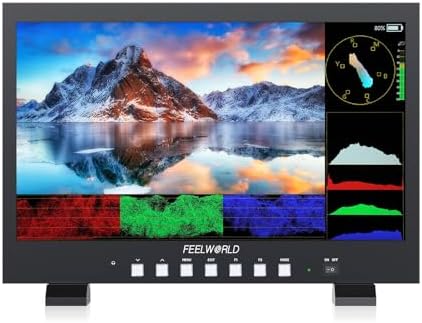
The FVM215 gives a production team a larger 21.5-inch screen and a stated brightness of 1000 nits. That high-brightness rating may be useful when your monitor sits in a well-lit room or where a dimmer screen is hard to see. It has HDMI and 3G-SDI connections, so it can fit setups that use professional cameras or other SDI gear as well as HDMI sources.
Its monitoring tools include focus assist, false color, waveform, RGB parade, vectorscope, and 3D LUT loading. Those features can help a camera operator or technical director judge focus, exposure, and image color. The product information also lists an 8-bit color depth and a 1000:1 contrast ratio. The listing describes the HDMI input as 4K, but does not specify the panel’s native resolution, so check the product details if display resolution is a deciding factor.
This model makes more sense for a larger control room or production position than for a compact desk. Its 21.5-inch size is useful when more than one person needs to view the screen, but it takes up more room than the 15.6-inch ATEM156 models. The package includes a V-mount battery plate and power adapter; confirm the power and mounting arrangement suits your installation.
Pros:
- 1000-nit brightness is the highest stated figure among these picks.
- Includes both HDMI and 3G-SDI connections.
- Has waveform, vectorscope, false color, and other monitoring tools.
- Larger 21.5-inch screen can be easier to view from a distance.
Cons:
- Its larger size may not fit a small production desk.
- The product details do not state the panel’s native resolution.
Verdict: Pick the FVM215 if screen brightness and SDI connectivity matter more to your church setup than a compact footprint or built-in quad view.
3. FEELWORLD ATEM156 Live Streaming Monitor: A Flexible Quad-View Choice
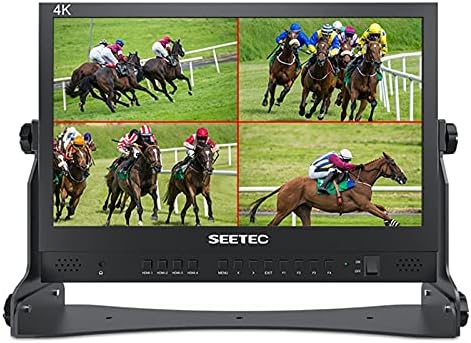
This ATEM156 is a 15.6-inch director monitor built around four HDMI inputs and four HDMI outputs. It can display camera, computer, or other HDMI feeds in quad, dual, or single view, which gives a church operator a way to check multiple sources without dedicating a separate monitor to each one. The loop outputs can also send feeds onward to a switcher or another device.
The screen is Full HD with a 170-degree viewing angle and an 800:1 contrast ratio. Peaking focus, false color, and pixel-to-pixel viewing provide basic tools for checking sharpness and exposure. The control panel supports customizable shortcut keys, which can make it easier to switch views during a service once the monitor is set up.
Compared with the newer ATEM156 Quad-Split listing in this guide, this model has similar core strengths: four HDMI inputs and outputs and multi-view monitoring. Its listed brightness is not specified, and it has a lower stated contrast ratio than the other ATEM156 listing, so compare the details and current availability before choosing between them. It can use a 12V DC supply or a V-mount battery, though the product description does not say that a battery is included.
Pros:
- Supports four HDMI sources and four loop outputs.
- Offers quad, dual, and single-view layouts.
- Includes peaking, false color, and pixel-to-pixel tools.
- Customizable shortcut keys can simplify view changes.
Cons:
- Its 15.6-inch Full HD screen may feel small for a larger control room.
- The listed specifications do not state screen brightness.
Verdict: Consider this ATEM156 if you want four-input HDMI monitoring and its specific combination of controls and connections fits your setup.
4. FEELWORLD 21.5-Inch Production Monitor: Best for a Fixed Desktop Setup

This desktop monitor has a 21.5-inch Full HD panel with a stated brightness of 400 cd/m² and a 160-degree viewing angle. It accepts several signal types, including HDMI, 3G-SDI, YPbPr, and AV. That mix can be helpful in a church production room where equipment has different outputs, though you should confirm that each camera or source matches the monitor’s available connections.
Its tools include peaking focus assist, false color, zebra exposure, pixel-to-pixel viewing, markers, image flip and freeze, and custom aspect ratios. Three-color tally lights provide red, green, and yellow cues, which can help a production team identify camera status. A desktop bracket is included, along with a sunshade hood and V-mount battery plate.
This is a broad-use production display rather than a dedicated four-camera multiview monitor. You can connect different kinds of sources, but the supplied product details do not describe a built-in quad split. It also has less stated brightness than the FVM215, so the FVM215 is the stronger specification match for a particularly bright room.
Pros:
- Offers HDMI, 3G-SDI, YPbPr, and AV connections.
- Includes several focus, exposure, and framing aids.
- Three-color tally lights can support camera cueing.
- Comes with a desktop bracket, sunshade hood, and V-mount plate.
Cons:
- No built-in quad-view feature is listed.
- Its 400 cd/m² brightness is below the FVM215’s stated 1000 nits.
Verdict: Choose this monitor for a stationary production desk that needs multiple input formats and tally lights, rather than built-in multi-camera viewing.
5. FEELWORLD P173-9HSD-CO: A Mid-Size Monitor with Broad Connectivity

The P173-9HSD-CO sits between the 15.6-inch and 21.5-inch options in screen size. Its 17.3-inch Full HD display has a stated brightness of 400 cd/m². The broad set of inputs includes 3G-SDI, HDMI, YPbPr, video, and DVI-I, while the listed outputs include 3G-SDI, HDMI, YPbPr, and video. That range may suit a church that needs to connect older and newer production equipment.
The monitor has a full metal cabinet, built-in tally lights in three colors, a headphone jack, and a built-in speaker. It can run from the included 12-volt power adapter or a standard 4-pin XLR power source. A V-mount battery plate, sunshade, U-bracket, and tally kit are also listed in the package.
The P173 offers useful connection flexibility, but its supplied details do not list quad-view monitoring or the more extensive waveform and scope tools found on the FVM215. Its listed viewing angles are narrower than those of the ATEM156 models, so consider where it will sit and who needs to see it. It may be a practical fit when a 15.6-inch screen is too small but a 21.5-inch monitor would take up too much space.
Pros:
- 17.3-inch Full HD screen offers a middle-ground size.
- Includes a wide selection of inputs and outputs.
- Has three-color tally lights and a built-in speaker.
- Includes a sunshade, bracket, and V-mount battery plate.
Cons:
- No quad-view function is listed.
- The stated viewing angles are narrower than those of the ATEM156 monitors.
Verdict: Choose the P173 if you need a mid-size screen with varied connections and do not need built-in multi-camera views.
How to Choose a FEELWORLD Monitor for Church Live Streaming
Match the monitor to your camera and switcher connections
Start by checking the outputs on your cameras, computer, and video switcher. The ATEM156 models focus on HDMI and offer four inputs with loop outputs, while the FVM215, 21.5-inch production monitor, and P173 also include 3G-SDI. The 21.5-inch production monitor and P173 list additional formats. Make sure the monitor accepts the signal your equipment sends, and check that any output you need for another device is available.
Decide whether you need a multiview display
If your operator needs to watch several camera angles at once, a monitor with a built-in quad view can reduce the need for separate screens. Both ATEM156 options list quad, dual, and single views. The other three models are described as production monitors, but their supplied specifications do not list a quad-view function. If you already have multiview handled by a switcher or computer, a standard monitor may be enough.
Choose a screen size for your control area
A 15.6-inch monitor can suit a compact desk or a position close to the operator. The 17.3-inch P173 offers a middle option, while the 21.5-inch models give you a larger screen that may be easier to view farther away. Think about desk space, viewing distance, and whether more than one person needs to see the display.
Consider brightness and viewing conditions
Brightness can affect how easily you see a picture in a lit room. Among these models, the FVM215 has the highest stated brightness at 1000 nits. The 21.5-inch production monitor and P173 list 400 cd/m², while the newer ATEM156 listing specifies 250 cd/m². Room lighting and screen placement matter, so a bright screen may be useful in a well-lit area, but it is not a substitute for choosing a suitable viewing position.
Look for the monitoring tools your team will use
Focus assist, false color, zebra exposure, waveform, and other analysis tools can help operators spot image issues. The ATEM156 models list peaking and false color, while the FVM215 adds waveform, RGB parade, vectorscope, and 3D LUT loading. The 21.5-inch production monitor includes several focus, exposure, and framing aids. Choose features that fit your workflow instead of paying attention only to the size of the feature list.
Plan the power and mounting arrangement
Consider whether the monitor will stay at a desk, attach to a stand, or need battery power. The ATEM156 Quad-Split listing includes a V-mount battery plate but not a battery; the other models list their own power accessories and mounting items. Check what is included and whether your existing power supply, battery, or mount is compatible before ordering.
Confirm signal handling for your full setup
Having matching HDMI or SDI ports does not by itself confirm that every source will work as expected. Check the resolution and signal format from each camera, switcher, and computer against the monitor’s listed support. The ATEM156 Quad-Split product information also notes that HDCP-protected signals may require an HDMI splitter to strip HDCP, so account for that limitation if it applies to your sources.
Frequently Asked Questions
Which FEELWORLD monitor is best for watching several church cameras at once?
The ATEM156 models are the clearest fit because they list four HDMI inputs and quad-view monitoring. They can show several connected feeds on the same screen, then switch to dual or single view.
Are the ATEM156 monitors native 4K displays?
No. The ATEM156 Quad-Split listing specifies a 1920 x 1080 display, even though it supports DCI 4K and UHD 4K HDMI input and loop-out signals. The other ATEM156 listing also specifies a 1920 x 1080 panel.
Which option has the highest stated brightness?
The FVM215 lists a 1000-nit screen. The 21.5-inch production monitor and P173 list 400 cd/m², and the ATEM156 Quad-Split lists 250 cd/m².
Should my church choose HDMI or 3G-SDI?
Choose based on the outputs on your cameras and other equipment. HDMI is used by both ATEM156 models, while the FVM215, 21.5-inch production monitor, and P173 also list 3G-SDI. Check the full signal path, including any switcher or converter, before deciding.
Do these monitors include a V-mount battery?
The product descriptions list V-mount battery plates for several models, but that does not mean a battery is included. The ATEM156 Quad-Split listing specifically says its battery is not included. Check each product’s package details for the power accessories you need.
Can I use one of these monitors with OBS or a streaming computer?
The ATEM156 Quad-Split product information describes compatibility with HDMI sources, including OBS setups, and notes pass-through integration with switchers. Your computer still needs an appropriate HDMI output or compatible connection, and the monitor does not replace streaming software or a switcher.
How should I check availability before buying?
Product availability can change. Use the Amazon listing to check whether the specific model is currently offered and review its latest package and compatibility details before ordering.
Final Recommendation
For most churches that need to monitor multiple HDMI camera feeds, the FEELWORLD ATEM156 Quad-Split is the strongest match because it combines four inputs, loop outputs, and quad-view monitoring. Choose the FVM215 instead if a bright screen and 3G-SDI connections matter more, or consider the 21.5-inch production monitor and P173 when you need different signal formats without a listed built-in quad view. Confirm your connections, power needs, and current listing details before you buy.