
Optical zoom gives you room to adjust a projected picture to your screen without moving the projector, which can make installation much easier. The models below range from bright Full HD projectors built for flexible installations to 4K options aimed at movies and gaming. Compare the zoom and lens features, brightness information, and setup tools with your room before choosing—especially if you plan to mount your projector in a fixed spot.
| Projector | Resolution | Zoom or lens flexibility | Best suited for |
|---|---|---|---|
| ViewSonic LS740HD | Full HD | 1.3x optical zoom | Bright rooms and installed setups |
| ViewSonic LX700-4K | 4K UHD | 1.3x optical zoom | 4K viewing and gaming |
| ViewSonic PX749-4K | 4K UHD | 1.3x optical zoom | Large-screen home theaters and gaming |
| XGIMI HORIZON 20 Max | 4K | Optical zoom and lens shift | Bright, flexible home entertainment |
| Valerion VisionMaster Pro2 | 4K UHD | OpticFlex lens system, 0.9–1.5 throw ratio | Flexible placement and cinematic viewing |
Our Picks: Best Home Theater Projectors With Optical Zoom reviews
ViewSonic LS740HD: A bright Full HD projector for flexible installations

The LS740HD is a Full HD laser projector with a stated brightness of 5,500 ANSI lumens. Its 1.3x optical zoom and 1.13–1.47 throw ratio help you fit the picture to your space without relying only on moving the projector. It can display images from 30 to 300 inches, according to the supplied product details.
Its installation adjustments are a notable strength. Horizontal and vertical keystone correction, four-corner adjustment, portrait mode, and 360-degree projection give you options for rooms where a standard ceiling or table placement is not practical. The laser light source is rated for up to 30,000 hours in Dynamic Eco mode. For connections, it has two HDMI inputs, USB Type-A, RS232 control, audio out, and a built-in 15W speaker.
This model makes the most sense for a bright multipurpose space, golf simulator, or permanent installation where flexibility and brightness matter more than 4K resolution. Its business- and venue-oriented feature set may be more than you need for a simple movie room. The supplied availability data also flags this listing as unavailable, so check the product page before making plans around it.
Pros:
- High stated brightness for a Full HD projector
- 1.3x optical zoom and a useful throw-ratio range
- Keystone, four-corner, portrait, and 360-degree adjustment options
- Laser light source with a stated long operating life in Dynamic Eco mode
Cons:
- Full HD rather than 4K resolution
- Its installation and control features may be unnecessary for a basic home theater
Verdict: Choose the LS740HD if bright output and installation flexibility matter more to you than 4K detail, but confirm that the listing is available before selecting it.
ViewSonic LX700-4K: A 4K pick with gaming-focused adjustments

The LX700-4K combines 4K UHD resolution with a laser light source and features aimed at gaming and home entertainment. Its supplied description lists a 1.3x optical zoom, horizontal and vertical keystone correction, and four-corner adjustment. Those tools can help you shape the image to your screen and correct placement issues, though they do not replace careful projector positioning.
Gaming is a major part of this model’s appeal. The product details list a 240Hz refresh rate and 4.2ms input lag, along with 1440p at 120Hz gaming support. HDR and HLG compatibility and ViewSonic SuperColor technology are also listed. The supplied information gives different brightness figures in the product title and description, so check the listing’s specifications and intended measurement before comparing it directly with another projector.
The LX700-4K is a better fit than the LS740HD if you want 4K resolution and gaming features in a home theater setup. It is described as projecting images from 80 to 150 inches, so it may be less suitable if your main goal is an exceptionally large image. The stated 1.3x zoom offers useful framing flexibility, but it is not an unusually wide zoom range.
Pros:
- 4K UHD resolution with HDR and HLG support
- 1.3x optical zoom plus multiple image-adjustment tools
- Gaming features include a listed 240Hz refresh rate and low input lag
- Dedicated Golf Mode is included for compatible simulator setups
Cons:
- Supplied brightness figures differ between the title and description
- The listed screen-size range tops out at 150 inches
Verdict: The LX700-4K is a strong option to consider if you want 4K movies and gaming features, and its optical zoom helps with room setup.
ViewSonic PX749-4K: A large-screen 4K projector for gaming and movies

The PX749-4K is a 4K UHD projector designed for home entertainment and gaming. Its product description lists 4,000 ANSI lumens, HDR and HLG support, and a 1.3x optical zoom. It can project an image up to 300 inches, giving it a broader stated screen-size range than the LX700-4K.
For setup, you get horizontal and vertical keystone correction, auto-keystone correction, and four-corner adjustment in addition to optical zoom. These tools help with alignment, but optical zoom is the more useful adjustment when you need to resize the image while keeping the projector in place. The description also lists 1440p at 120Hz support, a 240Hz refresh rate, and 4.2ms input lag for gaming.
Compared with the LX700-4K, the PX749-4K is the more natural choice if you want the option of a much larger projected image. Its 1.3x zoom is still a modest adjustment range, so measure your room and check the throw distance before buying. This projector suits a larger theater room or multipurpose entertainment space better than a setup with limited projection distance.
Pros:
- 4K UHD resolution and listed 4,000 ANSI-lumen brightness
- Projects images up to 300 inches
- 1.3x optical zoom with several image-alignment tools
- Gaming features include 1440p at 120Hz support and a 240Hz refresh rate
Cons:
- The 1.3x zoom offers less placement flexibility than a wider-range lens
- Maximum image size depends on having enough room and suitable placement
Verdict: Pick the PX749-4K if you want 4K entertainment, gaming features, and the option of a very large image in a room with enough space.
XGIMI HORIZON 20 Max: A bright 4K model with lens shift
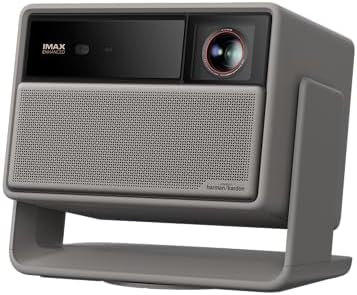
The HORIZON 20 Max pairs a 4K projector with an RGB triple-laser light source. Its product description lists 5,700 ISO lumens of peak brightness, 20,000:1 contrast, and 110% BT. color coverage. Brightness measurements use different standards across projector listings, so do not treat its ISO-lumen figure as a direct match for another model’s ANSI-lumen number.
For installation, XGIMI highlights optical zoom and lens shift, which can offer more freedom in placing the projector than digital image correction alone. The description also lists support for projection up to 300 inches, built-in Google TV, Google Home integration, and gaming features including 240Hz motion and 1ms input lag. The product information does not specify the zoom range, so check the manufacturer’s placement guidance if your room requires a particular image size from a fixed distance.
This model suits shoppers who want a feature-rich projector for movies, streaming, and gaming, especially when placement flexibility is important. Its smart-TV features may reduce the need for a separate streaming device, but you should still confirm that the apps and services you use are supported. The listed peak brightness is notable, though room lighting, screen choice, and setup will affect the picture you see.
Pros:
- 4K resolution and an RGB triple-laser light source
- Optical zoom and lens shift support flexible placement
- Built-in Google TV and Google Home integration are listed
- Gaming features include a listed 240Hz refresh rate
Cons:
- The supplied details do not state the optical zoom range
- ISO-lumen brightness figures are not directly comparable with ANSI-lumen figures
Verdict: Consider the HORIZON 20 Max if you want a bright, smart 4K projector with both optical zoom and lens shift, and verify its placement range for your room.
Valerion VisionMaster Pro2: A flexible lens system for home cinema

The VisionMaster Pro2 is a 4K triple-laser projector with a lens system designed to work across a range of room layouts. Its OpticFlex lens system is listed with a 0.9–1.5 throw ratio, and the description says it supports images up to 300 inches. Automatic focus and keystone correction are also listed, which can simplify initial alignment, though they do not replace checking the throw distance and screen placement.
For picture quality, the supplied details list 3,000 ISO lumens, a 15,000:1 contrast ratio, a 110% Rec. color gamut, HDR10+ with dynamic tone mapping, and AI Super Resolution. It also includes Google TV with named streaming services and gaming features such as 4ms input lag and a 240Hz refresh rate. Because the lens description gives a throw-ratio range rather than a specific optical-zoom multiplier, compare the projector’s placement chart with your room before treating it as a direct match for a 1.3x zoom model.
This projector is a good match for buyers who want 4K home cinema features and more placement options than a basic fixed-lens design may offer. Its listed 3,000 ISO lumens are lower than the peak brightness figures given for some other models here, though those figures use different measurement standards. Consider your room’s light control and screen size rather than comparing brightness numbers alone.
Pros:
- 4K resolution with HDR10+ and dynamic tone mapping
- OpticFlex lens system with a listed 0.9–1.5 throw ratio
- Automatic focus and keystone correction are included in the description
- Google TV and gaming features are built into the product offering
Cons:
- The supplied brightness figure is lower than some competitors’ stated figures
- The lens details use a throw-ratio range rather than a stated zoom multiplier
Verdict: Choose the VisionMaster Pro2 if its lens range fits your room and you value 4K, HDR, and built-in streaming features in a flexible home-cinema setup.
How to Choose a Home Theater Projector With Optical Zoom
Check the throw distance and zoom range
Before comparing extra features, measure the distance from your planned projector position to the screen. Then use the model’s throw ratio or placement chart to confirm it can produce your desired image size from that spot. A 1.3x optical zoom offers some room to adjust the picture without moving the projector, but it is not a substitute for checking the projector’s full throw range. If the unit must fit a tight shelf or fixed ceiling mount, lens shift or a wider lens range can be especially helpful.
Choose the resolution for your screen and content
Full HD can be a practical choice when bright output and installation flexibility matter most. A 4K model is worth considering if you want finer detail on a large screen or watch high-resolution content. Think about viewing distance as well as screen size: the larger the image, the more useful added resolution may become.
Compare brightness figures carefully
Bright rooms can wash out a projected image, so think about how much light you can control. The models in this guide list brightness in ANSI or ISO lumens, and those figures should not be treated as directly interchangeable. Screen material, image size, and room lighting also affect perceived brightness. Use the same measurement standard when comparing specifications whenever possible.
Understand optical adjustments versus digital correction
Optical zoom changes image size through the lens while the projector stays in place. Lens shift can move the image position without requiring the projector to be centered in the same way. Keystone and corner correction reshape the picture to help it look square, but digital correction may affect the image. A good setup starts with suitable placement, then uses adjustment features to fine-tune the result.
Match gaming features to the games you play
If you mainly watch movies, gaming specifications may not be a priority. For fast-paced games, check the listed input lag, refresh rate, and supported resolution together. A high refresh-rate figure alone does not tell you which resolution or input mode is available at that rate, so confirm the details for the console or PC you plan to use.
Plan connections and streaming
Check that the projector has the inputs you need for your sources, such as a game console, streaming device, or receiver. Some models list built-in streaming platforms, while others emphasize HDMI and installation controls. If you use a separate sound system, confirm that the projector’s audio connections match your setup rather than assuming a built-in speaker will suit a theater room.
Frequently Asked Questions
What does optical zoom do on a projector?
Optical zoom changes the image size through the projector’s lens while the projector remains in place. It can make it easier to fit the picture to a screen after installation. The amount of adjustment depends on the projector’s zoom range.
Is optical zoom better than keystone correction?
They solve different problems. Optical zoom adjusts image size, while keystone correction changes the image shape to help make it look rectangular. For the best setup, position the projector carefully first, use optical zoom to frame the screen, and rely on keystone correction only as needed.
Do all the projectors here have the same kind of zoom?
No. The ViewSonic LS740HD, LX700-4K, and PX749-4K list 1.3x optical zoom. The XGIMI HORIZON 20 Max lists optical zoom and lens shift but does not state a zoom range in the supplied details. The Valerion VisionMaster Pro2 lists an OpticFlex lens system with a 0.9–1.5 throw ratio rather than a specific zoom multiplier.
Which projector is best for a large screen?
The ViewSonic PX749-4K, XGIMI HORIZON 20 Max, and Valerion VisionMaster Pro2 each list support for projection up to 300 inches. The actual image size you can use depends on the room, throw distance, screen, and viewing conditions.
Should I choose a laser projector?
A laser light source can be appealing if you want a projector designed for extended use. The LS740HD’s supplied details state up to 30,000 hours in Dynamic Eco mode. Light-source life is only one factor, however; resolution, brightness, placement, and connections should also fit your needs.
Can I use these projectors in a room with ambient light?
Some listed models are designed with high brightness in mind, but ambient light can still reduce contrast and make a projected image look less vivid. Darkening the room and choosing a suitable screen can help. Compare brightness figures carefully because the supplied listings use different measurement standards.
Final Recommendation
For a bright Full HD installation with extensive placement adjustments, the ViewSonic LS740HD stands out, though its supplied availability status should be checked. For a 4K projector with a clear 1.3x optical zoom specification, compare the ViewSonic LX700-4K and PX749-4K based on your preferred image size and gaming needs. The XGIMI HORIZON 20 Max and Valerion VisionMaster Pro2 offer different lens-flexibility approaches alongside smart and home-cinema features. Before choosing, confirm the throw distance, screen size, and input requirements for your room.