
The right LED panel setup can make a YouTube studio look more polished without making lighting hard to manage. For a simple two-light arrangement, look for adjustable color temperature, dimming, and stands; if you want colorful backgrounds or effects, an RGB kit may be a better fit. Below, we compare five options by their supplied features, included gear, power choices, and practical trade-offs.
| Product | Best for | Key features | Power and included setup |
|---|---|---|---|
| NEEWER 2-Pack Bi-Color 480 LED Video Light Kit | Classic two-light studio setups | 3200K–5600K, 0–100% dimming, CRI 96+ | Power adapters, stands, diffusers, and carrying cases; batteries not included |
| NEEWER 13-Inch NL-192AI Panel Kit | Portable shoots and streaming | 3200K–5600K, 0–100% dimming, CRI 97+ | Two panels with 4000mAh batteries and tripod stands |
| GVM 800D RGB LED Video Light | App-controlled color and effects | Bi-color, RGB adjustments, eight scene modes | AC adapter or Sony F750/970 battery; battery not included |
| GVM 1500D 3-Pack RGB Video Light Kit | Multi-light studios and creative video | 75W, RGB, HSI, 2300K–5600K, 18 effects | Three lights, softboxes, diffusers, stands, and AC/DC power support |
| GVM 880RS 2-Pack RGB Video Light Kit | Two-light RGB setups | 60W, CRI 97+, app control, 18 scene effects | Two lights, stands, diffusers, adapters, and carrying bag |
Our Picks: Best Led Panel Lights For Youtube Studios reviews
NEEWER 480 LED Kit: A Practical Two-Light Setup for Everyday Videos

This two-light kit is built around straightforward, useful studio controls. Each panel combines 240 white and 240 yellow LEDs, with a color temperature range of 3200K to 5600K and brightness adjustment from 0 to 100%. That gives you room to match warmer indoor light or work closer to daylight, then fine-tune the output for your scene.
The aluminum alloy lights include U-brackets for changing the beam angle and white diffusers for softer illumination. The package also includes two telescoping stands, adjustable from 3 to 6.2 feet, plus power adapters and carrying cases. The listed CRI is 96+, a helpful specification when natural-looking color matters for skin, products, or clothing.
For a YouTube desk or small studio, the two panels can serve as a key and fill light, or light two people from separate angles. Unlike the battery-powered options here, this kit’s listed package is oriented around AC power; batteries are not included. If you want RGB effects or phone-app control, one of the GVM kits is a better match.
Pros:
- Two bi-color panels with independent brightness and color-temperature adjustment
- White diffusers and swiveling U-brackets help shape the light
- Includes two stands, adapters, power cables, and carrying cases
- CRI 96+ specification for color-conscious video work
Cons:
- Batteries are not included
- No RGB color effects or app control are listed
Verdict: Choose this kit if you want two adjustable, bi-color panels and a ready-to-place stand setup for conventional YouTube lighting.
NEEWER NL-192AI: Compact Panels for Portable Recording

The NL-192AI is a two-panel kit for creators who value portability. Each light has 192 warm and cool LEDs, adjustable color temperature from 3200K to 5600K, and brightness control from 0 to 100%. Its listed CRI is 97+, and a rear LCD screen shows the current settings.
Each panel is about 0.4 inches thick and weighs 1.3 pounds, so the lights are easier to pack than larger studio panels. The package includes two 70-inch stands and 4000mAh batteries. The supplied specifications state up to 90 minutes of continuous lighting per battery and a two-hour full charge with a 15V 2A quick charger.
Cold-shoe and 1/4-inch mounts give you options for attaching the panels to a camera or stand, and each light tilts up to 180 degrees. These panels suit streamers, traveling creators, or anyone who wants a compact setup that can operate away from an outlet for a limited session. Their smaller format may be less suited to lighting a broad area than a larger kit, and the stated battery runtime is finite.
Pros:
- Two thin, lightweight panels with bi-color control
- Includes 4000mAh batteries and two 70-inch stands
- LCD display makes settings easy to check
- Cold-shoe and 1/4-inch mounting options
Cons:
- Listed battery runtime is up to 90 minutes
- Compact panels may not suit every large-space lighting setup
Verdict: This is a strong fit if portability and included battery operation matter more to you than a larger, more elaborate studio kit.
GVM 800D RGB Panel: App Control and Color Effects

The GVM 800D is for creators who want more than plain white light. It offers a standard bi-color mode from 3200K to 5600K, plus adjustable red, green, and blue output with hue and saturation controls. The companion app is intended to let you adjust color and temperature from a mobile device.
Eight simulated scene modes include TV, candle, cop car, lightning, paparazzi, disco, party, and bad bulb. These effects can add atmosphere to a background or creative segment, though they are not a replacement for soft, neutral key lighting when you need consistent skin tones.
The panel uses an aluminum alloy casing and can be powered by its AC adapter or a Sony F750/970 battery, which is not included. The supplied description also lists master-and-slave control for coordinating compatible GVM lights. Compared with the NEEWER panels, this option puts more emphasis on creative color and app operation than on a two-light bundle with stands.
Pros:
- Offers both bi-color lighting and adjustable RGB output
- Includes eight simulated scene effects
- Mobile app control and master-and-slave mode are listed
- Can use AC power or a compatible Sony F750/970 battery
Cons:
- Sony batteries are not included
- The supplied description does not list a stand or a multi-light kit
Verdict: Consider the 800D if you want app-adjustable RGB effects for a creative background and are prepared to supply a compatible battery or use AC power.
GVM 1500D 3-Pack: A Full RGB Kit for Multi-Light Studios

This three-light kit is the most complete option here for building a more involved studio setup. Each light is listed at 75W and supports bi-color adjustment from 2300K to 5600K, full RGB, and HSI controls. That mix makes it possible to set a neutral key light while adding colored accents to a background or scene.
The kit includes three softboxes, three diffusers, barn doors, adjustable stands, AC adapters, power cables, and a carrying bag. The supplied description also lists 18 lighting effects, Bluetooth app control, an onboard LCD with controls, and master-and-slave operation for syncing lights. Those features offer more control than a basic bi-color kit, but they also give you more settings to manage.
AC/DC power support gives you indoor and location-shooting options. For outdoor use, the description specifies NP-F550/970 batteries, which are not included. The three stands and softboxes make this a larger setup than a compact two-panel kit, so it is best suited to creators who have room to place and adjust several lights.
Pros:
- Three lights with RGB, HSI, and bi-color modes
- Includes softboxes, diffusers, barn doors, and stands
- App and onboard controls, plus master-and-slave mode
- AC/DC power support for studio or location use
Cons:
- NP-F550/970 batteries for outdoor use are not included
- Three lights and accessories require more setup space than a compact kit
Verdict: Pick this kit if you want a three-light RGB setup with softboxes and stands, and have the space and time to make use of its expanded controls.
GVM 880RS 2-Pack: RGB Lighting with Stands and App Control
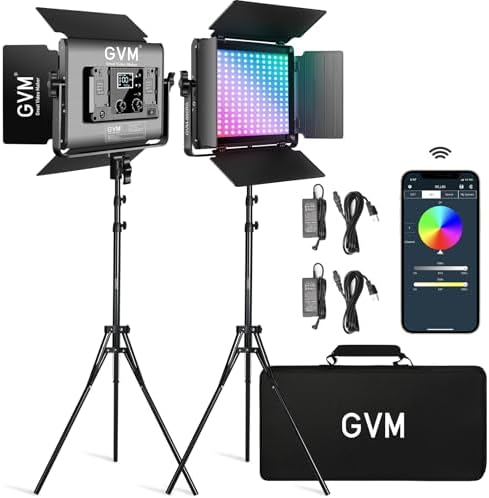
The GVM 880RS pairs two RGB lights with stands and a carrying bag, making it a middle ground between a basic bi-color kit and the larger three-light 1500D. The supplied specifications list 60W output, 752 LED beads, and CRI 97+. Its color temperature range is 3200K to 5600K, with app control for brightness, temperature, hue, and color.
The lights include 18 simulated effects, such as TV, candle, lightning, disco, and fire. You can set one light as the master and another compatible GVM light as a slave, which is useful when you want to coordinate a setup. The kit can run from its included AC adapters or a 7.4V, 4400mAh lithium-ion battery; the battery is not included.
Two stands and diffusers make the kit more ready to set up than the 800D option, while the RGB controls add background and accent-light flexibility. The 1500D kit provides three lights and includes softboxes, but the 880RS may better suit a creator who wants a two-light arrangement and does not need that larger bundle.
Pros:
- Two RGB lights with stands, diffusers, and a carrying bag
- App controls for brightness, color temperature, and hue
- Lists 18 lighting effects and master-and-slave control
- CRI 97+ specification
Cons:
- The listed 7.4V battery is not included
- Does not include the three-light softbox setup offered by the 1500D kit
Verdict: Choose the 880RS if you want two stand-mounted RGB lights with app control and effects without stepping up to a three-light kit.
How to Choose LED Panel Lights for a YouTube Studio
Decide Whether You Need Bi-Color or RGB
Bi-color panels let you shift between warmer and cooler white light, which is useful for matching the room or shaping a natural-looking face light. RGB panels add colored output and effects for backgrounds, music videos, or creative scenes. If most of your videos need clean, consistent lighting, bi-color may be enough. If color is part of your look, choose a model with RGB or HSI controls.
Check Brightness Control and Color Quality
A dimming range gives you more control over exposure and helps balance a panel with the light already in your room. Look for a clear brightness range in the product specifications. CRI is also useful when accurate-looking colors matter; the products here list CRI values from 96+ to 97+. Treat those numbers as one comparison point, not a guarantee that every camera and setting will produce identical results.
Match the Kit to Your Room and Lighting Plan
Think about where the panels will go before choosing a kit. Two lights can work as a key and fill setup, while three provide more options for lighting a subject and background separately. Check the listed stand height, mounting options, and included modifiers. Softboxes, diffusers, and barn doors can help shape light, but a larger kit also needs more space to set up.
Choose a Power Setup That Fits Your Recording Habits
For a permanent studio, AC adapters can keep your setup straightforward. Battery support is useful when you record away from outlets, but check the exact battery type and whether it is included. The portable NEEWER kit lists its batteries and an estimated runtime, while several GVM models require separately purchased batteries for battery-powered use.
Consider How You Want to Control the Lights
On-panel knobs and displays are direct and easy to understand when the lights are within reach. App control can be handy if a panel is positioned across the room or if you want to adjust several settings from one place. Master-and-slave features can also simplify multi-light adjustments, but confirm that your chosen lights are compatible before planning a coordinated setup.
Account for Setup Time and Portability
A compact panel kit may be easier to carry and store, while a kit with stands, softboxes, and multiple lights can offer more ways to shape a scene. Consider how often you will move the equipment and how much time you want to spend assembling it. A simple two-light arrangement may be more practical for a small home studio than a larger kit with extra effects and accessories.
Frequently Asked Questions
Are two LED panels enough for a YouTube studio?
Two panels can cover a common key-and-fill arrangement, though the best setup depends on your room, subject, and background. A third light can give you another source for a background or separate subject, but it is not necessary for every recording space.
Should I choose bi-color or RGB panels for talking-head videos?
Bi-color panels are a practical choice for straightforward talking-head lighting because they adjust between warm and cool white light. RGB panels are useful if you also want colored backgrounds or effects. You can use RGB models for regular white light as well, but their creative modes may be unnecessary for a simple setup.
What does CRI mean for video lighting?
CRI is a color-rendering measure used to describe how a light shows colors. A higher listed CRI can be useful when you want skin tones and objects to look natural, though your camera settings, room light, and other parts of your setup also affect the final image.
Can these lights run on batteries?
Battery options vary by model. The NEEWER NL-192AI kit includes 4000mAh batteries and lists up to 90 minutes of continuous lighting. The GVM models specify compatible batteries for some power setups, but those batteries are not included. Check the product details for the exact model before buying batteries.
Do LED panels need a softbox or diffuser?
A diffuser or softbox can soften the light and make it less harsh on a subject. Some kits include diffusers, and the GVM 1500D kit also includes softboxes. If your chosen panel does not include a modifier, check its compatibility before adding one.
Which option is best for a small or portable studio?
The NEEWER NL-192AI is the most portable option in this group based on its listed thin design, light panel weight, included batteries, and stands. For a more traditional two-light arrangement in a fixed space, the NEEWER 480 LED kit includes taller stands and AC adapters.
Conclusion
For a straightforward YouTube setup, the NEEWER 480 LED kit is the most balanced choice here: it includes two bi-color lights, stands, diffusers, and power adapters. If you often record away from an outlet, consider the portable NEEWER NL-192AI kit. For RGB effects and app-based control, the GVM 880RS is a two-light option, while the GVM 1500D is better suited to creators who want a more complete three-light setup with softboxes. Choose based on your space, power needs, and whether your videos call for simple white light or creative color.