
Nearfield studio monitors can make a gaming setup sound more detailed and direct than many compact desktop speakers. They sit close to you, which can help you hear dialogue, music, and in-game audio clearly without needing to fill a whole room with sound. The best fit depends on your desk space, preferred connections, and whether you want a compact stereo pair or larger speakers with more output.
Our picks include compact options for crowded desks, flexible speakers for switching between gaming and other devices, and larger monitors for more headroom. These are stereo speakers, not surround-sound systems, so your game or audio source still determines how spatial effects are handled.
Quick Comparison
| Monitor | Best for | Notable features |
|---|---|---|
| PreSonus Eris 3.5 Bluetooth | Compact, versatile desktop setup | 50W amplification, Bluetooth, TRS, RCA, and front aux |
| Ortizan C7 | Multiple sources and wireless playback | Bluetooth 5.3, balanced TRS, and front headphone output |
| PreSonus Eris E5 Pair | More output and larger desks | 5.25-inch woofers, 80W bi-amplification, acoustic tuning |
| KALI AUDIO LP-UNF | Very close listening | 4.5-inch monitors, Bluetooth, boundary EQ |
| Edifier MR4 | Gaming and creative work | Monitor and music modes, TRS, RCA, and aux inputs |
Our Picks: Best Nearfield Studio Monitors For Gaming Setup reviews
PreSonus Eris 3.5 Bluetooth: A Flexible Pick for Compact Desks

The Eris 3.5 Bluetooth is a powered stereo pair built for desktop listening, with features that also make sense for a gaming station. Its 3.5-inch woven-composite woofers and 1-inch silk-dome tweeters cover a stated frequency range of 80 Hz to 20 kHz. The 50W of built-in amplification gives you a useful amount of output for close listening at a desk.
Connection choices are a strong point. Balanced TRS and RCA inputs cover common audio gear, while the front aux input offers a convenient way to connect another source. Bluetooth is useful for playing audio from a compatible device, and the front headphone jack gives you an easy switch to private listening. High- and low-frequency controls let you adjust the sound for your room or desk position.
For gaming, this is a practical middle ground: compact enough to suit many desktop setups, but more flexible than a pair with only one input type. The 3.5-inch woofers are not a substitute for a dedicated subwoofer if you want very deep, room-filling bass. Also, Bluetooth convenience may not be the best choice for every gaming signal path; use a wired connection when you want a direct, dependable connection to your gaming device.
Pros:
- 50W of built-in amplification in a compact desktop pair
- Bluetooth, TRS, RCA, and front aux connections
- Front headphone jack for private listening
- High- and low-frequency acoustic tuning controls
Cons:
- Small woofers may not satisfy listeners seeking deep bass without a subwoofer
- Bluetooth is not as direct as a wired connection for every gaming setup
Verdict: Choose the Eris 3.5 Bluetooth if you want a compact, well-connected stereo pair for gaming, everyday listening, and switching among desk devices.
Ortizan C7: A Multi-Input Option for Mixed Devices

The Ortizan C7 is a compact powered monitor pair aimed at home studios and everyday audio use. Its listed speaker combination is a 3.5-inch carbon-fiber mid-bass driver and a 0.75-inch silk-dome tweeter. The listing describes a balanced tuning approach, which can suit games where you want clear dialogue and effects without an intentionally exaggerated sound.
Bluetooth 5.3 supports wireless playback from a compatible phone or tablet. The listed connections also include RCA, 3.5mm aux, and balanced 6.35mm TRS, with a front headphone output for monitoring privately. The product description also mentions a 24-bit DAC for USB audio; check the product listing for the exact connection details you need before choosing it.
The C7 may be a good fit if your desk serves more than one purpose, such as gaming, media playback, and music creation. Its assortment of connections can reduce the need to keep swapping speakers between sources. As with other compact monitors, the 3.5-inch drivers are a limit to consider if powerful low bass is a priority. Bluetooth is handy for casual listening, while a wired connection is the more straightforward choice for a gaming PC or console setup.
Pros:
- Bluetooth 5.3 plus RCA, aux, and balanced TRS connections
- Front headphone output for private listening
- Compact 3.5-inch driver design for desktop use
- Described as having a balanced, monitor-style tuning
Cons:
- Compact drivers may not deliver the deep bass some gaming setups call for
- Confirm the precise USB connection details if USB audio is essential
Verdict: Consider the Ortizan C7 if you want a compact set of monitors with several ways to connect and the option of wireless playback.
PreSonus Eris E5 Pair: More Headroom for a Larger Gaming Desk
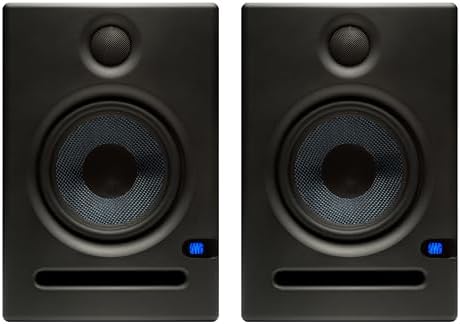
The Eris E5 Pair is the larger, more powerful PreSonus option in this group. Each monitor uses a 5.25-inch woven-composite woofer and a 1-inch silk-dome tweeter. The listed 80W Class AB bi-amplification provides more headroom than the compact Eris 3.5, making this pair a better match for a larger desk or listeners who want more output.
Balanced XLR and 1/4-inch inputs, along with unbalanced RCA inputs, make it suitable for connection to a computer, interface, or other audio equipment with compatible outputs. Acoustic tuning controls help tailor the sound to the listening space. A front-firing acoustic port supports bass reproduction, while built-in protection features are listed for issues such as overheating and transient signals.
These monitors take up more room than the smaller picks, so measure your desk and check where the speakers will sit before buying. Their larger drivers may offer a fuller low end than the 3.5-inch models, but they are still studio monitors rather than a dedicated gaming surround system. There is no Bluetooth listed, so plan on a wired setup or a separate compatible audio device if wireless playback matters to you.
Pros:
- 5.25-inch woofers and 80W bi-amplification for additional headroom
- Balanced XLR and 1/4-inch inputs plus RCA
- Acoustic tuning controls for adapting to the room
- Front-firing ports support bass-frequency reproduction
Cons:
- Larger cabinets need more desk space than the compact options
- No Bluetooth connection is listed
Verdict: Pick the Eris E5 Pair if you have room for larger monitors and value additional output and flexible wired inputs over a small footprint.
KALI AUDIO LP-UNF: An Ultra-Nearfield System for Close Listening

The KALI AUDIO LP-UNF is described as an ultra-nearfield monitor system, a format designed for listening at close range. Its listed features include 4.5-inch powered monitors, 1-inch tweeters, Bluetooth connectivity, a 3D imaging waveguide, and boundary EQ. The boundary control is especially relevant to desktop placement, where a speaker may sit close to a wall or other surface.
The 3D imaging waveguide is intended to support a sense of space from a nearfield listening position, which may appeal to gamers who want a more defined stereo presentation. Bluetooth adds a convenient path for wireless audio. The listing information supplied for this model is brief, so check its product page for full details about inputs, controls, and setup before deciding whether it matches your equipment.
This model is listed as unavailable in the supplied product information, so you may not be able to purchase it at the time you check. Availability can change; confirm the current listing before building your setup around it. If it is unavailable, the PreSonus Eris 3.5 Bluetooth and Ortizan C7 are alternative compact picks with more fully described connection options.
Pros:
- Ultra-nearfield design suits close desktop listening
- Boundary EQ is listed for adapting to speaker placement
- Bluetooth connectivity is included
- 3D imaging waveguide may suit listeners focused on stereo positioning
Cons:
- Listed as unavailable in the supplied product information
- Available connection details are limited in the supplied description
Verdict: The LP-UNF is worth considering if you want an ultra-nearfield design, but verify availability and connection details before choosing it for your gaming desk.
Edifier MR4: A Straightforward Pair for Gaming and Creative Work

The Edifier MR4 is a 4-inch active nearfield speaker pair designed for both studio-style listening and everyday use. It combines a 4-inch composite woofer with a 1-inch silk-dome tweeter. The manufacturer describes its monitor mode as the more accurate listening option and its music mode as a way to enjoy everyday audio.
For a gaming setup, the two modes give you a simple way to choose between a more neutral presentation and casual listening. The back-panel connections include balanced 1/4-inch TRS and RCA, with an aux input and a front headphone output also listed. Separate high- and low-frequency controls give you some room to adjust the sound, while a front-panel control handles volume and sound mode selection.
The MR4 offers a practical mix of desktop size and useful controls, especially if your speakers will also serve a creative workstation. It does not list Bluetooth, so wireless playback is not part of its feature set. The 4-inch woofers are larger than those in the compact 3.5-inch models, but listeners who want pronounced deep bass may still prefer a separate subwoofer-compatible system.
Pros:
- Monitor and music modes for different listening needs
- TRS, RCA, and aux inputs cover several wired sources
- Front headphone output and front-panel controls
- Separate high- and low-frequency adjustment
Cons:
- Bluetooth is not listed
- 4-inch woofers may not provide the deepest bass on their own
Verdict: Choose the Edifier MR4 if you want a flexible wired pair for gaming, everyday audio, and creative work with straightforward front-panel controls.
How to Choose Nearfield Studio Monitors for a Gaming Setup
Match the Speaker Size to Your Desk
Think about both cabinet size and listening distance. Compact monitors such as the Eris 3.5 Bluetooth or Ortizan C7 are easier to fit on a crowded desk. Larger models such as the Eris E5 Pair need more space, but their larger woofers and higher listed amplification may better suit a desk where you want more output. Measure the space on each side of your screen before you buy.
Choose Connections That Fit Your Gaming Gear
Check what audio outputs your computer, console, monitor, or interface can provide. RCA and 3.5mm aux connections are common on consumer gear, while balanced TRS and XLR inputs are useful with compatible audio equipment. If you want to connect several sources, compare the input options and think about how you will switch between them. Bluetooth is convenient for compatible devices, but wired connections are a straightforward choice for a gaming audio path.
Consider Bass Expectations
Smaller nearfield monitors can make dialogue and effects easy to hear at a desk, but compact woofers may not reproduce the deepest bass with the same weight as a larger speaker or a system with a subwoofer. If low-frequency impact is important for games and movies, consider the woofer size and whether you can add a suitable subwoofer later. Do not assume that a studio monitor pair includes one.
Look for Controls That Help with Placement
Desk placement affects what you hear. Monitors close to a wall, in a corner, or directly on a hard surface can sound different from speakers with more space around them. Acoustic tuning or boundary EQ controls can help adjust the sound for the room, though they cannot replace sensible placement. Aim the speakers toward your listening position and keep them at a similar distance from you when possible.
Decide Whether You Need Bluetooth or Headphone Listening
Bluetooth can make it easier to play audio from a phone or tablet without adding a cable, but it is not essential if your speakers will stay connected to one gaming device. A front headphone jack can be useful when you want to switch to private listening without reaching behind the speakers. Choose the convenience features you will use rather than paying for a connection you do not need.
Remember That Studio Monitors Are Usually a Stereo Setup
Nearfield monitors are typically used as a left-and-right pair. They can provide a clear stereo image for game audio, but they do not automatically create a multichannel surround setup. Check your game and device audio settings, and confirm how your chosen source sends sound to stereo speakers. For precise positioning, correct speaker placement and balanced left-right levels matter as much as the speaker choice.
Frequently Asked Questions
Are studio monitors good for gaming?
They can work well for gaming at a desk, especially if you want direct stereo sound and clear detail at close range. They are designed as speakers for nearfield listening, not as a complete surround-sound system.
Will nearfield monitors give me surround sound?
A standard pair gives you left and right stereo channels. Surround effects depend on your game, computer, console, and audio settings. A pair of monitors does not by itself provide physical multichannel surround speakers.
Do I need a subwoofer with desktop monitors?
Not necessarily. A subwoofer is worth considering if you want stronger low bass than the monitor pair can provide. Check that the speakers and your audio setup can be connected to a compatible subwoofer before buying one.
Can I connect monitors directly to a gaming console?
That depends on the console’s audio outputs and the inputs on the monitors. Compare the connection types before you buy. You may need an audio interface, adapter, or another device if the console and speakers do not share a compatible connection.
Are Bluetooth monitors suitable for gaming?
They can be useful for casual playback from compatible devices. For a direct setup, connect your gaming device by a supported cable when possible. Check the connection options on both the monitor and your game system.
How should I place nearfield monitors on a desk?
Place one speaker on each side of your display and aim them toward your usual listening position. Try to keep them at a similar distance from you and avoid blocking the drivers. Follow the product’s setup guidance and use its tuning controls if the sound needs adjustment for your room.
Final Recommendation
For most compact gaming desks, the PreSonus Eris 3.5 Bluetooth is the most versatile starting point in this group, thanks to its multiple wired inputs, Bluetooth, tuning controls, and front headphone jack. Choose the Edifier MR4 if you want monitor and music modes, or the Ortizan C7 if its mix of wireless and wired connections suits your devices. If you have more room and want greater listed amplification, consider the PreSonus Eris E5 Pair. The KALI AUDIO LP-UNF has appealing nearfield features, but confirm its availability and full connection details before making it your pick.