
A projector can give an apartment a big-screen feel without taking up space like a large TV, but the right pick depends on your room. Brightness, projector placement, sound, and whether you need a portable setup all matter. The Nebula Capsule 3 is the easiest to move and has a built-in battery, while the P1i offers a brighter 1080p picture and adjustable speakers. The larger 4K models bring more brightness and features, but their screen sizes and theater-style sound may be more than a small room needs.
Use the comparison below to narrow down your options, then check the buying guide for tips on fitting a projector to your space.
| Projector | Key features | Best suited to | Apartment consideration |
|---|---|---|---|
| NEBULA Capsule 3 | 1080p, 200 lumens, Google TV, up to 120-inch image, 2.5-hour battery life | Portable viewing and smaller setups | Dim the room for the best picture; battery life is listed under eco mode. |
| soundcore Nebula X1 Pro | 4K triple laser, 3,500 ANSI lumens, wireless 7.1.4 Dolby Atmos, inflatable screen | A full, movable home-theater setup | The included 200-inch screen and large sound system may be impractical in a compact room. |
| soundcore Nebula P1i | 1080p, 380 ANSI lumens, Google TV, adjustable 20W speakers | Flexible placement with built-in streaming | It weighs 7.3 pounds, so it is portable but not pocket-sized. |
| NEBULA X1S | 4K triple laser, up to 6,000 ANSI lumens in Peak Output Mode, Google TV, optical zoom | Bright rooms and a more permanent home-theater setup | Its high output and advanced features may be more than a small, dark apartment needs. |
| NEBULA Cosmos 4K SE | 4K, Dolby Vision, 1,800 ANSI lumens, Google TV, up to 200-inch image | Large-screen viewing with built-in streaming | Its maximum image size calls for enough wall space and viewing distance. |
Our Picks: Best Nebula Home Theater Projectors For Apartments reviews
NEBULA Capsule 3: A Small, Battery-Powered Pick for Flexible Viewing

The Capsule 3 is the easiest choice here to move from room to room. Its compact portable design, built-in battery, and Google TV make it a useful option if you do not want a projector permanently installed in your apartment. It supports a screen size up to 120 inches, though a smaller image may be more comfortable in a typical living room.
The projector offers 1080p resolution and 200 lumens of brightness. That figure is lower than the ANSI lumen ratings listed for several other models here, so plan to watch with the curtains closed or lights dimmed. It also includes autofocus, auto keystone correction, screen fit, and obstacle avoidance to help with quick setup.
Its battery is rated for up to 2.5 hours of video playback under eco mode. That can cover some movies, but runtime depends on settings and use, so keep charging access in mind for longer viewing. The product description also recommends updating the system software before first use for improved app compatibility.
Pros:
- Portable design with a built-in battery
- Google TV and Netflix certification
- 1080p resolution and a screen size up to 120 inches
- Automatic setup features for easier placement
Cons:
- Lower listed brightness makes a darkened room important
- Battery runtime is limited for longer sessions
Verdict: Choose the Capsule 3 if portability and a battery matter more than bright-room performance or a large, fixed theater setup.
soundcore Nebula X1 Pro: A Mobile Theater for Spacious Apartments

The X1 Pro is an all-in-one mobile theater rather than a simple apartment projector. It combines a 4K triple-laser projector rated at 3,500 ANSI lumens with a wireless 7.1.4 Dolby Atmos audio system and a 200-inch inflatable screen. Built-in wheels and a telescopic handle are designed to make the setup easier to move.
Its brightness and included audio system are substantial, but the complete package may be hard to justify in a small apartment. The 200-inch screen needs considerable clear space, and the powerful surround setup may be more than you need if you share walls with neighbors. Autofocus, keystone correction, screen fit, obstacle avoidance, and a micro gimbal help with positioning, but they cannot remove the need for room to set up the screen.
The supplied product data marks this model as unavailable. Check the product listing before planning around it. If it is available, it makes the most sense for someone with an unusually spacious apartment, a flexible viewing area, and room to store the screen and sound equipment.
Pros:
- 4K triple-laser picture with 3,500 ANSI lumens
- Includes a wireless 7.1.4 Dolby Atmos audio system
- Wheels and a telescopic handle support moving the setup
- Automatic image adjustments help with setup
Cons:
- The included 200-inch screen may be too large for many apartments
- The listing is marked unavailable in the supplied product data
Verdict: Consider the X1 Pro only if you have the space to use and store its full theater setup; it is not the most practical pick for a compact apartment.
soundcore Nebula P1i: Adjustable Speakers and Easy Streaming
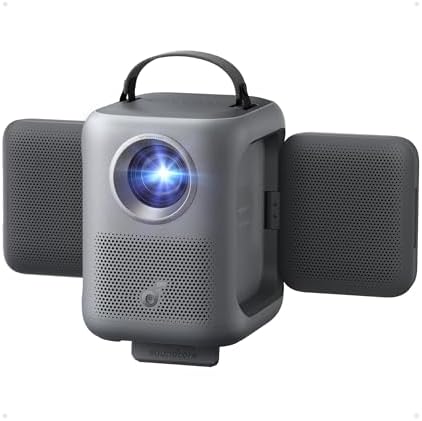
The P1i balances portability with a brighter listed output than the Capsule 3. It displays a 1080p Full HD image at 380 ANSI lumens and has built-in Google TV, so compatible streaming apps can be accessed without an extra streaming device. Initial Google TV access requires an internet connection and Google account.
Its two 10W Dolby Audio speakers can rotate to direct sound toward your seating area. This can be useful when you move the projector between rooms or place it on a shelf rather than directly in front of the screen. The projector measures 8.9 by 8 by 7.2 inches and weighs 7.3 pounds, making it movable but less convenient to carry around than the Capsule 3.
Autofocus, auto keystone correction, obstacle avoidance, and screen fit help simplify setup. The product description also highlights an all-glass lens and sealed optical engine. No battery runtime is specified in the supplied information, so plan on having power nearby rather than assuming it can run untethered.
Pros:
- 1080p resolution and 380 ANSI lumens
- Google TV provides built-in access to streaming apps
- Rotating speakers let you direct audio toward your seating area
- Automatic focus and image adjustments support quick setup
Cons:
- At 7.3 pounds, it is not as easy to carry as the Capsule 3
- The supplied information does not list battery life
Verdict: Pick the P1i if you want a portable 1080p projector with built-in streaming and flexible speakers, and you have a nearby power outlet.
NEBULA X1S: A Bright 4K Projector with Optical Zoom

The X1S is the most high-output option in this group, with a 4K RGB triple-laser engine and a listed peak output of 6,000 ANSI lumens in Peak Output Mode. Its description notes that Vivid Mode is intended for optimal color accuracy. It also supports Dolby Vision and Google TV, including the official Netflix app.
For apartment use, the 1.67× optical zoom is especially useful. It lets you change image size without moving the projector, which can help when furniture or room layout limits placement. AI Spatial Adaptation and Spatial Recall are designed to adjust and save room-specific image settings. The built-in 40W speakers with Dolby Audio may also reduce the need to add separate speakers.
This model’s high brightness and 4K features are appealing if you watch in a room that is not fully dark or want a more permanent setup. However, the supplied information does not give its dimensions or weight, so check those details before choosing a shelf or planning to move it often. Its peak-output brightness should not be treated as the only picture mode; the product description distinguishes it from the color-focused Vivid Mode.
Pros:
- 4K triple-laser picture with a stated peak output of 6,000 ANSI lumens
- Optical zoom changes image size without moving the projector
- Google TV includes the official Netflix app
- Built-in 40W speakers and Dolby Audio
Cons:
- Peak-output brightness is tied to Peak Output Mode
- Dimensions and weight are not listed in the supplied product information
Verdict: Choose the X1S if you want a feature-rich 4K projector and can confirm that its size and placement work in your apartment.
NEBULA Cosmos 4K SE: A 4K Option for a Dedicated Viewing Space

The Cosmos 4K SE is a smart projector for viewers who want a large image and built-in streaming. It offers 4K visuals, Dolby Vision, Google TV, and a stated brightness of 1,800 ANSI lumens. Its HybridBeam light source combines LED and laser technology, and the listed maximum screen size is 200 inches.
For an apartment, the 200-inch maximum is best viewed as a capability, not a recommended everyday size. Measure your wall and viewing distance before choosing a screen size. Automatic focus, keystone correction, obstacle avoidance, screen fit, and adjustments for wall color and ambient light can help with setup, but a suitable projection surface and room layout still matter.
The supplied product data marks this model as unavailable. It also notes that a refurbished product may have scratches that do not affect normal use. Check the listing’s availability and condition details before purchasing. Compared with the Capsule 3 and P1i, this is a less portable choice; compared with the X1S, its listed brightness is lower.
Pros:
- 4K resolution with Dolby Vision
- Google TV includes Netflix in 4K
- 1,800 ANSI lumens and a listed maximum image size of 200 inches
- Automatic setup includes wall-color and ambient-light adaptation
Cons:
- A very large image may not fit typical apartment rooms
- The supplied product data marks it unavailable and notes possible cosmetic scratches on refurbished units
Verdict: Consider the Cosmos 4K SE if you have room for a larger projection setup and confirm the listing’s availability and product condition first.
How to Choose a Nebula Projector for an Apartment
Match brightness to your room
Brightness affects how well an image holds up when there is light in the room. If you can close curtains and switch off lamps, a lower-brightness portable model may suit your setup. If you expect to watch with some ambient light, compare the listed ANSI lumen figures. The Capsule 3 lists 200 lumens, while the P1i lists 380 ANSI lumens; these figures use different wording in the product data, so do not assume they are directly comparable. The X1S lists 6,000 ANSI lumens in Peak Output Mode, and its description identifies Vivid Mode as the option for optimal color accuracy.
Measure the wall and viewing distance
Before buying, measure the width of the wall or screen area and the distance from the likely projector position. A projector’s maximum supported image size does not mean that size will work well in your room. Check the product listing for its throw distance and placement guidance, since those details are not included for every model here. Optical zoom, as on the X1S, can help adjust image size without moving the projector.
Decide whether you need a battery or a fixed setup
The Capsule 3 lists up to 2.5 hours of video playback under eco mode, which can make it convenient to move around without plugging in during a short viewing session. The P1i is also portable, but its supplied information does not specify battery life. For the larger 4K models, consider where the projector will sit and whether you can keep it connected to power. Portability is most valuable if you plan to move the unit often.
Consider sound and shared walls
Built-in speakers can simplify a small setup by avoiding extra equipment. The P1i has two 10W speakers that can be repositioned, while the X1S lists built-in 40W speakers. The X1 Pro includes a much larger wireless 7.1.4 Dolby Atmos system. In an apartment, think about your neighbors and how much equipment you want to store, not only how immersive the sound might be.
Check streaming needs and setup features
Google TV is included on all five models in this selection, though setup and app access may require an internet connection and account. The Capsule 3 is Netflix-certified, and the Cosmos 4K SE and X1S descriptions specify Netflix access through Google TV. Autofocus, keystone correction, screen fit, and obstacle avoidance can save time when you set up, especially if the projector does not stay in one place. They help adjust the picture, but they do not replace careful placement.
Plan for storage and room layout
Apartment space is limited, so consider the projector, screen, power connection, and any extra sound equipment as one setup. A portable model can be stored when not in use, while the X1 Pro’s inflatable screen and audio system need room of their own. For larger models, confirm the dimensions and weight in the listing before choosing a shelf or deciding how often you will move the projector.
Frequently Asked Questions
Which Nebula projector is easiest to move around an apartment?
The Capsule 3 is the most portable option in this group and includes a battery rated for up to 2.5 hours of video playback under eco mode. The P1i is also described as portable, but it weighs 7.3 pounds and the supplied product information does not list battery runtime.
Which model is best for a small, dark room?
The Capsule 3 is a reasonable fit if you value a compact, battery-powered design and can dim the room. Its listed brightness is 200 lumens, so it is less suited to viewing with substantial ambient light.
Do I need a screen, or can I project onto a wall?
A suitable plain wall can work as a projection surface, but the product data does not specify that a screen is required for most of these models. The X1 Pro is supplied with a 200-inch inflatable screen. In either case, check that your wall or screen has enough clear space for the image size you want.
Which projector has the brightest listed output?
The X1S lists up to 6,000 ANSI lumens in Peak Output Mode. Its product description says Vivid Mode is intended for optimal color accuracy, so consider the mode and room conditions rather than choosing based on the peak figure alone.
Which models include Google TV?
All five projectors in this selection list Google TV. The P1i description says an internet connection and Google account are required for initial setup and access.
Are the X1 Pro and Cosmos 4K SE currently available?
The supplied product data marks both models as unavailable. Availability can change, so check the product listings before making plans to buy either one.
Final Recommendation
For most apartment dwellers who want a flexible setup, the NEBULA Capsule 3 is the simplest pick when portability and battery operation matter most. Choose the soundcore Nebula P1i if you prefer a brighter listed 1080p model with adjustable built-in speakers and do not need battery operation. If you want a more advanced 4K setup, the X1S offers optical zoom and extensive features, but first confirm that its placement and size suit your room. The X1 Pro and Cosmos 4K SE are better considered only when their larger-screen setups match your available space and the listings show they can be purchased.