
Field production puts a premium on clean connections, dependable power, and a setup that fits your crew’s workflow. The mixers below range from a battery-powered, two-channel interface to compact consoles with several inputs, but they are not all dedicated broadcast field mixers. Check the input types, power needs, and recording path against your microphones and cameras before choosing.
| Product | Inputs and standout features | Best fit |
|---|---|---|
| JOYO MOMIX PRO Portable Audio Mixer | Two combo inputs, 48V phantom power, rechargeable battery, dual OTG | Small mobile setups and phone-based streaming |
| SIKUING 6-Channel DJ Audio Mixer | Six channels, USB audio interface, Bluetooth, DSP effects | Multi-source setups with access to external power |
| Maker Hart LOOP MIXER | Five stereo 3.5 mm inputs, three outputs, individual level controls | Mixing line-level sources and playback devices |
| Depusheng 4-Channel USB Interface Mixer | Two XLR/line combo inputs, stereo inputs, USB interface | Compact setups that need mic and playback connections |
| Kmise 6-Channel Audio Mixer | Four mic/line inputs, phantom power, USB playback and recording | Small productions with several microphones |
Our Picks: Best Portable Broadcast Audio Mixers For Field Production reviews
1. JOYO MOMIX PRO: A battery-powered pick for compact mobile setups

The JOYO MOMIX PRO is a small, rechargeable audio interface aimed at live streaming, podcasting, and recording. Its two combo XLR/6.35 mm inputs accept microphones or instruments, and its 48V phantom power supports condenser microphones. For a field setup built around a small crew and a limited number of sources, that combination is more relevant than a large bank of effects.
Its built-in battery is rated for up to four to five hours of continuous use, and the unit charges through USB-C. Two OTG ports are designed for connecting two phones, which can be useful if you stream from one device while playing audio from another. A stereo instrument input, separate headphone outputs, direct monitoring, and a main output add flexibility for small recording or performance setups.
The compact size and battery power are its clearest advantages for working away from an outlet. However, this is not a full broadcast console: it has only two combo mic/instrument inputs, and the supplied information does not describe a dedicated multitrack field-recording workflow. The built-in reverb is applied to the first two channels, so keep effects and signal routing in mind if you need a dry, controlled production mix.
Pros:
- Rechargeable battery for use away from mains power
- Two combo inputs with 48V phantom power
- Dual OTG ports for a two-phone streaming setup
- Direct monitoring and two headphone outputs
Cons:
- Limited to two combo mic/instrument inputs
- Its feature set is geared more toward streaming and compact recording than larger broadcast crews
Verdict: Choose the JOYO if you need a genuinely compact, battery-powered mixer for a small number of sources; look elsewhere if your field production needs several microphone inputs or a more extensive recording workflow.
2. SIKUING 6-Channel Mixer: More connections for multi-source setups

This SIKUING console offers six channels: four mono channels and two stereo channels. It is designed to accept a mix of microphones, instruments, phones, and computers. A USB audio interface supports connection to a PC or Mac, while Bluetooth can bring in audio wirelessly from a phone or tablet.
The onboard 7-band graphic equalizer and collection of DSP effects provide options for shaping and adding effects to a mix. The product description also lists 48V phantom power capability, though it does not clearly spell out the channel-by-channel routing. Confirm that its phantom-power arrangement suits your microphones before relying on it in a production setup.
The metal chassis is described as lightweight and portable, but the supplied information lists a power supply rather than a built-in battery. That makes it better suited to a field location with access to power, or to a setup where you have confirmed a compatible power solution. Its six channels give you more connection options than the JOYO, but effects and Bluetooth are not substitutes for the routing, recording, or battery features of a purpose-built field mixer.
Pros:
- Six channels for a wider range of connected sources
- USB audio interface for connection to a computer
- Bluetooth playback from a phone or tablet
- Graphic EQ and built-in DSP effects
Cons:
- No built-in battery is listed
- Phantom-power channel details are not fully specified in the product description
Verdict: Consider this mixer when you need several input channels and can plan around its external power supply; it is a less natural choice for remote work where a built-in battery is essential.
3. Maker Hart LOOP MIXER: Simple stereo mixing for playback sources

The Maker Hart LOOP MIXER takes a different approach from the other options here. It combines up to five stereo sources through 3.5 mm connections and provides three outputs: headphones, speakers, and a recording output. Per-input controls for balance, gain, and volume, along with a master volume control, make it useful for combining playback devices or other line-level sources.
The included adapter combines two mono 6.35 mm inputs into one stereo 3.5 mm plug. The mixer can also connect to other LOOP units through a separately sold LOOP BUS cable. Its listed gain adjustment can boost an input signal, but the product description specifically says it does not provide power for a microphone and cannot be used with a USB or condenser microphone.
That limitation matters for field production: the LOOP MIXER is not a suitable direct choice for connecting common XLR broadcast microphones, and it does not list phantom power. It also uses a 9V AC adapter, with no built-in battery mentioned. Think of it as a handy hub for stereo playback and line-level sources—not as a replacement for a microphone mixer or a battery-powered location recorder.
Pros:
- Five stereo inputs for combining multiple playback sources
- Three outputs for headphones, speakers, and recording
- Separate input controls and a master volume control
- Can connect with other LOOP units using a separate bus cable
Cons:
- Does not power microphones or support USB and condenser microphones
- Uses a 9V AC adapter, with no built-in battery listed
Verdict: Pick the LOOP MIXER for a compact line-level playback rig; skip it if you need to plug in powered condenser microphones or standard XLR mics.
4. Depusheng 4-Channel Mixer: A compact option with XLR and stereo inputs
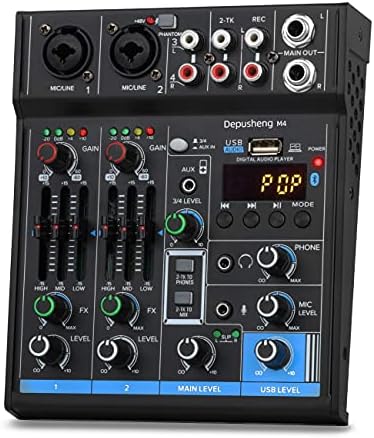
This four-channel Depusheng mixer combines two XLR/line combo inputs with a pair of 1/4-inch stereo inputs and a pair of RCA stereo inputs. It also lists RCA and 1/4-inch main outputs, a headphone jack, and a built-in USB audio interface for connecting to a computer. That mix of connections can help when a small production needs microphone inputs alongside playback or other stereo sources.
The product description says the unit can run from an adapter or USB power, which offers some flexibility for a compact setup. It also includes Bluetooth streaming and delay and repeat effects. The stated Bluetooth operating range is short, so wired playback may be a more practical plan when the source device will sit farther away.
Although the description calls this mixer suitable for travel and small venues, it does not list a built-in battery. It also does not specify 48V phantom power, so do not assume it can power a condenser microphone. The listing’s availability can change, so check the product page before planning around this model.
Pros:
- Two XLR/line combo inputs plus stereo input options
- USB audio interface for computer recording
- USB or adapter power is listed
- Provides both RCA and 1/4-inch main outputs
Cons:
- No built-in battery or phantom power is specified
- Bluetooth range is listed as only 1.5 feet
Verdict: This is worth considering for a compact, computer-connected setup with dynamic mics and stereo sources, but verify microphone power needs and the product’s current availability before buying.
5. Kmise 6-Channel Mixer: Multiple mic inputs with USB playback and recording

The Kmise mixer has four mono mic/line inputs and one stereo input, with 48V phantom power listed for condenser microphones. It also offers a two-band EQ and built-in effects. Compared with the JOYO, it gives you more mic/line inputs; compared with the Maker Hart, it is designed for microphone connections rather than only 3.5 mm stereo sources.
Its USB features cover several jobs. The mixer can play audio from a USB drive, connect wirelessly to a phone through Bluetooth, and record to a computer or external USB storage. The product description notes that recording to a computer requires a noise-filter cable, which is not included. That extra requirement is important if you want to use it as part of a computer-based field workflow.
The listing describes this as a portable console but does not specify a built-in battery, its weight, or a dedicated carrying design. Treat it as a small mixer that may be moved between locations, not as a confirmed battery-powered field unit. Its number of mic/line inputs and phantom power make it more suited to a multi-microphone setup than the small JOYO, provided you can meet its power and recording needs.
Pros:
- Four mic/line mono inputs and a stereo input
- 48V phantom power is listed
- USB playback and recording features, plus Bluetooth input
- Two-band EQ and built-in sound effects
Cons:
- No built-in battery is specified
- A noise-filter cable is required for computer recording and is not included
Verdict: Choose the Kmise when you need several microphone inputs and USB playback or recording; for remote work, first confirm your power plan and the required computer cable.
How to Choose a Portable Mixer for Field Production
Match the inputs to your microphones and sources
Start by counting the sources you need to mix at the same time. If you have two microphones, a compact two-input unit may be enough. A panel discussion, small band, or multi-person shoot may call for more mic/line inputs. Check the connector type as well: an XLR/line combo input, a 3.5 mm stereo input, and an RCA input serve different setups. Make sure you have the right inputs before considering effects or wireless features.
Check phantom power requirements
Some condenser microphones need 48V phantom power, while other microphones do not. Confirm the mixer supports the power your microphone requires, and check which inputs receive phantom power if the product information explains it. Do not assume a mixer can power a condenser mic just because it accepts an XLR connector. The LOOP MIXER, for example, specifically says it does not supply microphone power.
Plan for power away from the studio
A mixer’s portability depends on more than its size. For an outdoor shoot or a location without convenient outlets, a built-in rechargeable battery can simplify the setup. If a product lists an adapter or power supply but no battery, plan for a suitable power source and confirm compatibility before taking it on location. Also consider battery runtime and charging time when those details are provided.
Confirm how audio gets to your recording device
A mixer may blend audio without recording it, or it may connect to a computer as a USB audio interface. Those are different jobs. Check whether you need a computer, phone, camera, USB drive, or separate recorder, then confirm the mixer’s outputs and recording options match. Look for any required cables or adapters, too; the Kmise product description, for example, calls for a noise-filter cable for computer recording and says it is not included.
Consider monitoring and output connections
Being able to hear the mix while you work can help you catch an unbalanced source or unwanted noise. Check for a headphone output, direct monitoring, and the number and type of outputs you need. If you must feed speakers, a camera, or another mixer, verify that the listed main outputs support your intended connections. A headphone jack alone does not cover every monitoring or delivery need.
Keep effects and wireless features in perspective
EQ, reverb, and other effects can be useful, but they should not distract from input quality, power, monitoring, and recording compatibility. Bluetooth can make playback convenient, but its stated range and connection needs matter on location. For a production where a stable signal path is important, plan around the wired inputs and outputs you can verify.
Think about the full field kit, not just the mixer
Include microphones, cables, adapters, headphones, power supplies, and recording devices in your setup plan. A compact mixer may still need several accessories to work with your gear. Before buying, map each source to an input and each destination to an output, then check what power the whole system needs. This simple check can reveal connection gaps before shoot day.
Frequently Asked Questions
What is the best mixer here for use away from an outlet?
The JOYO MOMIX PRO is the only option in this selection that clearly lists a built-in rechargeable battery. Its product description gives an estimated four to five hours of continuous use per charge. The other products do not specify a built-in battery.
Which of these mixers can power a condenser microphone?
The JOYO MOMIX PRO and Kmise mixer list 48V phantom power. The SIKUING description also mentions phantom power capability, but does not clearly detail which channels it applies to. Confirm the exact setup on the product page before connecting your microphone.
Which option has the most microphone inputs?
The Kmise lists four mic/line mono inputs. The SIKUING has four mono channels plus two stereo channels, but its product description does not fully explain the input arrangement for each source type. Check the connection details if you need several microphones at once.
Is the Maker Hart LOOP MIXER suitable for XLR broadcast microphones?
It is not described as an XLR microphone mixer. It uses 3.5 mm inputs, and its product information says it does not power microphones or support USB and condenser microphones. It is better suited to stereo playback and line-level sources.
Do these mixers record directly to a camera?
The supplied product details do not confirm direct camera recording for every model. Check the output type on the mixer and the input type on your camera, and confirm whether you need an adapter. Some models list computer or USB recording features, which are not the same as a direct camera connection.
Are these dedicated broadcast field mixers?
They are compact audio mixers or interfaces aimed at uses such as streaming, podcasting, music, and small performances. The supplied information does not establish that any is a dedicated broadcast field recorder with a full professional location-production workflow. Match each model’s inputs, power, monitoring, and recording path to your actual needs.
Final Recommendation
For a small mobile setup where battery operation and two microphone or instrument inputs are enough, the JOYO MOMIX PRO is the clearest fit. If you need more mic inputs, the Kmise offers four mic/line channels and listed phantom power, but its power and computer-recording requirements need planning. For stereo playback sources, the Maker Hart LOOP MIXER has a more specific role, while the SIKUING and Depusheng models make more sense when their channel layouts and external power options suit your location. For any broadcast job, confirm the signal path and recording method before choosing a mixer.