
Portable receipt printers can help you hand customers a paper receipt at a food truck, market stall, or service call without relying on a fixed checkout counter. The key is matching the printer to your phone or point-of-sale (POS) app: Bluetooth alone does not guarantee compatibility. These five options vary in paper width, connection type, battery details, and supported software, so check those details before you buy.
Quick Comparison
| Printer | Paper width | Connection and compatibility notes | Best suited for |
|---|---|---|---|
| Rongta Portable 80mm POS Printer | 80mm; also supports 58mm | Bluetooth and USB; ELabel app and ESC/POS software; not Square compatible | Android or computer-based setups that need wider receipts |
| Sunydog 58mm Thermal Printer | 58mm | Bluetooth and USB; Android and Windows; not Square compatible | Compact mobile setups using a compatible app |
| GZGYNADAST 80mm Portable Receipt Printer | 80mm | Bluetooth; listed Android apps include Loyverse and iReap; not for iPhone, iPad, or Mac | Android users who need a rechargeable, wider-paper option |
| SHUAIGUO 58mm Mini Receipt Printer | 58mm; 48mm valid print width | Bluetooth and USB; Android and specified Windows versions; not Square compatible | Android users who want a small printer with stated speed and resolution |
| GZGYNADAST 58mm Bluetooth Receipt Printer | 58mm | Bluetooth; Android and Windows; broad app list, with several major POS exclusions | Android users whose POS app is on the supported list |
Our Picks: Best Portable Receipt Printers For Mobile Pos reviews
Rongta Portable 80mm POS Printer: Flexible Paper Width and USB

The Rongta is a compact thermal printer that supports both 80mm and 58mm receipt paper. Its 203 dpi resolution and ESC/POS instruction set make it a possible fit for compatible POS software, while USB and Bluetooth offer two ways to connect. The product information also directs phone users to the ELabel app and says computer drivers are included on a CD.
The wider paper option can be useful when you need more room for item details or a longer receipt. The printer’s small, non-slip design is intended for mobile printing in places such as restaurants, bookstores, and warehouses. However, the listed details do not specify a rechargeable battery, so confirm how it will be powered before treating it as a fully cordless option.
Compatibility is the main limitation. The listing explicitly says it does not support Square, Chromebook, Uber Eats, or Clover POS. Check that your phone, operating system, and chosen app work with the printer before ordering.
Pros:
- Supports both 80mm and 58mm thermal paper
- Offers Bluetooth and USB connections
- Uses 203 dpi printing and the ESC/POS instruction set
- Compact design with a power indicator light
Cons:
- Not compatible with Square, Clover POS, Chromebook, or Uber Eats
- Battery details are not stated in the supplied product information
Verdict: Choose the Rongta if you need the option of wider receipts and your app supports its connection method; look elsewhere if Square compatibility or built-in battery operation is essential.
Sunydog 58mm Thermal Printer: A Compact Android and Windows Option

This Sunydog model prints on 58mm thermal paper and connects by Bluetooth or USB. Its stated resolution is 203 dpi, and the listed maximum print speed is 70mm per second. A built-in 1500mAh rechargeable battery is intended to support printing away from a power outlet.
For phone use, the maker lists apps such as Loyverse, iREAP, CasierStock, and Kyte. Computer users can connect by USB and install the printer driver. The thermal printing system needs paper but no ink, toner, or ribbon, which keeps the supply setup simple.
The trade-off is that compatibility depends on both your device and POS app. Square is specifically listed as unsupported, and the supplied details do not establish broad compatibility with every phone operating system. Confirm support with your POS provider before buying.
Pros:
- Bluetooth and USB connection options
- Rechargeable 1500mAh battery for mobile printing
- Stated 70mm-per-second speed and 203 dpi resolution
- Uses thermal paper rather than ink or toner
Cons:
- Does not support Square POS
- Phone use requires a compatible app and device
Verdict: The Sunydog is a sensible compact choice if your setup uses a listed app on Android or a compatible Windows computer and 58mm receipts are sufficient.
GZGYNADAST 80mm Portable Printer: Rechargeable Printing for Android

This portable thermal printer is designed for 80mm receipts and has a built-in rechargeable battery for use away from an outlet. Its Bluetooth connection is aimed at mobile printing, with the supplied information listing Android apps such as Utak, Loyverse, iReap, CashSale POS, and RawBT. A USB drive is included with a driver, SDK, video, and user manual.
The wider format may suit food trucks, market stalls, delivery work, and other settings where you need to print away from a fixed register. The product information says it requires thermal paper rather than ink, toner, or ribbon. It also instructs buyers to remove insulating material from the battery before first use.
This is a narrow-fit choice: the supplied compatibility notes say it does not work with iPhone, iPad, or Mac, and list several unsupported services, including Square, Clover, Uber Eats, DoorDash, and Shopify. The product data also marks this listing as unavailable, so check its Amazon page before planning around it.
Pros:
- 80mm paper width for wider receipts
- Rechargeable battery and Bluetooth connection
- Includes a USB drive with setup resources
- Lists several Android POS and printing apps
Cons:
- Not compatible with iPhone, iPad, Mac, Square, or several named services
- Listing is marked unavailable in the supplied product data
Verdict: Consider this printer only if you use a supported Android app and can confirm the listing is available; its 80mm format and battery are appealing, but its exclusions are extensive.
SHUAIGUO 58mm Mini Printer: Stated Speed and Resolution
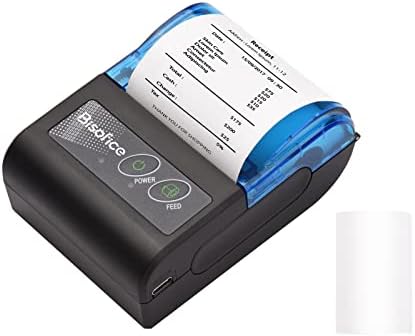
The SHUAIGUO is a small thermal printer for 58mm paper, with a stated valid print width of 48mm. The listed specifications include 203 dpi resolution and a maximum speed of 70mm per second. Bluetooth and USB connections give you a wireless option for a phone and a wired option for a computer.
A 1500mAh rechargeable battery is built in, and the printer uses thermal paper without ink cartridges or ribbons. The supplied app suggestions include Loyverse, iREAP, CasierStock, and Kyte. The listing says the printer works with Android and identifies Windows 7, 8, and 10 for its driver.
It is not a fit for every mobile POS system: Square is explicitly unsupported, and the listing says iOS is not recommended. The supplied product data also marks this listing as unavailable, so check the listing for current availability before choosing it.
Pros:
- Bluetooth and USB connectivity
- Rechargeable 1500mAh battery
- Stated 70mm-per-second speed and 203 dpi resolution
- Lists several compatible retail and inventory apps
Cons:
- Does not support Square and is not recommended for iOS
- Listing is marked unavailable in the supplied product data
Verdict: If the listing is available, this model is worth considering for an Android setup that needs a rechargeable 58mm printer and uses one of the listed apps.
GZGYNADAST 58mm Bluetooth Printer: Long Standby Claim and Broad App List

This 58mm thermal receipt printer is designed for Android and Windows, with Bluetooth printing and a built-in 2000mAh rechargeable battery. The maker states up to seven days of standby time; that is a standby claim, not a promise of seven days of continuous printing. It also describes automatic sleep and wake functions.
The listed app options include Android versions of Loyverse, iReap, Kyte, CasierStock, and PayPal, among others. The printer uses 58-by-30mm thermal paper and does not need ink, toner, or a ribbon. Its stated compatibility with Android commands includes ESC/POS and STAR, but you should still confirm that your particular app supports the printer.
The list of exclusions is important. The product is not for iOS, iPad, or Mac, and it does not support Square, Clover, Shopify, Uber Eats, DoorDash, Grubhub, and several other named systems. The maker advises checking with your POS provider before purchase.
Pros:
- 2000mAh rechargeable battery with a stated standby time of up to seven days
- Bluetooth connection for mobile printing
- Lists many Android-compatible apps
- Thermal printing avoids ink, toner, and ribbon supplies
Cons:
- Not compatible with iOS, iPad, Mac, Square, Clover, or Shopify
- Requires 58-by-30mm thermal paper and a compatible app
Verdict: This is a useful candidate for Android businesses whose POS app is confirmed compatible, but its long exclusion list makes a compatibility check essential.
How to Choose a Portable Receipt Printer for Mobile POS
Check POS App and Device Compatibility First
Start with the POS app you already use, then check the printer’s supported operating systems and connection method. A printer may offer Bluetooth but still fail to work with a particular app. Confirm compatibility with the app provider as well as the printer listing. This is especially important if you use Square, Clover, or a delivery platform, since several printers here name those services as unsupported.
Choose a Paper Width That Fits Your Receipts
Most of these models use 58mm paper, while the Rongta supports both 58mm and 80mm and the GZGYNADAST portable model is specified for 80mm. Wider paper can provide more room for longer receipts or item details, but the rolls may take up more space. Check the printer’s supported paper size and roll dimensions before ordering supplies.
Decide Whether You Need Battery Power
A built-in rechargeable battery is useful when you print at a stall, from a vehicle, or anywhere without easy access to an outlet. The Sunydog, SHUAIGUO, and both GZGYNADAST models list rechargeable batteries. Battery details are not included for the Rongta, so ask how it is powered if cordless operation matters to you. Treat standby claims separately from expected printing time.
Compare Bluetooth and USB Setup
Bluetooth can make phone printing more convenient, while USB can be a useful wired connection for a computer or a stable work area. Some printers require a specific mobile app, and computer use may require a driver. Before buying, check whether your device has the needed connection, whether the app is available for your operating system, and whether setup instructions or drivers are included.
Understand Thermal Paper and Ongoing Supplies
These printers use direct thermal printing, so they do not require ink cartridges or ribbons. You will still need the correct thermal paper, and width or roll-size limits can vary by model. Confirm the paper specification before buying in bulk. Thermal receipts are also different from standard inkjet or laser printouts, so make sure this format meets your business needs.
Look Beyond Portability to Print Details
Portability is only one part of the decision. A stated resolution such as 203 dpi and a specified print speed can help you compare models, but those numbers do not guarantee that every app will print at its maximum speed. Consider the usable print width, paper size, supported software, and how the printer will be powered as a complete setup.
Frequently Asked Questions
Will these portable printers work with Square?
The product details explicitly say that the Rongta, Sunydog, SHUAIGUO, and both GZGYNADAST listings do not support Square. If Square is central to your business, check with Square and the printer maker for a compatible model before purchasing.
Can I use these printers with an iPhone or iPad?
Compatibility varies, but the GZGYNADAST 80mm model says it is not compatible with iPhone or iPad, the 58mm GZGYNADAST model is listed for Android and Windows rather than iOS, and the SHUAIGUO listing says iOS is not recommended. Check the exact printer and app requirements before buying for an Apple device.
Do portable thermal receipt printers need ink?
No. These models use thermal paper and a thermal print head, so they do not need ink, toner, or ribbons. You will need paper that matches the printer’s stated width and roll size.
What is the difference between 58mm and 80mm paper?
Paper width affects how much space is available across a receipt. An 80mm roll can provide a wider print area, while a 58mm printer takes narrower rolls. Check both the supported paper width and the printer’s actual valid print width, which can be smaller than the roll width.
Can I connect a portable receipt printer to a computer?
Some models offer USB connections and computer drivers. The Rongta, Sunydog, SHUAIGUO, and 58mm GZGYNADAST product details mention computer or Windows support, but supported systems vary. Confirm the driver works with your computer’s operating system before ordering.
Are these printers suitable for printing away from an outlet?
Several models list rechargeable batteries, including the Sunydog, SHUAIGUO, and both GZGYNADAST printers. The supplied Rongta details do not specify a battery. Check the product listing for battery and charging details, and remember that standby time is not the same as continuous printing time.
Final Recommendation
For a mobile POS setup, choose based on app compatibility first and paper width second. The Sunydog is a straightforward 58mm option with Bluetooth, USB, and a listed rechargeable battery, while the Rongta stands out for supporting both 58mm and 80mm paper but has important POS exclusions and unclear battery details. The other models may suit specific Android setups, but their compatibility limits—and, for two listings, availability status in the supplied product data—make it especially important to verify the listing before you buy.