
If you want deeper bass without giving up accurate sound, a studio monitor pair with a subwoofer is one of the most practical setups you can build. The speakers handle the midrange and highs where detail matters most, and the subwoofer takes care of the low end that small drivers struggle to reproduce. Whether you are producing music, editing video, gaming, or watching movies, the right combination can make a noticeable difference. This guide compares five options, explains what each one does well, points out where each might fall short, and helps you decide which setup fits your room, your budget, and your listening habits.
| Product | Driver Size | Subwoofer Included? | Best For |
|---|---|---|---|
| Audiosavings Bundle: Mackie CR3.5 Monitors with Mackie CR8SBT Subwoofer | 3.5″ monitors, 8″ subwoofer | Yes | Complete 2.1 setup with Bluetooth streaming |
| JBL 305P MkII 5″ 2-Way Active Powered Studio Reference Monitors | 5″ woofer | No (sold separately) | Accurate mixing in treated or semi-treated rooms |
| PreSonus Eris E4.5 2-Way 4.5″ Near Field Studio Monitor (Pair) | 4.5″ woofer | No (Eris Sub 8BT sold separately) | Desktop setups that need a clear, balanced sound |
| Ortizan C7 Powered Studio Monitors Pair with Bluetooth 5.3 | 3.5″ mid-bass driver | No | Compact home studios and small desks |
| ULTIMEA 3-Way Powered Bookshelf Speakers with Smart App Control, BS-3 | 5.25″ woofer | No (SUB OUT for an external subwoofer) | Home theater and TV listening with room to expand |
Our Picks: Best Studio Monitor Speaker Pairs With Subwoofer reviews
Audiosavings Bundle: Mackie CR3.5 Monitors With CR8SBT Subwoofer for a Complete Desktop System

This bundle is the most complete option on the list because it includes everything you need in one box: a pair of Mackie CR3.5 powered monitors, a Mackie CR8SBT 8-inch powered subwoofer, and a 10-foot dual RCA cable made with copper. For many people, that takes most of the guesswork out of building a 2.1 system. You do not have to match speakers, check crossover compatibility, or hunt for the right cable. Everything is designed to work together from the start.
The CR3.5 monitors have 3.5-inch drivers and a tone control knob that lets you adjust bass and treble. You can run them in a flat, accurate mode for mixing, or boost the sound for casual listening. They also offer a desktop mode and a bookshelf mode, so you can tune the output to where they sit. The front-panel headphone jack is a useful touch. Plugging in headphones cuts the speaker output automatically, which is handy when you need quiet, private listening late at night.
The CR8SBT subwoofer uses an 8-inch polypropylene woofer and custom-tuned ports. Its crossover can be adjusted from 40Hz to 180Hz, which gives you control over where the subwoofer starts handling the low end. The included CRDV desktop remote lets you adjust the overall volume and subwoofer level without reaching behind your desk. The subwoofer also includes Bluetooth, so you can stream music wirelessly. This is a nice feature if you want to play audio from a phone without connecting a separate device.
In everyday desktop use, this kind of bundle works well for people who want their setup to feel finished right away. Some owners appreciate that the remote makes balancing the satellites and subwoofer easy during a listening session. A common point of interest is the adjustable crossover, since it lets you blend the subwoofer with the small monitors instead of letting the bass sound boomy or disconnected. Because the speakers are compact, they fit well on a desk or shelf, though the subwoofer will need its own floor space and might be noticeable in a small room.
The main drawback is that the bundle is listed as unavailable at the moment, so you may need to check back or look at the other options. Small monitors with a 3.5-inch driver also have limits at high volume. They are best for near-field listening rather than filling a large room with sound. If your space is big or you want very loud playback, you may want a larger monitor. Compared with the JBL and PreSonus options, this bundle is the easiest to set up but offers less driver size and fewer professional-level tuning controls.
Pros:
- Includes the monitors, subwoofer, and cable in one package, so there is no need to match parts
- The adjustable crossover from 40Hz to 180Hz helps blend the bass smoothly with the small speakers
- The desktop remote gives direct control over system volume and subwoofer level
- Bluetooth streaming on the subwoofer adds convenience for casual listening
Cons:
- The bundle is currently listed as unavailable, which may limit immediate purchase
- The 3.5-inch monitors are better suited to near-field listening than large rooms
Verdict: If you want a complete 2.1 desktop system with minimal setup, this bundle is an excellent choice when it is in stock. It is best for gamers, casual listeners, and home creators who want solid bass and simple controls. If you need the most precise monitoring for mixing, look at the larger professional monitors on this list.
JBL 305P MkII Studio Monitors: Accurate Sound for Serious Mixing

The JBL 305P MkII is a pair of 5-inch two-way powered studio monitors built for people who care about accuracy. It is designed for music production, podcasting, and video editing, where you need to hear exactly what is in your mix. The speakers use JBL’s patented Image Control Waveguide, which spreads the sound in a controlled way. This gives you a wide sweet spot, so you do not have to sit in one exact position to hear a balanced mix.
Each speaker uses a dual 41-watt Class-D amplifier. That power, combined with a 5-inch woofer and a Slip Stream port, gives the monitors enough punch for detailed work at comfortable listening levels. The Boundary EQ and HF Trim controls help you adapt the sound to your room. This matters a lot, because walls, desks, and corners can make bass sound too strong or too weak. Being able to adjust these settings is a practical advantage over speakers that offer no tuning at all.
The enclosure is made from MDF and feels solid on a desk. The speakers include XLR and TRS inputs, which makes them a good fit for audio interfaces and mixers. Because they are not sold with a subwoofer, you have to choose one separately. That gives you freedom to pick a subwoofer that suits your room, but it also means you need to confirm that the subwoofer has a line-level input that can connect to these monitors. The listing does not describe a dedicated subwoofer output, so plan your connections carefully before buying.
In everyday studio use, these monitors are well suited to people who want a neutral sound. Many owners appreciate the sense of clarity and the way they reveal small details in a mix. Some users note that the low end can be tightened with proper placement and the Boundary EQ setting, which is useful in smaller rooms. The main limitation is that bass extension from a 5-inch woofer will not match a dedicated subwoofer. If you want deep, cinematic low end for movies or gaming, you will need to add a sub.
Compared with the other options, the 305P MkII is the strongest choice for accurate monitoring. It is more demanding than a casual bundle, and it asks you to build your own subwoofer setup. Still, that flexibility is part of its appeal for people who already have a studio workflow in mind.
Pros:
- The Image Control Waveguide offers a wide listening sweet spot for mixing
- Boundary EQ and HF Trim help adjust the sound to different room types
- XLR and TRS inputs suit professional audio gear
- Dual 41-watt Class-D amplifiers provide enough power for detailed studio work
Cons:
- No subwoofer is included, so you must buy and connect one separately
- The listing does not describe a dedicated subwoofer output, which may complicate setup
Verdict: The JBL 305P MkII is a strong pick for producers, podcasters, and video editors who want honest, detailed sound. Choose it if accurate mixing is your top priority and you are willing to add a subwoofer that matches your room. If you want an all-in-one bass solution, the bundle on this list is a simpler option.
PreSonus Eris E4.5 Near Field Monitors: Balanced Desktop Sound With a Subwoofer Option

The PreSonus Eris E4.5 is a pair of 4.5-inch near-field studio monitors made for desktop music production, hi-fi listening, and multimedia work. Each speaker is powered by 25 watts of Class AB amplification, for a total of 50 watts. The woven-composite woofers are designed to give tight bass and clean midrange, and the 1-inch silk-dome tweeters are meant to produce a wide stereo image from different seating positions.
The tuning controls are one of the most useful parts of this design. You can adjust the high and low frequencies to suit your room, your ears, and where the speakers sit. This is helpful if you place them on a desk near a wall, or on a bookshelf, since those positions can add extra bass. The back panel has 1/4-inch TRS balanced inputs and RCA inputs, and the front panel has a 1/8-inch aux input for a phone. A front headphone output with a built-in amplifier makes it easy to switch to private listening.
For bass, PreSonus offers the Eris Sub 8BT as a companion subwoofer. It adds a 50-watt 8-inch sub with Bluetooth, which creates a 2.1 system. The subwoofer is listed as a separate purchase, so you should budget for it if you want the full setup. The monitors also include a power-saving mode that turns on after 40 minutes of idle time, which is a thoughtful detail for a desktop speaker that might sit on for long periods.
Owners of similar desktop monitors often praise the balance and how easy the speakers are to place. Some note that the tuning controls help them dial in a more natural sound in rooms that otherwise sound boomy or thin. The tradeoff is that the 4.5-inch woofers have limited low-end reach on their own, so the subwoofer is not optional if you want full, room-filling bass for movies or games.
Compared with the Mackie bundle, the Eris E4.5 gives you more flexibility and better connection options for a studio setup, but you pay for it with a more involved buying process. It also sits between the JBL and Ortizan options in terms of studio focus and compact size.
Pros:
- Front and rear tuning controls help adapt the sound to different desk and room setups
- Balanced TRS and RCA inputs work with both professional and consumer gear
- The Eris Sub 8BT companion subwoofer creates a clear 2.1 upgrade path
- A front headphone output with built-in amplification makes switching to headphones simple
Cons:
- The subwoofer is sold separately, so the full system costs more to assemble
- The 4.5-inch woofers need the subwoofer to deliver deep bass for movies and games
Verdict: The PreSonus Eris E4.5 is a well-rounded pick for desktop producers and listeners who want flexible tuning and balanced sound. Pair it with the Eris Sub 8BT if you want a complete 2.1 system. It is a good middle ground between casual and professional use.
Ortizan C7 Studio Monitors: Compact Bluetooth Speakers for Small Home Studios
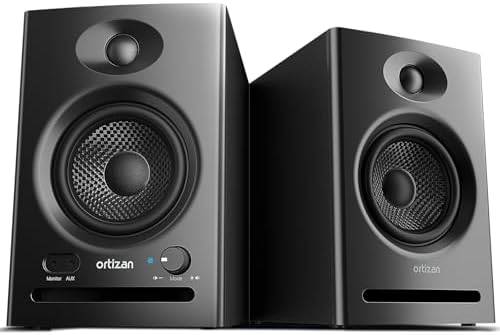
The Ortizan C7 is a compact pair of powered studio monitors with Bluetooth 5.3 and multiple inputs. Each speaker uses a 3.5-inch mid-bass driver paired with a 0.75-inch silk-dome tweeter. The design is aimed at small home studios, desks, and bookshelves, where space is limited and you want a clean, simple setup without a lot of gear.
The connection options are broad. The listing describes a 6.35mm TRS balanced input for mixers and instruments, two unbalanced AUX inputs, RCA connections, and a front headphone output. The built-in 24-bit DAC supports direct USB audio, which can reduce signal loss when you connect a computer. Bluetooth 5.3 makes it easy to pair a phone or tablet, which is convenient for casual listening between work sessions.
The speakers are tuned to deliver a flat response, which is a good goal for accurate monitoring. In practical use, that means you can hear your mix without extra coloring, although small drivers have limits. The listing does not mention a subwoofer output, and that is an important point if you want to add bass later. These monitors are best used as standalone speakers in a compact room. If you need a true subwoofer pairing, you should check the rear connections or choose a different model.
Some buyers appreciate how easily the speakers fit into small spaces and how quick Bluetooth pairing is. Others find that the compact drivers are best for voice work, guitar practice, and everyday listening, rather than deep bass. That makes this pair a good choice for creators who need clear midrange detail more than heavy low end.
Compared with the PreSonus and JBL options, the Ortizan C7 is less expensive to fit into a tight room but gives you less bass extension and fewer tuning controls. It also lacks a documented subwoofer output, which sets it apart from the ULTIMEA BS-3 on this list.
Pros:
- Compact size suits small desks and home studios with limited space
- Bluetooth 5.3 and multiple inputs make it easy to connect many devices
- A 24-bit USB DAC supports direct digital connection to a computer
- TRS balanced input works with mixers and electric instruments
Cons:
- The listing does not describe a subwoofer output, which limits bass expansion
Verdict: The Ortizan C7 is a practical choice for small home studios and desktop listening where space and connectivity matter most. If you need a subwoofer pairing, choose the ULTIMEA BS-3 or the Mackie bundle instead. For compact, accurate midrange sound, the C7 is a sensible option.
ULTIMEA BS-3 3-Way Bookshelf Speakers: Expandable Sound With a Dedicated Subwoofer Output

The ULTIMEA BS-3 is a powered three-way bookshelf speaker system with a 5.25-inch woofer, a dedicated midrange driver, and a tweeter. It is more of a home entertainment speaker than a strict studio monitor, but it fits well into a setup where you want room-filling sound with a subwoofer for extra bass. Its most important feature for this topic is the dedicated SUB OUT port, which lets you add an external subwoofer for a full-range system.
The three-driver layout is a real strength. The midrange driver helps vocals and instruments stay clear, while the woofer handles bass without overpowering the rest of the sound. The Edge Horn design directs treble toward the listening area, which can improve clarity and keep details focused. The speakers are rated at 70 watts RMS, and the listing describes a 15mm long-excursion woofer with BassMX technology aimed at deeper low end than a typical bookshelf speaker of this size.
Connectivity is wide. The BS-3 offers HDMI ARC, optical, RCA, USB, and Bluetooth inputs, along with Auracast support. This makes it a flexible option for connecting a TV, a game console, or a computer. The Ultimea app lets you adjust EQ settings for movies, music, or gaming, which gives you more control than many basic speakers. For someone who wants an easy setup with a smart feel, that is a meaningful advantage.
In a living room or media room, these speakers can deliver strong midrange clarity and enough bass for everyday movies and music. Many owners appreciate the flexible connection options and how easily the speakers work with a TV. The main consideration is that this is a consumer-focused design. It does not offer the same flat, neutral monitoring that a professional studio pair provides, and its bass tuning is designed for entertainment rather than precise mixing. You will also need to buy a subwoofer separately if you want the full home theater effect.
Compared with the rest of the list, the BS-3 is the best choice for TV and home theater use and the strongest option for connecting an external subwoofer. It is less suited to detailed mixing than the JBL or PreSonus options, but it is much more versatile for everyday entertainment.
Pros:
- The dedicated SUB OUT port makes it easy to add a subwoofer for full-range sound
- The three-driver design helps separate vocals, instruments, and highs clearly
- HDMI ARC, optical, RCA, USB, and Bluetooth provide wide compatibility
- The Ultimea app offers EQ presets for movies, music, and gaming
Cons:
- It is designed for entertainment use, so it is less suited to precise studio mixing
- A subwoofer must be purchased separately to complete the system
Verdict: The ULTIMEA BS-3 is the best pick on this list for TV, movies, and general home entertainment with a subwoofer. Choose it if you want flexible inputs, a smart app, and a clear path to a 2.1 or full-range system. If your main goal is accurate studio monitoring, one of the studio-focused options above will serve you better.
How to Choose the Right Studio Monitor and Subwoofer Combination
Decide Whether You Need Studio Accuracy or Entertainment Sound
The first question to ask is what you plan to do with your system. Studio monitors are designed to reproduce sound as accurately as possible, with a flat or neutral response. This is important when you are mixing music, editing podcasts, or adjusting video audio, because you need to hear what is really in the recording. Entertainment speakers, by contrast, often add extra bass or sparkle to make movies and music feel bigger. Neither approach is wrong, but they serve different goals. If you mix audio for a living, lean toward accurate monitors like the JBL 305P MkII or PreSonus Eris E4.5. If you mostly watch shows and play games, a speaker with a subwoofer output and EQ presets, such as the ULTIMEA BS-3, may suit you better.
Match Driver Size to Your Room and Listening Distance
Driver size shapes how a speaker sounds, especially in the bass. Small drivers around 3.5 to 4.5 inches are excellent for near-field listening, where you sit close to the speakers at a desk. They produce clear detail but struggle to fill a large room with low frequencies. Larger drivers, such as the 5-inch woofer in the JBL or the 5.25-inch woofer in the ULTIMEA, can move more air and sound fuller at a distance. Think about how far you sit from your speakers and how big your room is. A small desk setup usually works well with compact monitors, while a living room may need a larger speaker paired with a subwoofer.
Understand How a Subwoofer Fills the Bass Gap
A subwoofer takes over the lowest frequencies so your main speakers can focus on midrange and highs. This division creates a cleaner, more balanced sound and reduces strain on small drivers. The key feature to look for is an adjustable crossover, which controls the point where the subwoofer hands off to the main speakers. The Mackie CR8SBT offers a crossover from 40Hz to 180Hz, which gives you good control. Without a well-set crossover, the bass can sound boomy, muddy, or disconnected from the rest of the music. Take time to set the crossover by ear, since the right point depends on your speakers and room.
Check Connections Before You Buy
Connections decide whether your gear will work together without extra adapters. Professional setups often use 1/4-inch TRS or XLR inputs, while consumer devices commonly use RCA or 3.5mm connectors. Make a list of the devices you plan to connect, such as an audio interface, computer, TV, or phone, and compare that list with the ports on each speaker. Also look for a dedicated subwoofer output or a line-level input on the subwoofer. The ULTIMEA BS-3 includes a SUB OUT port, which makes adding bass simple. Several other options do not describe a subwoofer output in their listings, so confirm the connection before you commit to a pairing.
Consider Room Placement and Acoustic Behavior
Where you place your speakers affects bass and clarity as much as the speakers themselves. Speakers placed close to walls or corners often produce more bass, which can be helpful in a small room but overwhelming in others. Many of the speakers on this list offer tuning controls, such as the JBL’s Boundary EQ and HF Trim or the PreSonus high and low frequency controls. These features let you correct the sound for your space. Keep the speakers at ear height and form a triangle with your listening position so that the left and right speakers are roughly equal distances from you. Small changes in placement can have a bigger effect than upgrading to a more expensive model.
Think About Connectivity and Everyday Convenience
Modern setups often rely on wireless features. Bluetooth is convenient for streaming music from a phone or tablet, and it can make a speaker feel more flexible. The Mackie CR8SBT, the Eris Sub 8BT, and the Ortizan C7 all include Bluetooth in some form, while the ULTIMEA BS-3 adds HDMI ARC and Auracast support for TV and multi-device use. Consider how you will use the system each day. If you switch between a computer, a phone, and a TV, choose a speaker that supports all three without constant rewiring. Convenience features like headphone outputs and remote controls can also make daily use smoother.
Balance Your Budget With Long-Term Plans
It can be tempting to buy only the speakers and add a subwoofer later, but a complete system often provides better value from the start. A bundle such as the Mackie package keeps the speakers and subwoofer matched and includes the necessary cable. Buying separately can give you more choice, as with the JBL or PreSonus options, but you will need to research compatibility and budget for the extra part. Think about where you want your setup to be in a year or two. If you expect to add more gear or upgrade your room, choose a system with clear expansion paths, such as a subwoofer output or companion sub.
Frequently Asked Questions
Do I really need a subwoofer with studio monitors?
You do not always need one, but a subwoofer can help a lot. Small studio monitors often reproduce midrange and highs well, yet they have limited bass extension. A subwoofer fills in the lowest frequencies, which can make music and movies feel fuller. If you mostly work with vocals, podcasts, or light listening, you may be happy without one. For music production with heavy bass or film work, a subwoofer is worth serious consideration.
What does a subwoofer crossover do?
A crossover sets the frequency where the subwoofer stops and the main speakers take over. If the crossover is too high, the subwoofer may sound exposed or boomy. If it is too low, you may lose bass depth or notice a gap in the sound. The Mackie CR8SBT offers an adjustable range from 40Hz to 180Hz, which makes it easier to blend the sub with small speakers. Adjust it while listening to familiar music until the bass sounds connected to the rest of the mix.
Can I use a studio monitor pair with a TV?
Yes, but it depends on the connections. Speakers with RCA or 3.5mm inputs are the easiest to connect to a TV. If the TV has an optical output, you may need a speaker with an optical input. The ULTIMEA BS-3 is the most TV-friendly option on this list because it includes HDMI ARC, optical, and RCA inputs. Studio-focused speakers can work with a TV, but they are usually better for desktop listening than for a living room setup.
Are powered studio monitors better than passive speakers?
Powered monitors include built-in amplifiers, so you do not need a separate amplifier. This makes setup simpler and often keeps the system compact. Passive speakers require an external amplifier, which adds cost and complexity. For most desktop setups and home studios, powered monitors are the more practical choice. All the speakers in this guide are powered, which makes them easier to set up and move between rooms.
What size speaker is best for a small desk?
Speakers with drivers around 3.5 to 4.5 inches usually suit a small desk well. They are easy to place near your computer and provide clear midrange detail at close range. The Mackie CR3.5, PreSonus Eris E4.5, and Ortizan C7 all fit this size range. If your desk is small but your room is larger, a compact speaker with a subwoofer may give you the best balance of detail and bass.
Do these speakers include the subwoofer?
Only the Audiosavings Bundle includes a subwoofer, which is the Mackie CR8SBT. The JBL 305P MkII, PreSonus Eris E4.5, Ortizan C7, and ULTIMEA BS-3 are listed as speaker options, and you will need to buy a subwoofer separately for a 2.1 setup. The PreSonus Eris Sub 8BT is the companion subwoofer for the Eris E4.5, and the ULTIMEA BS-3 offers a SUB OUT port for an external sub. Always check the package contents before you buy.
Which option is best if I want the simplest setup?
The Audiosavings Bundle is the simplest choice on this list because it includes two monitors, a subwoofer, and a cable in one package. The included remote makes volume and subwoofer adjustments easy, and the adjustable crossover helps blend the bass. Keep in mind that this bundle is currently listed as unavailable, so you may need to check its status before planning your purchase.
Final Recommendation
For most people building a complete desktop system with bass, the Audiosavings Bundle is the easiest path when it is in stock. It includes matched monitors, a subwoofer, and a cable, along with a remote and adjustable crossover. If you want professional-grade accuracy for mixing, the JBL 305P MkII is the strongest studio pick, provided you plan to add a subwoofer and confirm the connections. The PreSonus Eris E4.5 is a balanced middle option with useful tuning controls and a clear companion subwoofer. The Ortizan C7 suits compact spaces that do not need a subwoofer, while the ULTIMEA BS-3 is the best choice for TV and home theater setups that benefit from a SUB OUT connection. Match your choice to your room, your connections, and your main goal, and your speaker and subwoofer pairing will serve you well.