
For a 3-year-old, “tablet” can mean a screen-free learning toy with buttons and sounds, or a pretend computer—not necessarily a device that connects to apps. The options below focus on hands-on play, early learning, and pretend use. Compare the language choices, play modes, and design before choosing what fits your child and your household.
| Product | Type | Key features | Best for |
|---|---|---|---|
| hahaland 5-Language Learning Tablet Toy | Screen-free learning toy | Four play modes; language and preschool themes | Families looking for a broad range of learning topics |
| Peacurh Trilingual Learning Toy Tablet | Screen-free learning toy | Three languages; 39 icons; four modes | Language practice and travel play |
| GMAOPHY 2-in-1 Kids Laptop Tablet | Pretend laptop and tablet toy | Detachable base; four modes; 120+ learning themes | Children who enjoy pretend computer play |
| Peacurh Trilingual Learning Tablet with Music | Screen-free learning toy | Three languages; 39 icons; four modes | Simple sound and vocabulary activities |
| Fisher-Price Laugh & Learn Smart Stages Tablet | Pretend tablet toy | Three learning stages; 28 buttons; songs and phrases | Press-and-play activities with lights and music |
Our Picks: Best Tablets For 3 Year Olds reviews
hahaland Learning Tablet Toy: A Wide Range of Early-Learning Topics

The hahaland is a screen-free activity toy designed for toddlers, with interactive icons for topics such as animals, shapes, instruments, vehicles, letters, numbers, and colors. Rather than showing videos or apps, it uses spoken words and sounds to prompt hands-on play.
Four modes—learning, quiz, music, and pretend play—give children different ways to use the buttons. That variety may help keep the toy interesting as your child shifts between naming objects, answering questions, listening to music, and pretending to use a phone or camera.
The listing describes five languages, but its language details also call out English, Spanish, and French. Since the stated options are not fully consistent, check the product listing or packaging to confirm which languages are included before buying. Its screen-free design is a plus if you want an electronic toy without a video display, but it will not replace a real tablet for apps or video calls.
Pros:
- Includes a broad selection of early-learning topics.
- Offers learning, quiz, music, and pretend-play modes.
- Screen-free design encourages pressing and listening rather than watching.
- Made from BPA-free ABS plastic, according to the product description.
Cons:
- The language information in the listing is not entirely consistent.
- It is a learning toy, not a screen-based tablet.
Verdict: Choose the hahaland if you want one screen-free toy with varied topics and play modes, but verify the available languages first.
Peacurh Trilingual Learning Tablet: Simple Language and Sound Play

This Peacurh toy uses 39 icons to introduce themes such as letters, numbers, shapes, colors, animals, vehicles, instruments, and fruit. Pressing an icon plays a spoken word and a related sound effect, offering a straightforward way for a child to explore vocabulary and listen for familiar sounds.
Its four modes cover basic learning, quiz questions, music, and pretend play. The toy supports English, Spanish, and French, so it may suit families who want to expose a child to more than one language. The lightweight design and rounded edges are described as suitable for small hands, although an adult should still check the toy regularly for wear.
Compared with the hahaland, this model’s language options are more clearly stated in the supplied description, while the hahaland lists a wider range of learning themes and languages. The Peacurh is still a sound-and-button toy, so its activities depend on the built-in prompts rather than open-ended apps or video.
Pros:
- Offers English, Spanish, and French language options.
- Uses 39 icons across several familiar learning themes.
- Includes learning, quiz, music, and pretend-play modes.
- Lightweight design is intended for small hands and travel.
Cons:
- It does not have a video screen or app access.
- Its activities are limited to the built-in icons and modes.
Verdict: This is a practical pick if you want a portable, screen-free toy with clearly described English, Spanish, and French play.
GMAOPHY 2-in-1 Kids Laptop: A Toy for Pretend Computer Play

The GMAOPHY is a pretend laptop that can be used with its base attached or as a tablet-style toy. Its lights, sounds, and music accompany activities for letters, words, numbers, and colors. The description lists more than 120 learning themes, along with learning, spelling, quiz, and music modes.
Its pretend-play features include phone and email scenarios, giving children a chance to imitate everyday computer use. That makes it different from the simpler press-and-listen tablets in this list: it has a keyboard-style base and a more laptop-like setup. The base is detachable, which offers a choice of play styles, though it also means there is an extra piece to keep track of.
The product description says the toy is made from ABS plastic, has rounded edges, and has a power compartment that requires a screwdriver to open. It is not a real computer or internet-connected tablet, and the supplied information does not specify language options. Consider it for pretend play and built-in learning activities, not for video or app use.
Pros:
- Switches between laptop-style and tablet-style play.
- Includes learning, spelling, quiz, and music modes.
- Offers a range of pretend computer activities.
- Described as having rounded edges and a secured power compartment.
Cons:
- The detachable base is an extra part to store and keep track of.
- Language options are not specified in the supplied product details.
Verdict: Pick the GMAOPHY if your child is drawn to pretend laptops and you want a toy that can be used in two configurations.
Peacurh Music and Sound Tablet: A Familiar Set of Toddler Activities

This Peacurh model is another screen-free sound toy with 39 icons covering topics such as the alphabet, numbers, colors, shapes, animals, vehicles, instruments, and fruit. Its English, Spanish, and French options make it a possible fit for families who want language exposure built into play.
Like the other Peacurh tablet in this guide, it has learning, quiz, music, and pretend-play modes. Pressing an icon produces a spoken word and a related sound effect. That simple interaction may suit a 3-year-old who likes choosing an activity and hearing an immediate response.
The descriptions for the two Peacurh models are very similar, so the supplied information does not point to a clear feature advantage for this one over the other. Compare the current listing details and images if you are deciding between them. This is a learning toy rather than a screen-based device, and its play is limited to the built-in content.
Pros:
- Supports English, Spanish, and French.
- Combines spoken words, sound effects, and music.
- Includes four modes for different kinds of play.
- Its lightweight design is intended to be easy for toddlers to hold.
Cons:
- The supplied details closely overlap with another Peacurh model.
- It does not provide video, apps, or open-ended digital activities.
Verdict: Consider this Peacurh if you want a trilingual, button-based learning toy, and compare its listing with the other Peacurh option before choosing.
Fisher-Price Laugh & Learn Smart Stages Tablet: Press-and-Play Fun
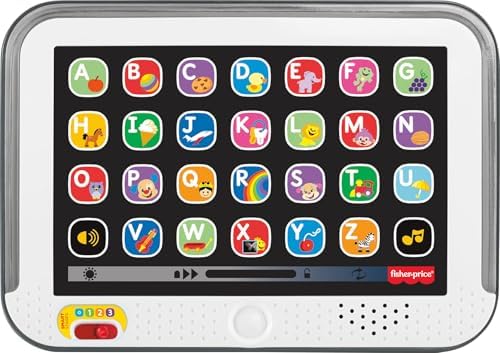
The Fisher-Price Laugh & Learn Smart Stages is a pretend tablet with 28 “app” buttons that activate lights, songs, sounds, and phrases. It is designed for younger children as well as toddlers, and its three Smart Stages levels introduce topics such as the alphabet, familiar objects, and colors.
This toy is a good match for children who enjoy pressing buttons and responding to lights and music. The staged learning approach gives it a different feel from the Peacurh and hahaland options, which emphasize language choices and topic icons. The Fisher-Price description lists more than 100 songs, sounds, and phrases, but does not specify multilingual support.
Its pretend-tablet design makes it easy to understand what the toy is meant to be, but it should not be mistaken for a device that runs apps or displays videos. The supplied details also do not list a language switch or specific travel features, so check those points if they matter to your family.
Pros:
- Three learning stages introduce early concepts.
- 28 buttons activate lights and audio content.
- Includes songs, sounds, and phrases for interactive play.
- Encourages pressing buttons and pretend play.
Cons:
- The supplied information does not specify language options.
- It is a pretend tablet, not a screen-based device.
Verdict: Choose the Fisher-Price if your child enjoys lights, music, and simple button play more than multilingual activities or a pretend laptop design.
How to Choose a Tablet Toy for a 3-Year-Old
Decide Whether You Want a Screen or a Screen-Free Toy
Most options here are electronic learning toys with buttons, sounds, and lights rather than tablets with video displays. That can be a good fit if you want hands-on play without apps. If you are looking for video, downloadable games, or internet access, these products are not substitutes for a real tablet.
Match the Activities to Your Child’s Interests
Look at the type of play your child enjoys. A child who likes naming animals and objects may enjoy icon-based learning. One who likes music may prefer a toy with songs and sound effects, while a child who imitates grown-ups may get more from the laptop-style GMAOPHY. Extra modes are useful only if your child will enjoy using them.
Check Language Options Carefully
Some models offer English, Spanish, and French, while the hahaland listing describes five languages but also gives a shorter list in its details. Confirm the exact languages and how to switch between them before ordering. The Fisher-Price and GMAOPHY descriptions do not specify multiple language options.
Consider Size, Parts, and Where the Toy Will Be Used
A lightweight, self-contained toy may be easier to bring along than a design with a detachable base. If you plan to use it in the car or on trips, think about whether its shape and number of pieces will be convenient to carry and store. Product descriptions call several options portable, but they do not provide measurements, so check the listing for dimensions if fit matters.
Review Age Guidance and Safety Details
Check the manufacturer’s age guidance, the toy’s materials, and any care instructions before giving it to your child. The supplied descriptions mention BPA-free plastic for several models and a screwdriver-secured battery compartment for the GMAOPHY. Follow the product instructions, supervise play as appropriate, and inspect toys for damage over time.
Set Expectations for Learning Toys
These products offer built-in prompts and activities; they are not a substitute for conversation, reading, or shared play. A toy that gives a word or asks a question can be a starting point for talking with your child. Consider whether you want a simple activity toy, a pretend device, or a mix of both.
FAQs
Are these real tablets with screens?
No. The products in this guide are described as learning or pretend-play toys. They use buttons, sounds, lights, or music, and the supplied information does not describe them as app-connected devices with video screens.
Which options offer more than one language?
The two Peacurh models list English, Spanish, and French. The hahaland listing describes five languages, but its details also refer to English, Spanish, and French, so confirm the exact options before buying. The supplied descriptions for the GMAOPHY and Fisher-Price do not specify multilingual support.
Which toy has a pretend laptop design?
The GMAOPHY is described as a 2-in-1 laptop and tablet-style toy. It has a detachable base and includes pretend computer activities such as phone and email scenarios.
Which option includes several learning stages?
The Fisher-Price Laugh & Learn Smart Stages Tablet has three stages that introduce concepts such as the alphabet, familiar objects, and colors.
Can these toys help with speech and vocabulary?
Their spoken words, sounds, and questions can provide opportunities to listen and practice vocabulary. They are learning toys, not a replacement for individualized support from a qualified speech-language professional if your child needs it.
Which choice is best for travel?
The Peacurh descriptions call their toys lightweight and suitable for travel. The hahaland is also described as compact and portable. Check the product dimensions and consider whether a toy’s buttons and sound features suit your travel plans.
Final Recommendation
For a screen-free toy with a broad mix of learning themes and modes, the hahaland is a strong option, provided you confirm its language lineup. Choose a Peacurh model if English, Spanish, and French are priorities; the two listings describe very similar features. The GMAOPHY stands out for pretend laptop play, while the Fisher-Price is a straightforward pick for button-activated lights, music, and staged learning. The best choice is the one that matches how your 3-year-old likes to play.