
An ultra-short-throw (UST) projector can give your living room a much larger picture than a typical television while sitting close to the wall. The right choice depends on how bright your room is, how large an image you want, and whether you need smart streaming or built-in sound. Below, we compare five options, from compact 4K models to a bright projector designed for larger screens.
| Projector | Best for | Key details | Maximum image size listed |
|---|---|---|---|
| AWOL VISION LTV-3000 Pro | Large-screen home theater | 4K triple laser, Dolby Vision, Atmos, and 3D | 150 inches |
| LG CineBeam S PU615U | Compact 4K viewing in a small room | Triple laser, smart streaming, Dolby Atmos | 100 inches |
| Epson EpiqVision LS800 | Bright rooms and sports | 4,000 lumens, 3LCD, 4K PRO-UHD | 150 inches |
| LG PF1000UW | Full HD viewing on a tighter budget | Smart TV features, Bluetooth sound out | 100 inches |
| Samsung The Premiere LPU9D | Large 4K picture with built-in streaming | Triple laser, Tizen OS, 2,500 ISO lumens | 130 inches |
Our Picks: Best Ultra Short Throw Projectors For Living Room Tv Replacement reviews
AWOL VISION LTV-3000 Pro: A feature-rich pick for a big-screen setup
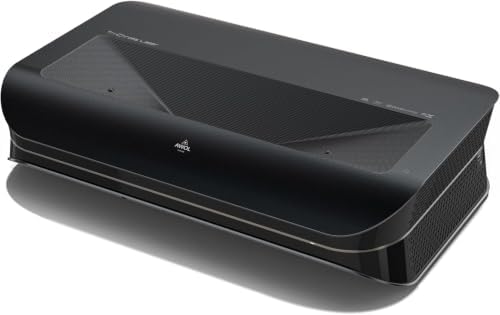
The LTV-3000 Pro is a 4K triple-laser UST projector built for a large home theater image. It supports Dolby Vision, HDR10+, and 3D, and its listed picture size reaches 150 inches. A triple-laser light source can deliver vivid color without a color wheel, while the projector’s wide color-gamut claims make it a strong fit for viewers who care about cinematic color.
Its standout design feature is a built-in center-channel speaker mapping system intended to make dialogue sound as if it comes from the screen. Dolby Atmos is also supported. That may simplify a setup, but it does not mean the projector replaces a full surround-sound system. AWOL describes pairing it with its separate ThunderBeat system for a larger surround setup.
Placement needs attention. The projector has a fixed 0.25:1 throw ratio; the supplied guidance gives approximate distances of 8.54 inches for a 100-inch image and 12.84 inches for a 150-inch image. Measure your cabinet and screen area before buying, and allow for precise alignment. AWOL says the projector works best in darker rooms, though it also promotes an optional ALR screen for daytime viewing. Active-shutter glasses and a 3D-capable source are needed for 3D content.
This is the most ambitious choice here for a dedicated big-screen room, especially if you want Dolby Vision and 3D. Its many features may be more than you need if you mainly watch everyday TV, and its placement and screen requirements call for more planning than a compact projector.
Pros:
- 4K triple-laser picture with Dolby Vision and HDR10+ support
- Projects an image up to 150 inches
- Built-in center-channel speaker mapping and Dolby Atmos support
- Supports 3D playback with compatible equipment
Cons:
- Best suited to a darker room unless paired with an appropriate ambient-light screen
- Fixed throw ratio makes cabinet measurements and placement important
Verdict: Choose the LTV-3000 Pro if you want a feature-packed 4K projector for a large, carefully planned home theater.
LG CineBeam S PU615U: A compact 4K projector for smaller spaces

The CineBeam S is a small 4K UST projector designed for rooms where a larger unit would be intrusive. Its compact body measures about 4.3 by 6.3 by 6.3 inches, according to the supplied product details. It uses triple-laser projection and includes smart streaming, making it a tidy option if you want fewer boxes and cables around your viewing area.
Its maximum listed image size is 100 inches, which is enough for a noticeable upgrade from a standard television without aiming for a wall-filling screen. The projector supports Dolby Atmos, and LG lists a wide color gamut and a high contrast ratio. Those specifications may appeal to movie watchers, but the stated brightness is 500 ANSI lumens, and LG recommends dimming the lights for a clear picture.
The CineBeam S is a better fit for controlled lighting than for a sunlit living room. Its compact size makes it easier to place on a shelf or media cabinet, but UST projection still calls for careful alignment with the screen or wall. Compared with the Epson and Samsung picks, it prioritizes a smaller footprint over higher stated brightness.
Pros:
- Compact design that takes up little space
- 4K UHD resolution and triple-laser projection
- Smart streaming and Dolby Atmos support
- Projects up to 100 inches from a short distance
Cons:
- 500 ANSI lumens makes it a better choice for dimmer viewing conditions
- Its listed maximum image size is smaller than those of several alternatives
Verdict: Consider the CineBeam S if you want a compact 4K UST projector and can control the light in your viewing room.
Epson EpiqVision LS800: A bright option for everyday living rooms

The EpiqVision LS800 is designed to put a large image in a room where you may not want to block out every bit of light. Epson lists 4,000 lumens of both color and white brightness, along with a picture size up to 150 inches. Its three-chip 3LCD system is intended to maintain color brightness and avoid the distracting rainbow effect that some projection technologies can show.
The projector uses Epson’s 4K PRO-UHD approach, which relies on pixel shifting rather than three native 4K chips. It also supports 10-bit HDR color processing. For sports, games, or family viewing, the high stated brightness is its main advantage over the compact LG CineBeam S and the older Full HD LG PF1000UW.
The LS800 has a modern UST design, adjustable feet, and multi-point picture adjustment to help with setup. Its supplied description does not specify a built-in streaming platform, so plan to use a separate streaming device if you need one. As with any UST model, small changes in position can affect the image alignment, so allow time to set it up carefully.
Pros:
- Listed at 4,000 lumens for color and white brightness
- 3LCD design avoids the rainbowing associated with some projector technologies
- Supports an image size up to 150 inches
- Includes multi-point picture adjustment and adaptable feet
Cons:
- Uses pixel shifting for its 4K PRO-UHD picture rather than native 4K chips
- Streaming features are not specified in the supplied product details
Verdict: The LS800 is a compelling option if a brighter living-room picture matters more to you than having streaming apps built into the projector.
LG PF1000UW: A straightforward Full HD choice for modest screens

The LG PF1000UW is a Full HD UST projector with a listed resolution of 1920 by 1080. LG says it can create a 100-inch image from 15 inches away, which may suit a room where a traditional projector cannot sit far from the screen. It also includes LG Smart TV compatibility and supports wireless screen sharing from Android and iOS devices, as well as laptops.
At up to 1,000 lumens, this model has a more modest brightness specification than the Epson LS800 or Samsung Premiere. It is best considered for a controlled-light room rather than as a direct substitute for a bright television in a sunny space. Bluetooth Sound Out provides a way to send audio wirelessly to compatible equipment.
The main trade-off is resolution: Full HD is below the 4K options in this group, so fine detail will not match them, particularly on a large image. Still, it may make sense if you value the short placement distance and smart features more than 4K sharpness. Check that the built-in smart functions and wireless sharing meet your needs before relying on them as your only source of content.
Pros:
- Can project a 100-inch image from 15 inches away
- Includes LG Smart TV compatibility
- Supports Bluetooth audio output and wireless screen sharing
- Full HD resolution is suitable for viewers who do not need 4K
Cons:
- Full HD resolution is lower than the 4K models in this comparison
- Its listed brightness is lower than the Epson and Samsung options
Verdict: Pick the PF1000UW if you want a short-distance 100-inch setup with smart features and are comfortable with Full HD rather than 4K.
Samsung The Premiere LPU9D: A smart 4K projector with built-in sound

Samsung’s LPU9D is a triple-laser UST projector with a listed maximum image size of 130 inches. It combines 4K resolution, HDR10+, and AI upscaling for lower-resolution content. Samsung also lists up to 2,500 ISO lumens, making this a brighter-on-paper choice than the compact LG CineBeam S, though room lighting and screen choice still affect the picture you see.
The built-in Tizen OS provides access to streaming services, while Gaming Hub offers game streaming without a console. Its 40-watt 2.2.2-channel audio system includes up-firing speakers and built-in woofers, which can reduce the need for separate speakers in a simple living-room setup. Alexa and Bixby voice assistants are also listed.
Samsung includes ambient mode features and Vision Boost, which adjusts color and contrast based on the surroundings. These options add flexibility, but no projector can guarantee a television-like picture in every brightly lit room. The LPU9D tops out at 130 inches, so the AWOL and Epson models are the better matches if your goal is the largest listed image.
Pros:
- 4K triple-laser picture with HDR10+ support and AI upscaling
- Tizen streaming platform and Gaming Hub are built in
- 40-watt 2.2.2-channel audio system is included
- Up to 2,500 ISO lumens and a maximum listed image size of 130 inches
Cons:
- Its maximum listed image size is smaller than the 150-inch AWOL and Epson models
- Ambient-light performance still depends on the room and projection surface
Verdict: The LPU9D is a strong all-in-one pick if you want 4K, built-in streaming, and substantial onboard audio in one UST system.
How to Choose an Ultra-Short-Throw Projector for Your Living Room
Match brightness to your room
Brightness is one of the most important factors when you are replacing a television. A projector usually looks its best when the room is dim, but a brighter model can be more practical when you watch with some light on. Compare brightness figures carefully: the Epson lists 4,000 lumens, the Samsung lists up to 2,500 ISO lumens, and the LG CineBeam S lists 500 ANSI lumens. These specifications use different labels, so they are not a perfect apples-to-apples comparison. An ambient-light-rejecting screen may help, but it does not remove the need to consider windows, lamps, and viewing times.
Choose a screen size you can actually use
A larger image sounds appealing, but it needs enough clear wall or screen space and may make lower-resolution content look less sharp. The AWOL and Epson models list sizes up to 150 inches, the Samsung up to 130 inches, and both LG models up to 100 inches. Decide how far you will sit and how much of the wall you want the picture to fill before settling on a size.
Measure the cabinet and projector position
UST projectors sit close to the wall, but their exact placement affects image size and alignment. Check the manufacturer’s distance guidance and measure the depth of your media cabinet, including room for cables. The AWOL LTV-3000 Pro has a fixed 0.25:1 throw ratio, with its supplied guidance giving approximate distances for 100- and 150-inch images. A small shift in position can change where the image lands, so leave room for setup adjustments.
Think about resolution and the content you watch
The 4K models in this group are better suited to viewers who want detailed images on a large screen. The Epson uses pixel shifting for its 4K PRO-UHD presentation, while the AWOL, LG CineBeam S, and Samsung are listed as 4K models. The LG PF1000UW is Full HD. If most of your content is lower resolution, consider whether features such as upscaling matter to you; Samsung lists AI upscaling for lower-resolution content.
Decide whether you need built-in streaming
Some models list smart features directly, while the supplied information for the Epson does not specify a built-in streaming platform. Samsung includes Tizen OS and Gaming Hub, the LG CineBeam S lists smart streaming, and the PF1000UW lists LG Smart TV compatibility. If you choose a model without the apps you need, plan on using a separate streaming device and check that your preferred setup is compatible.
Plan your sound setup
Built-in sound can make a living-room installation simpler, but audio needs vary by room and viewer. Samsung lists a 40-watt 2.2.2-channel system, and the AWOL includes center-channel speaker mapping and Dolby Atmos support. The LG CineBeam S also lists Dolby Atmos support, while the PF1000UW offers Bluetooth Sound Out. If you want theater-style surround sound, confirm what equipment you will need beyond the projector.
Consider how much light control you can manage
Projectors do not behave exactly like televisions: the picture depends on the room and the screen or wall surface. If you watch mostly at night or can close curtains, a model intended for darker conditions may work well. If your living room stays bright, give priority to the brightness specifications and consider a screen designed for ambient light. Make your choice based on your actual viewing habits, not just the largest screen-size claim.
Frequently Asked Questions
Can an ultra-short-throw projector replace a living-room TV?
Yes, it can serve as your main screen if you have suitable wall or screen space, a workable lighting setup, and a source for the shows you watch. Unlike a typical TV, a projector’s picture is more affected by room light and the projection surface, so it may not suit every living room equally well.
Do I need a special screen for a UST projector?
A compatible screen can help provide a consistent surface and may improve viewing in a room with ambient light. A plain, smooth wall may work for some setups, but surface texture and wall alignment can affect the image. Check the projector maker’s screen recommendations before choosing one.
Which model is best for a brighter room?
The Epson LS800 lists 4,000 lumens, and the Samsung LPU9D lists up to 2,500 ISO lumens. Those figures make them the brighter-on-paper options in this group. Actual results depend on room light, screen choice, and image size, so they should not be treated as a guarantee of a TV-like picture in direct sunlight.
Which projector can create the largest image?
The AWOL VISION LTV-3000 Pro and Epson EpiqVision LS800 both list image sizes up to 150 inches. Samsung lists up to 130 inches, while the two LG models list up to 100 inches.
Is 4K worth choosing over Full HD?
4K can show more detail, especially on a large image, and is a good fit if you watch 4K movies or shows. The LG PF1000UW is Full HD, which may still suit a smaller screen or a viewer who does not need 4K. Consider the content you watch and the image size you plan to use.
Do these projectors include streaming apps?
The Samsung lists Tizen OS and the LG CineBeam S lists smart streaming. The PF1000UW lists LG Smart TV compatibility. The supplied Epson details do not specify a streaming platform, so check the product listing or plan to connect a streaming device.
Can I use a UST projector for 3D movies?
The AWOL LTV-3000 Pro lists 3D support. Its product information specifies that you need active-shutter 3D glasses and a compatible source, such as a 3D Blu-ray player and disc or suitable 3D content. The other products in this comparison are not described as supporting 3D.
Final Recommendation
For a large, feature-rich home theater, the AWOL VISION LTV-3000 Pro stands out for its 150-inch image support, Dolby Vision, 3D, and center-channel speaker mapping. If your living room is brighter, compare the Epson LS800 and Samsung LPU9D, paying close attention to their brightness specifications and the features you need. The LG CineBeam S is a compact 4K option for a dimmer room, while the LG PF1000UW is worth considering if Full HD meets your needs. Before choosing, measure your cabinet, check your screen space, and think about how much light you can control.