
A USB desk fan can make a stuffy workspace or bedside feel more comfortable by moving air where you need it. The right choice depends on how much airflow control you want, whether you need a built-in battery, and how much noise or desk space you can tolerate. These five picks range from simple USB-powered fans to rechargeable models with digital displays and extra cooling features.
| Fan | Power | Adjustment | Standout feature |
|---|---|---|---|
| KIMMOO Rechargeable USB Desk Fan | Rechargeable battery or USB charging | 100 speeds; 90° rotation | Digital display and up to 8.5 hours of stated runtime |
| SWEETFULL 5-Inch Mini Desk Fan | USB cable; no built-in battery | 4 speeds; 360° adjustable head | Detachable cover for cleaning |
| VOXON 5.5-Inch Desk Fan | USB cable | 5 speeds; 90° angle adjustment | Removable front cover and stated 36-month warranty |
| Coolhill USB Desk Fan | Rechargeable battery or USB power | 100 speeds; 120° oscillation | Digital display and wireless use |
| KIMMOO USB Desk Fan with Ice Cooling | Rechargeable USB-C battery | 199 speeds | Fan-and-cooling modes; table or wall placement |
Our Picks: Best Usb Desk Fans For Improved Airflow reviews
1. KIMMOO Rechargeable Fan: Best for Fine-Tuned Airflow

The KIMMOO stands out for its broad range of airflow settings. Its 100 speed levels let you make small adjustments, from a gentle breeze for reading to a stronger stream of air when you need more immediate relief. A digital display shows the selected speed and battery status.
This compact fan has a rechargeable battery, so you can use it away from an outlet. The listed runtime is up to 8.5 hours, with a stated recharge time of about 2.5 hours using a 5V/2A adapter. Actual runtime will depend on the speed you choose. Its 90-degree rotation and portable size make it easier to aim at a desk chair, bedside spot, or travel setup.
The trade-off is that this fan has more controls than a basic four- or five-speed model, which may be unnecessary if you tend to leave a fan on one setting. Its battery also means you will need to recharge it for cordless use. The claimed 35 dB noise level applies to the lowest setting, so do not expect the same quiet operation at high speeds.
Pros:
- 100 speed levels for precise airflow adjustment
- Rechargeable design for use away from an outlet
- Digital display shows speed and battery status
- Compact, lightweight body with 90-degree rotation
Cons:
- Listed runtime will vary with the selected speed
- The lowest-speed noise figure may not reflect louder settings
Verdict: Choose this KIMMOO if you want cordless use and detailed speed control in a small fan.
2. SWEETFULL Mini Fan: Best for Simple, USB-Powered Cooling
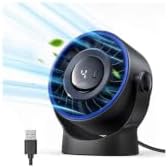
The SWEETFULL is a straightforward personal fan for a desk, nightstand, or other small surface. It offers four speeds and a 360-degree adjustable head, so you can direct airflow toward your face or reposition it as you move. The maker lists a maximum airflow speed of 5.2 m/s and a low noise level of 25 dB.
This model runs from a USB connection and comes with a 4.9-foot cable. It can connect to a USB charger, computer port, power bank, or car charger, but it does not have a built-in battery. That makes it a practical choice for a fixed workstation, though you will need a suitable power source nearby.
A detachable rear cover is designed to make cleaning the blades and interior easier. That is useful because dust buildup can affect a small fan over time. Compared with the rechargeable picks here, the SWEETFULL is simpler, but it does not offer a display, battery operation, or as many speed choices.
Pros:
- Four speed settings with a 360-degree adjustable head
- USB power works with several common power sources
- Detachable rear cover helps with cleaning
- Lightweight and compact for desks or travel bags
Cons:
- No built-in battery for cordless use
- Four speeds offer less fine control than the 100- and 199-speed models
Verdict: Pick the SWEETFULL if you want a compact fan with a simple control setup and plan to keep it connected to USB power.
3. VOXON 5.5-Inch Fan: Best for a Clear, No-Frills Setup

The VOXON uses five speed settings to cover different airflow needs, from a lower setting for quiet activities to a higher setting for stronger cooling. The listed speeds range from 1,900 to 3,200 RPM. Its head adjusts through 90 degrees, giving you room to aim airflow without moving the whole fan.
At 7.65 ounces, this is one of the lighter options in the group. It is powered by a 1.5-meter USB cable, so it is best suited to a spot with a nearby USB power source. The front cover is removable for cleaning, and the base has extended rubber pads intended to reduce vibration and help prevent slipping.
The product information lists noise as low as 25 dB at low speed and below 50 dB at high speed. Those figures make the settings worth considering separately: a higher speed may move more air, but it will also be more noticeable. Unlike the rechargeable models, the VOXON cannot run from its own battery. It does include a stated 36-month manufacturer warranty.
Pros:
- Five speeds offer a useful range without a complex control system
- Lightweight design with 90-degree angle adjustment
- Removable front cover supports easier cleaning
- Stated 36-month manufacturer warranty
Cons:
- Requires USB power and has no built-in battery
- High-speed noise is listed as louder than the lowest setting
Verdict: The VOXON is a sensible pick for a light, USB-powered desk fan with a removable cover and a simple set of speed controls.
4. Coolhill Oscillating Fan: Best for Broad Directional Coverage

The Coolhill combines 100 speed settings with 120-degree oscillation. Its display shows the selected speed, which can be helpful if you want to repeat a setting rather than rely on a basic low-medium-high control. The product information also lists a maximum airflow speed of 6 m/s.
A built-in 3,000 mAh battery allows cordless use, and the fan can also run from USB power. The stated battery life is about three to ten hours, with a charging time of roughly 2.5 hours. The wide runtime range suggests that your chosen speed and use pattern matter; check the display and plan to recharge if you intend to use it away from an outlet for long stretches.
The 120-degree oscillation can spread moving air across a wider area than a fixed-direction personal fan, though it remains a compact desk fan rather than a whole-room cooling solution. The listed low-speed noise is 28 dB. If you want a simpler fan without a rechargeable battery or digital controls, the VOXON or SWEETFULL may be easier to operate.
Pros:
- 100 speed settings and a digital display
- 120-degree oscillation helps direct airflow across a broader area
- Can run on its built-in battery or USB power
- Suitable for a desk, bedroom, kitchen, or camper setup
Cons:
- Stated battery life varies widely by use
- More controls may be unnecessary if you prefer a basic fan
Verdict: Choose the Coolhill if you want oscillation, cordless operation, and detailed speed adjustment in one compact fan.
5. KIMMOO Ice-Cooling Fan: Best for Added Cooling Features

This KIMMOO adds a cooling plate feature to a rechargeable desk fan. It has two listed modes: fan-only and fan plus ice cooling. The maker describes the cooling chip as a way to cool the skin where it touches, but that is different from lowering the temperature of a room. Treat it as a personal-contact feature, not a substitute for air conditioning.
The fan offers 199 speed settings, a digital display for battery and speed information, and a stated maximum speed of 9,000 RPM. Its battery runtime is listed as four to thirteen hours in fan-only mode and three to four hours with the cooling feature on. The shorter stated runtime in the combined mode is important if you expect to use it unplugged for an extended stretch.
The design can sit on a table or be mounted on a wall, which may help when desk space is limited. It also has a dual-layer guardrail. Compared with the other picks, it has the most specialized feature set, but it is also the least straightforward choice if all you need is a breeze. The advertised 28 dB figure applies to the lowest setting, not necessarily the highest fan speeds.
Pros:
- Fan-only and fan-plus-cooling modes
- 199 speed settings and a digital display
- Can be placed on a table or mounted on a wall
- USB-C rechargeable with stated runtime information for both modes
Cons:
- Cooling mode has a shorter stated battery runtime than fan-only mode
- The cooling feature is intended for personal use, not room cooling
Verdict: Consider this KIMMOO if you want a rechargeable fan with a personal cooling feature and are comfortable with its added controls and shorter runtime in cooling mode.
How to Choose a USB Desk Fan for Improved Airflow
Decide whether you need a battery
A USB-powered fan without a built-in battery needs to stay connected to a power source. That can work well at a fixed desk or bedside table, especially if you already have a USB charger nearby. A rechargeable model is more flexible for travel, outdoor use, or moving between rooms, but you will need to monitor its charge and recharge it as needed.
Match the speed controls to your habits
Four or five settings are usually easier to manage if you want a simple choice between a softer breeze and stronger airflow. Fans with 100 or 199 levels allow more precise adjustment, but many people may not need that much control. Consider whether you will use the extra settings or would rather have a button that is quick to operate.
Check how the fan aims and spreads air
A tilting or adjustable head lets you direct airflow toward your face, hands, or upper body. Oscillation can move air across a wider area, which may help when more than one sitting position needs airflow. Remember that a compact desk fan is designed for personal comfort; it is not the same as a room fan or an air conditioner.
Think about sound at the speed you will use
Noise claims often describe operation at the lowest setting. A stronger speed can be louder, so look for information about both low- and high-speed operation when you plan to use a fan for sleep, calls, or focused work. If you are sensitive to noise, a fan with several lower settings may make it easier to find a comfortable balance.
Look for easy cleaning
Dust can collect on fan blades and inside the grille. A removable cover can make cleaning easier, but check the product instructions before taking a fan apart. For any model, use the cleaning method recommended by its manufacturer and disconnect it from power before cleaning.
Consider battery runtime in context
Runtime claims are not always directly comparable because different fans have different settings and features. A fan may last longer on a low speed than at its strongest setting, and using an added cooling feature can shorten runtime. If you need cordless airflow for a long period, compare the listed runtime with how you expect to use the fan.
Choose features you will actually use
A display can make speed and battery status easier to see, while a basic USB model may be simpler and lighter. Extra features such as oscillation, wall mounting, or a cooling plate can be useful for specific setups. Prioritize the features that solve a real problem for you rather than choosing a fan only because it has the longest feature list.
Frequently Asked Questions
Can a USB desk fan cool an entire room?
These are compact personal fans that move air near your desk, bedside, or other small area. They can help you feel more comfortable, but they are not designed to cool an entire room like an air conditioner.
Can I run a USB desk fan from a power bank?
USB-powered models can work with a compatible power bank if the power bank provides suitable output. Some models also have built-in rechargeable batteries, so check the product details to understand whether you can use the fan while it is charging.
Which of these fans can run without being plugged in?
The KIMMOO rechargeable fan, Coolhill fan, and KIMMOO fan with ice cooling list built-in batteries. The SWEETFULL and VOXON are USB-powered and do not list built-in batteries.
Are more speed settings always better?
Not necessarily. More settings allow finer adjustments, but a four- or five-speed fan may be quicker to control. Choose based on whether you prefer simple controls or want to tune airflow more precisely.
What does oscillation do on a desk fan?
Oscillation moves the fan’s airflow from side to side across a wider area. It can be useful if you want air to reach more than one position, while a fixed fan sends airflow in one main direction.
How should I clean a USB desk fan?
Unplug the fan or turn it off before cleaning. Follow the manufacturer’s instructions for removing covers and cleaning the blades. Models with removable covers are designed to make access easier, but avoid getting electrical parts wet.
Does a cooling plate make a desk fan work like an air conditioner?
No. The KIMMOO model with ice cooling describes a feature for personal cooling, but it is not a room-cooling system. If your goal is to lower the temperature of a whole room, you will need a suitable room-cooling solution.
Final Recommendation
For the best balance of cordless use and detailed airflow control, the KIMMOO Rechargeable USB Desk Fan is the strongest all-around option in this group. Choose the SWEETFULL for a simple fan that stays connected to USB power, or the Coolhill if oscillation and a digital display matter more to you. If you want the most specialized feature set, the KIMMOO with ice cooling adds a personal cooling mode, but keep its shorter stated runtime in that mode in mind.