
A tally light makes a production monitor more useful to a camera operator: it can show when a camera is live, recording, or cued for preview. The right choice depends on where you’ll use it. A compact field monitor, a large director’s display, and a rack-mounted pair of screens solve different problems—and not every monitor in this roundup clearly lists a tally light. Here’s how the five options compare, including the details you should confirm before buying.
Quick Comparison
| Product | Screen and format | Tally details | Best suited for |
|---|---|---|---|
| SEETEC P215-9HSD-192 | 21.5-inch, Full HD | Red, green, and yellow tally signal | Director and production-area monitoring |
| Ikan 7-inch 4K HDMI/3G-SDI Tally Field Monitor Deluxe Kit (V2) | 7-inch, 1920 × 1200 IPS | Three-color indicators on front and rear | Portable camera-side monitoring |
| FEELWORLD D71 Plus Dual 7-inch Rack Monitor | Dual 7-inch screens, 3RU rack mount | Front tally lights, controlled through DB-9 ports | Control rooms and rack-based setups |
| SEETEC P173-9HSD 17.3-inch Broadcast Monitor | 17.3-inch, Full HD | Red, green, and yellow lights on front and rear | Studio or production-area monitoring |
| SEETEC P215 PRO-CO 21.5-inch Broadcast Monitor | 21.5-inch, Full HD, 1000-nit brightness | Tally light not specified in the supplied details | Bright locations and advanced image monitoring |
Our Picks: Best Video Production Monitors With Tally Lights reviews
SEETEC P215-9HSD-192: A Large Director Monitor With Three-Color Tally

The P215-9HSD-192 is a 21.5-inch Full HD monitor designed for a production area where several people may need to see the picture. Its listed tally system uses red, green, and yellow signals to help indicate whether a camera is on-air, recording, or cued on a switcher’s preview output.
It offers a 1920 × 1080 IPS panel, Rec.709 color standard, and 250-nit brightness. That brightness is more suited to controlled indoor environments than bright outdoor locations. Its range of inputs includes 3G/HD/SD-SDI, HDMI, YPbPr, audio, video, and DVI, which can be helpful when a setup includes a mix of video sources.
Focus and exposure assistance features add practical value for production work. The supplied package details also list a tally kit, V-mount battery plate, power adapter, and jib crane bracket. At this screen size, plan for a stable mounting position rather than treating it as a small camera-top display.
Pros:
- Large Full HD screen for director or shared viewing
- Three-color tally signal for production status cues
- Broad mix of SDI, HDMI, analog, and DVI inputs
- Includes a tally kit and V-mount battery plate
Cons:
- 250-nit brightness is limited for bright outdoor viewing
- Its large size is less convenient for camera-side use
Verdict: Choose the P215-9HSD-192 if you want a large indoor production monitor with clear three-color tally signaling and flexible input options.
Ikan 7-inch Tally Field Monitor: A Portable Kit for Camera-Side Work

This Ikan monitor is the most compact option in the group and is designed for field use. Its 7-inch IPS panel has a listed resolution of 1920 × 1200. Three tally indicator LEDs are positioned on both the front and rear, so the signal can be visible from different angles around the camera.
The monitor includes on-screen tools such as waveform, false color, peaking, zebra, pixel-to-pixel viewing, zoom, clip guides, and an audiometer. These functions can help with exposure checks, focus, and framing without needing a larger display. Its aluminum construction is intended to provide a durable housing, while the deluxe kit adds a case, battery, charger, and several connection cables.
Compared with the larger SEETEC displays, this model is easier to bring along and position near a camera, but its screen is naturally less suited to group viewing. Check your camera’s connector needs as well: the kit lists HDMI-to-micro-HDMI, HDMI-to-mini-HDMI, and SDI cables, but your exact setup may require a different connection.
Pros:
- Compact 7-inch IPS screen for field and camera-side use
- Front and rear tally indicators in three colors
- Includes waveform, false color, peaking, and other monitoring tools
- Deluxe kit includes a case, battery, charger, and cables
Cons:
- Smaller screen is less practical for a group of viewers
- Included cables may not match every camera’s connectors
Verdict: The Ikan is a strong fit when you need a portable field monitor with visible front-and-rear tally lights and a useful set of image-assist tools.
FEELWORLD D71 Plus: Dual Screens for a Rack-Mounted Control Setup

The D71 Plus is made for a rack-based production setup rather than a handheld or camera-mounted role. It combines two 7-inch screens in a 3RU rack-mount design, allowing you to monitor two video feeds in a control room or equipment rack. Front tally lights for each screen show red, green, or yellow, with control through DB-9 ports on the rear.
Its described connections include SDI, HDMI, CVBS, and audio. The IPS screens are listed with a 178-degree horizontal and vertical viewing angle and brightness up to 400 nits. A LAN port and included software provide network control, which may help when several compatible D71 monitors need to be managed together.
There is a specification discrepancy to check before buying: the product title refers to 1920 × 1200, while the description gives a resolution of 1080 × 800 for the dual 7-inch screens. Confirm the actual panel resolution with the seller or product documentation if it matters to your workflow. This model also needs a rack location and tally wiring, so it is not a simple portable-monitor choice.
Pros:
- Two screens in a single 3RU rack-mount unit
- Separate three-color front tally lights for each screen
- DB-9 tally control and Ethernet-based software control
- Includes SDI, HDMI, CVBS, and audio connections
Cons:
- Designed for rack use, not portable camera-side monitoring
- Supplied resolution details are inconsistent and need confirmation
Verdict: Consider the D71 Plus if you need two tally-equipped screens in a rack, but verify the resolution and make sure your switcher or tally system can connect through DB-9.
SEETEC P173-9HSD: A 17.3-inch Monitor With Front-and-Rear Tally
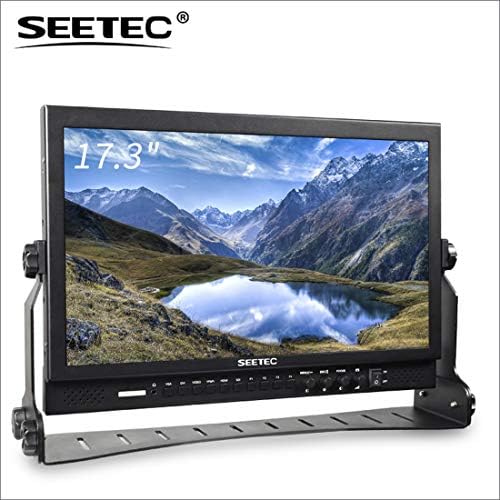
The P173-9HSD sits between a compact field display and a large director monitor. Its 17.3-inch Full HD IPS screen is listed at 400 nits, with three-color tally lights on both the front and rear. The tally system is controlled through DB-9 ports on the back, so check that your switcher or tally controller supports the connection.
Its aluminum design and broad input selection make it a flexible choice for a fixed production position. Listed inputs include 3G-SDI, HDMI, YPbPr, video, audio, and DVI-I; outputs include SDI, HDMI, YPbPr, and video. Focus peaking, check field, pixel-to-pixel, markers, image flip, image freeze, and zoom are among the listed assistance functions.
The monitor’s 17.3-inch size gives you more viewing area than the Ikan, while remaining smaller than the 21.5-inch SEETEC models. Its listed viewing angles are narrower vertically than those of the FEELWORLD rack monitor, so placement and viewing height may matter in a shared setup. The package details include a power adapter, V-mount battery plate, tally kit, sunshade, and U-bracket.
Pros:
- 17.3-inch Full HD display with listed 400-nit brightness
- Three-color tally lights are visible from the front and rear
- Wide range of inputs, outputs, and image-assist tools
- Includes tally kit, sunshade, and mounting accessories
Cons:
- DB-9 tally control requires a compatible tally source
- Its size is less convenient for compact camera rigs
Verdict: The P173-9HSD is a practical middle-ground choice if you want a larger production display with tally lights on both sides and a broad set of video connections.
SEETEC P215 PRO-CO: Bright, Feature-Rich Monitoring, but Tally Is Unconfirmed

The P215 PRO-CO is a 21.5-inch Full HD monitor built for situations where screen visibility and image analysis matter. Its listed 1000-nit brightness is a major difference from the 250-nit P215-9HSD-192, making this model the more suitable of the two for brighter viewing conditions. The supplied details also list HDR monitoring and CalMAN software calibration.
For image checks, it includes waveform monitoring and supports uploading up to 32 custom LUTs. It has two SDI inputs, two HDMI inputs, two SDI outputs, and one HDMI output; HDMI is listed as supporting 4K at 60 Hz. The aluminum frame and protective case with reinforced corners are intended to make the monitor easier to transport and protect.
There is one important limitation for this roundup: the supplied product information does not mention a tally light or tally input. That does not confirm whether the monitor has one, so verify directly before purchasing if tally status is essential to your setup. Compared with the other picks, this monitor offers stronger listed brightness and image tools, but the tally information is less complete.
Pros:
- Listed 1000-nit brightness for brighter viewing conditions
- Waveform monitoring, HDR monitoring, and support for custom LUTs
- Multiple HDMI and SDI inputs and outputs
- Protective case and aluminum frame for transport
Cons:
- Tally light support is not specified in the supplied details
- Its advanced image features may be unnecessary for basic monitoring
Verdict: Choose the P215 PRO-CO for its listed brightness and monitoring tools only after confirming tally compatibility if a tally signal is a must-have.
How to Choose a Video Production Monitor With Tally Lights
Choose a screen size for your position
A 7-inch monitor can fit closer to a camera and is easier to carry, while a 17.3- or 21.5-inch model is more useful when a director or several crew members need to see the image. Rack-mounted dual screens suit control rooms where monitoring multiple feeds matters more than portability. Consider viewing distance and who needs to see the display before choosing by screen size alone.
Check what each tally color means in your setup
These monitors describe red, green, and yellow tally signals, but the exact meaning of each color depends on the production system. Common uses include indicating a live camera, a camera in preview, or a recording state. Confirm that the monitor’s tally connection works with your switcher or controller and that your team uses the colors consistently.
Confirm the tally connection and control method
A listed tally light does not always mean the monitor can connect directly to every switcher. The SEETEC P173-9HSD and FEELWORLD D71 Plus describe DB-9 control, while the P215-9HSD-192 lists a tally kit. Check the connector, cable, tally signal requirements, and included accessories against your equipment. For the P215 PRO-CO, ask the seller to confirm tally support because it is not specified in the supplied details.
Match brightness to the viewing environment
Brightness matters most when you cannot control the light around the monitor. The P215 PRO-CO lists 1000 nits, while the P173-9HSD lists 400 nits and the P215-9HSD-192 lists 250 nits. Those figures can help narrow your choices, but placement, glare, and ambient light also affect visibility. A bright field display may be unnecessary for a shaded indoor control room.
Check resolution and image-assist tools
Resolution affects how much detail you can inspect, while tools such as waveform, peaking, false color, zebra, and pixel-to-pixel viewing help you evaluate exposure and focus. Think about which tools are useful in your workflow rather than paying for features you will not use. The FEELWORLD D71 Plus listing has conflicting resolution details, so confirm the actual panel resolution before making a decision based on it.
Make sure the inputs match your cameras and switcher
SDI and HDMI are common connections in production, but older or mixed systems may also rely on formats such as CVBS, YPbPr, or DVI. Check the monitor’s inputs and outputs against every device in your signal chain. Also consider whether you need to loop a signal onward to another display, and whether the required cables are included.
Plan for mounting and power
A portable field monitor, a large desktop display, and a rack unit need different mounting plans. Check how the monitor will be secured, whether a sunshade or bracket is included, and what power options are available. Some of these products list a V-mount battery plate or a battery in the kit, but you should confirm compatibility with the batteries and mounts you already use.
Frequently Asked Questions
What does a tally light do on a production monitor?
A tally light provides a visual status cue for a camera or monitor feed. Depending on your switcher or production system, colors may indicate that a camera is live, in preview, or recording. Check how the colors are configured in your own setup.
Do these monitors work with every video switcher?
Not necessarily. Tally connections and signal requirements can vary. Check the monitor’s listed tally control method, such as DB-9 or a supplied tally kit, and compare it with your switcher or tally controller before buying.
Which option is easiest to use near a camera?
The 7-inch Ikan is the most compact option in this group and includes a battery and field accessories in its deluxe kit. The larger SEETEC monitors are better suited to a fixed position or shared viewing area.
Which monitor has two screens?
The FEELWORLD D71 Plus is a 3RU rack-mount monitor with two 7-inch screens. Its product details conflict on the screen resolution, so confirm that specification before purchasing.
Is a 1000-nit monitor necessary for indoor production?
Not always. Higher brightness can help in brighter environments, but it may be more than you need in a controlled indoor space. Consider where the monitor will sit and how much ambient light or glare it will face.
Does the SEETEC P215 PRO-CO have a tally light?
Tally support is not listed in the product details provided here. If you need tally functionality, confirm it with the seller before choosing this model.
Final Recommendation
For a large indoor display with a clearly described three-color tally signal, the SEETEC P215-9HSD-192 is a strong starting point. Choose the Ikan if portability and camera-side monitoring matter most, or the FEELWORLD D71 Plus for a rack setup that needs two screens. The SEETEC P173-9HSD offers a useful middle size with front-and-rear tally lights. The brighter P215 PRO-CO has compelling image-monitoring features, but verify tally support before treating it as a fit for a tally-dependent workflow.