
A webcam with a built-in microphone and a physical privacy shutter can simplify video calls while giving you a clear way to block the camera when you’re done. The options below range from straightforward 1080p models to a webcam with automatic framing, so you can match the features to your desk setup and how you meet.
| Webcam | Video | Privacy and audio | Best fit |
|---|---|---|---|
| Logitech Brio 101 (Black) | Full HD 1080p; auto-light balance | Slide cover; built-in mic | Simple everyday calls |
| Logitech C920S HD Pro | 1080p at 30 fps; autofocus | Lens cover; two microphones | Calls where framing and stereo audio matter |
| Logitech Brio 505 | Full HD 1080p; auto-framing | Integrated shutter; dual noise-reduction mics | Work calls with movement or show-and-tell |
| Logitech Brio 100 (Black) | Full HD 1080p; auto-light balance | Slide cover; built-in mic | Basic meetings and streaming |
| Logitech Brio 100 (Rose) | Full HD 1080p; auto-light balance | Slide cover; built-in mic | A simple webcam with a color option |
Our Picks: Best Webcams With Privacy Shutter And Mic reviews
Logitech Brio 101: A straightforward 1080p webcam with a slide cover

The Brio 101 is a practical pick if you want a webcam for regular video calls without a long feature list. It captures Full HD 1080p video and has a built-in microphone, so it can handle both picture and voice for a typical computer setup.
Its integrated slide cover gives you a physical way to block the lens when you’re not on camera. Logitech’s RightLight feature is designed to boost brightness and reduce shadows, which may help when your room lighting is less than ideal. It is also described as plug-and-play and compatible with common calling platforms such as Teams, Zoom, and Google Meet.
The Brio 101’s appeal is its simplicity. It does not list automatic framing or the more advanced microphone features found on the Brio 505. If those features are not important to you, the 101 covers the essentials in a familiar form. As with any built-in webcam mic, your room noise and distance from the camera can affect how clearly you come through.
Pros:
- Full HD 1080p video
- Integrated slide cover for the camera
- Built-in microphone for calls
- Auto-light balance and plug-and-play setup
Cons:
- No automatic framing feature is listed
- The microphone is built in, so it may not suit users who need more flexible mic placement
Verdict: Choose the Brio 101 if you want a basic 1080p webcam with a physical lens cover and built-in mic for everyday calls.
Logitech C920S HD Pro: Autofocus, dual microphones, and a lens cover

The C920S HD Pro combines a privacy cover with a more detailed video and audio feature set than the Brio 100 models. It records Full HD at 1080p and 30 frames per second, and its autofocus is intended to keep the image sharp as your position or focus distance changes.
The camera has a fixed 78-degree field of view, a defined frame that suits a solo speaker or a small amount of desk space. Two microphones capture sound from a broader range of angles, and Logitech’s listing describes the audio as stereo. The cover protects the lens and gives you a physical way to block the camera between calls.
Light correction is another useful point for home offices where brightness changes during the day. The trade-off is that the C920S does not list auto-framing, so it will not automatically adjust the shot as you move around. Its fixed field of view may also be less suitable if you want to include a wide room or several people.
Pros:
- Full HD 1080p video at 30 fps
- Autofocus and light correction
- Two microphones for stereo audio
- Lens cover for physical camera privacy
Cons:
- Fixed 78-degree field of view
- Does not list automatic framing
Verdict: The C920S is a strong choice if you want autofocus and two microphones along with a physical lens cover, and you are comfortable with a fixed frame.
Logitech Brio 505: A flexible webcam with automatic framing
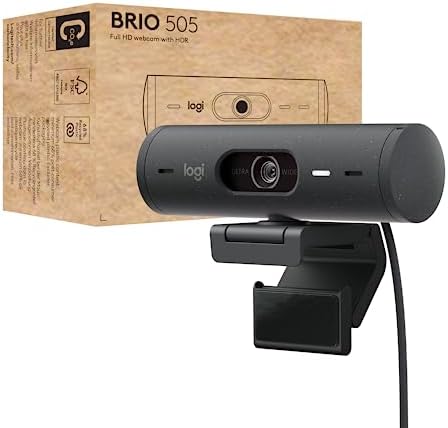
The Brio 505 is the most feature-rich choice in this group. It offers Full HD 1080p video and RightSight auto-framing, which is designed to keep you centered as you stand or move. That can be useful for presentations or calls where you do not stay in one spot.
Its integrated privacy shutter blocks the camera when you do not want to be seen. The webcam also has dual noise-reduction microphones, auto light correction, and a Show Mode that lets you tilt the camera to show physical items. These additions make it more suited to work calls and demonstrations than a basic fixed-frame model.
The extra features are most useful if you will actually move around or share items on camera. If your calls are usually seated and still, the Brio 100 or C920S may cover your needs with fewer features to consider. The listed specifications do not state a separate microphone mute control, so remember that the camera shutter blocks the lens, not the microphone.
Pros:
- Full HD 1080p video with auto light correction
- Auto-framing designed to keep you centered as you move
- Dual noise-reduction microphones
- Integrated privacy shutter and Show Mode
Cons:
- Its framing and Show Mode features may be unnecessary for simple calls
- The privacy shutter covers the camera, not the microphone
Verdict: Choose the Brio 505 if you want a physical shutter plus automatic framing and features for presenting objects on camera.
Logitech Brio 100 in Black: A simple webcam for calls and streaming

This black Brio 100 is another straightforward webcam for meetings and streaming. Its listed core features are Full HD 1080p video, a built-in microphone, auto-light balance, and an integrated sliding cover. It works with common video calling platforms including Teams, Zoom, and Google Meet.
The physical cover is useful if you prefer a visible, manual way to block the camera rather than relying only on software settings. RightLight is designed to boost brightness and reduce shadows, which can help in rooms that are not evenly lit. The webcam is described as plug-and-play, keeping setup simple for a standard computer call setup.
This model shares its main feature set with the rose Brio 100 below, so the choice between them is mostly about the color that suits your desk. Neither listing specifies autofocus, dual microphones, or automatic framing. If you need those features, consider the C920S or Brio 505 instead.
Pros:
- Full HD 1080p video
- Integrated sliding privacy cover
- Built-in mic for video calls
- Auto-light balance and simple setup
Cons:
- No auto-framing or dual-microphone setup is listed
- Offers fewer advanced features than the Brio 505
Verdict: The black Brio 100 is a sensible pick for basic calls if you want 1080p video, a built-in mic, and a manual camera cover.
Logitech Brio 100 in Rose: The same practical features in a different color

The rose Brio 100 has the same core functions as the black version: Full HD 1080p video, a built-in microphone, auto-light balance, and a sliding privacy cover. It is aimed at everyday meetings and streaming, with plug-and-play setup for common calling platforms.
The main distinction is the color. If you want your webcam to coordinate with a particular desk setup, the rose finish offers an alternative to the black model without changing the basic feature set. Logitech also states that this webcam is made with a minimum of 34% post-consumer plastic.
Like the black Brio 100, this model keeps things simple rather than adding automatic framing or dual microphones. The built-in mic is convenient, but its fixed position means it may not be the right choice if you need to place a microphone closer to you. The sliding cover blocks the lens, so it does not mute the microphone.
Pros:
- Full HD 1080p video and built-in microphone
- Physical sliding cover for the camera
- Auto-light balance and plug-and-play setup
- Rose color option and stated use of recycled plastic
Cons:
- No automatic framing or dual microphones are listed
- The camera cover does not mute the mic
Verdict: Pick the rose Brio 100 if you want the basic Brio 100 feature set in a color that better fits your workspace.
How to Choose a Webcam With a Privacy Shutter and Mic
Check what the privacy shutter covers
A physical shutter or cover blocks the camera lens, giving you a direct way to prevent video capture when the webcam is not in use. It does not necessarily turn off the microphone. If you want to stop audio capture too, check the mute controls in your calling app or computer settings, or use a separate microphone with its own mute control.
Choose a video resolution that fits your calls
All five picks list Full HD 1080p video, which is a useful level of detail for work calls, classes, and streaming. The C920S also lists 1080p at 30 frames per second. If you are comparing models, pay attention to whether you need extra image features such as autofocus or light correction, rather than choosing by resolution alone.
Consider how you move on camera
A fixed frame can work well when you sit in one place and position the webcam before a call. The C920S lists a fixed 78-degree field of view. The Brio 505 adds auto-framing designed to keep you centered as you move, which may be helpful for standing presentations. For a stationary desk setup, a simpler model may be enough.
Match the microphone to your room and habits
A built-in microphone keeps your setup compact and avoids adding another device. The Brio 101 and Brio 100 list a built-in mic, while the C920S has two microphones and the Brio 505 has dual noise-reduction microphones. A webcam mic may be convenient, but your distance from the camera and background noise can still affect how your voice sounds.
Look for lighting features if your room is dim
Automatic light correction can help when the light around your desk is uneven or changes during the day. The Brio 100 models and Brio 101 list Logitech RightLight auto-light balance, and the C920S lists RightLight 2. The Brio 505 also lists auto light correction. These features can adjust the image, but they do not replace good lighting in a dark room.
Check compatibility and the features you will use
If you use a particular video platform or operating system, check the product listing for compatibility before you buy. The Brio 101 and Brio 100 descriptions name Teams, Zoom, and Google Meet. The Brio 505 lists certifications for Teams, Zoom, and Google Meet, as well as compatibility with Chromebook, Windows, macOS, and ChromeOS. Consider whether features such as Show Mode or auto-framing are worth prioritizing for your routine.
Frequently Asked Questions
Does a webcam privacy shutter turn off the microphone?
No. A physical shutter blocks the camera lens, but it does not necessarily mute the microphone. Use your meeting app or computer audio controls to mute the mic when you want to stop transmitting sound.
Which option has automatic framing?
The Logitech Brio 505 lists RightSight auto-framing, which is designed to keep you centered as you stand or move. The other models in this guide do not list that feature.
Which webcam has two microphones?
The Logitech C920S lists two microphones for stereo audio. The Brio 505 lists dual noise-reduction microphones. The Brio 101 and Brio 100 descriptions specify a built-in microphone.
Are these webcams suitable for video calls?
All five models are described as webcams for calls or meetings and list Full HD 1080p video. The Brio 101 and Brio 100 descriptions mention common platforms such as Teams, Zoom, and Google Meet; check each listing for compatibility details that match your computer.
What is the difference between the Brio 100 options?
The black and rose Brio 100 options share the listed core features: 1080p video, auto-light balance, a built-in mic, and a sliding privacy cover. The rose version adds a color choice and states that it is made with a minimum of 34% post-consumer plastic.
Is the C920S or Brio 505 better for someone who moves during calls?
The Brio 505 is the more suitable choice if you want the camera to adjust its framing as you move. The C920S has a fixed 78-degree field of view, which is better suited to a consistent, set position.
Final Recommendation
For a simple webcam with a physical cover and built-in mic, the Logitech Brio 100 or Brio 101 covers the essentials; choose between the Brio 100 color options based on your setup. The C920S adds autofocus and two microphones, while the Brio 505 is the best fit if you want auto-framing, dual noise-reduction mics, and Show Mode. Check the product listing for current availability and compatibility before choosing.