
A basement can be a great place for a big-screen setup, especially if you can control the light. The right projector depends on more than picture size: check how bright it is, whether its throw range fits your room, how you plan to stream, and whether you need built-in sound or a separate audio system. The picks below range from smart projectors for simple streaming to brighter models suited to flexible or permanent installations.
Quick Comparison
| Projector | Best for | Resolution and brightness | Standout features |
|---|---|---|---|
| NexAurea Smart Projector | Built-in streaming and flexible setup | Native 1080p; 4K decoding | Smart apps, auto focus, eARC |
| ViewSonic LS740HD | Bright rooms and fixed installations | 1080p; 5,500 ANSI lumens | Laser light source, optical zoom, placement adjustments |
| Epson Home Cinema 980 | Sports, movies, and casual gaming | 1080p; 4,000 lumens | 3LCD color, two HDMI ports |
| Optoma HD146X | A straightforward home cinema setup | 1080p; brightness not specified | Game display mode, easy installation |
| Oldisk 4K Smart Projector | Streaming and smaller projection setups | Native 1080p; 3,000 ANSI lumens; 4K decoding | Built-in apps, Wi-Fi 6, auto adjustments |
Our Picks: Best Home Theater Projectors For Basement Rooms reviews
1. NexAurea Smart Projector: Best for Built-In Streaming and Easy Setup

The NexAurea is an all-in-one option for a basement where you want to stream without adding a separate TV device. Its built-in smart system supports services such as Netflix, YouTube, and Prime Video, and the product information also describes an app store and browser.
For picture quality, it uses native 1080p resolution and can decode 4K sources. That distinction matters: 4K decoding lets it handle compatible 4K content, but the displayed resolution remains 1080p. HDR10+ and AI picture features are listed, though the provided information does not give a brightness figure. For a dark basement, that may be fine, but it is harder to judge how it will perform with room lights on.
Setup features are a strong point on paper. Auto focus, 6D keystone correction, obstacle avoidance, and electronic zoom are designed to help with placement and image alignment. The projector also lists dual 25W speakers, Dolby Audio, DTS decoding, and eARC for connecting compatible external audio equipment. Its stated projection size goes up to 300 inches, but the best size for your room will depend on placement and viewing conditions.
Pros:
- Built-in streaming apps reduce the need for a separate streaming device.
- Auto focus and multiple image adjustments can simplify setup.
- eARC provides an option for connecting compatible audio equipment.
- Native 1080p resolution with 4K decoding for compatible sources.
Cons:
- The supplied product information does not state an ANSI brightness figure.
- 4K decoding is not the same as native 4K resolution.
Verdict: Choose the NexAurea if you want built-in streaming and automatic setup aids, and your basement can be kept fairly dark.
2. ViewSonic LS740HD: Best for Brightness and Flexible Installation

The ViewSonic LS740HD is a bright 1080p laser projector built for spaces that need flexible installation. Its listed output is 5,500 ANSI lumens, a higher stated brightness than the other picks here with a published ANSI figure. That can be useful if your basement is not fully dark, though a darker room and suitable screen still help create a more cinema-like picture.
Its 1.13–1.47 throw ratio and 1.3x optical zoom give you options when matching the image to your room. The product supports image sizes from 30 to 300 inches, along with horizontal and vertical keystone adjustment and four-corner correction. Those controls may help with tricky placement, but they do not replace measuring the throw distance before you buy.
The laser phosphor light source is listed for up to 30,000 hours in Dynamic Eco mode. Connectivity includes two HDMI inputs, USB Type-A, RS232 control, audio out, and a built-in 15W speaker. The model is also positioned for golf simulators and presentation spaces, so it is a more installation-focused choice than a compact smart projector. The supplied product information marks this listing as unavailable; check the listing before planning a setup around it.
Pros:
- High listed brightness of 5,500 ANSI lumens.
- Optical zoom and a stated 1.13–1.47 throw ratio aid room planning.
- Corner adjustment, keystone correction, and 360-degree projection support flexible installation.
- Laser light source is rated for up to 30,000 hours in Dynamic Eco mode.
Cons:
- The supplied listing information marks the product as unavailable.
- Its feature set is installation-focused rather than centered on built-in streaming apps.
Verdict: Consider the LS740HD if brightness and installation flexibility matter most, but verify availability and plan to connect your own streaming source.
3. Epson Home Cinema 980: Best for Colorful Sports and Movies

The Epson Home Cinema 980 is a 1080p projector aimed at home entertainment, including fast-action sports and casual gaming. It lists 4,000 lumens for both color brightness and white brightness. For a basement that is not completely dark, those figures make it worth considering, although image quality still depends on screen size, room light, and placement.
Epson’s 3LCD system displays the full RGB color signal in every frame, according to the product information. That design is intended to deliver vivid color brightness without distracting rainbowing. If you are sensitive to color artifacts or want strong color in sports and animated films, this is a useful point of difference from the other options.
Two HDMI ports make it easier to connect devices such as a streaming player or game console, and a USB port can power a streaming device. It also has a built-in speaker for basic use. The supplied information does not list smart apps, lens zoom, or automatic setup tools, so check your room measurements and plan to use an external streaming device if you want app-based viewing.
Pros:
- 1080p resolution and listed 4,000-lumen color and white brightness.
- 3LCD technology is designed to maintain vivid color brightness.
- Two HDMI ports support multiple connected devices.
- Built-in speaker and USB power for a streaming device simplify a basic setup.
Cons:
- Built-in streaming apps are not listed in the supplied product information.
- Zoom range and automatic image adjustment features are not specified.
Verdict: Pick the Epson if you want a 1080p projector with a stated emphasis on bright color for sports, movies, and casual gaming.
4. Optoma HD146X: A Simple 1080p Option for Home Cinema
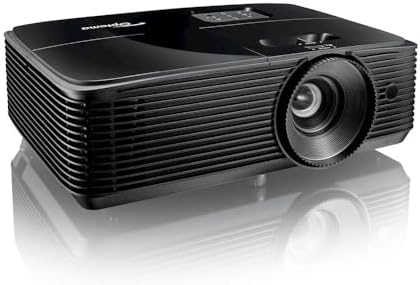
The Optoma HD146X is presented as a 1080p Full HD projector for home cinema, with a game display mode and easy installation highlighted in the supplied product details. Its straightforward feature list may appeal if you want a dedicated projector for movies and games rather than a model focused on built-in apps or advanced installation controls.
The product information provided here does not give a brightness rating, throw ratio, zoom range, speaker details, or specific connection options. Those details are important in a basement: you will need to confirm that the projector can fill your chosen screen from your planned mounting position and connect to your video and audio equipment.
Compared with the Epson, ViewSonic, and Oldisk picks, there is less specification detail available to judge brightness and setup flexibility. Compared with the NexAurea, no built-in smart system is listed. Treat the HD146X as a possible basic cinema choice, but verify the full specifications and connection requirements before committing to a room layout.
Pros:
- 1080p Full HD resolution is specified in the product title.
- Home cinema and game display use are highlighted.
- Easy installation is listed as a feature.
Cons:
- The supplied information does not include a brightness figure or throw details.
- Specific connectivity and smart features are not described.
Verdict: The HD146X may suit a simple 1080p home cinema setup, but confirm its brightness, throw distance, and connections before choosing it for your basement.
5. Oldisk 4K Smart Projector: Best for Apps in a Compact Projection Range

This Oldisk model combines built-in streaming apps with a stated 3,000 ANSI lumens, making it a flexible option for a basement where you want to stream directly from the projector. Its listed projection range is 40 to 120 inches, with a recommended throw distance of about 4.9 to 11.5 feet. That more limited maximum size may be easier to plan around than a projector advertised for much larger images.
The projector has native 1080p resolution, 4K decoding, and HDR10 support. As with the NexAurea, decoding 4K content does not mean the image is displayed at native 4K resolution. The product also lists a 98% NTSC color gamut, AI image features, and dual-band Wi-Fi 6. Bluetooth 5.2 is described for connecting compatible headphones, speakers, or controllers.
Auto focus and keystone correction are included to help align the picture. The supplied description says the model supports Netflix and other streaming apps, but it is still worth checking that your preferred services and devices work as expected before building your setup around them. Compared with the NexAurea, the Oldisk has a stated ANSI brightness figure and a smaller stated maximum projection size; the NexAurea, in turn, lists stronger built-in speakers and eARC.
Pros:
- Built-in streaming apps include Netflix, Prime Video, and YouTube.
- Lists 3,000 ANSI lumens and native 1080p resolution.
- Auto focus and keystone correction can help with setup.
- Bluetooth and dual-band Wi-Fi 6 support wireless connections.
Cons:
- 4K decoding does not provide native 4K display resolution.
- Its listed projection size tops out at 120 inches.
Verdict: Choose the Oldisk if you want built-in streaming, a stated brightness figure, and a projection size up to 120 inches.
How to Choose a Home Theater Projector for a Basement
Match brightness to the room
A basement with blackout curtains and little ambient light gives you more flexibility than a room with windows or lights left on during movies. Compare stated brightness figures when they are available, but do not treat brightness alone as a guarantee of picture quality. Screen size, screen material, wall color, and room lighting all affect the image you see. In this group, the ViewSonic, Epson, and Oldisk list brightness figures; the NexAurea and Optoma information supplied here does not.
Measure throw distance before choosing a screen size
Measure from the planned projector position to the screen or wall, then check the projector’s throw range and zoom options. A projector that cannot fill your screen from its mounting spot may force you to rearrange seating or move the screen. The ViewSonic lists a throw ratio and optical zoom, while the Oldisk provides a recommended distance and projection-size range. For models without those details in the supplied information, confirm them before purchase.
Understand resolution and 4K decoding
Native resolution describes the number of pixels the projector displays. A projector with native 1080p resolution can decode a 4K source without displaying it at native 4K resolution. If you want a large image, consider your viewing distance as well as the resolution: sitting closer can make image detail more noticeable.
Decide how you will stream
Built-in apps can keep your setup simple, while HDMI inputs give you the option to connect a streaming player, game console, or other source. The NexAurea and Oldisk list built-in streaming features. The Epson lists two HDMI ports and a USB port that can power a streaming device. Check the connections you need, including any audio connections, before purchasing.
Plan for sound, not just picture
Projector speakers can be convenient for casual viewing, but a basement theater may benefit from a soundbar or separate audio system. The NexAurea lists dual 25W speakers and eARC for compatible audio equipment. The Epson and ViewSonic list built-in speakers, but the supplied descriptions do not provide the same audio connection details. Check whether the projector supports your preferred sound setup.
Consider mounting and image adjustments
Auto focus, keystone correction, corner adjustment, optical zoom, and electronic zoom can make positioning easier, but these features work in different ways. Optical zoom changes the image through the lens; digital or electronic zoom resizes it. If you plan a ceiling mount or have an off-center placement, review the specific adjustment options and installation requirements rather than assuming every projector can correct every angle.
Frequently Asked Questions
Is a basement a good room for a projector?
It can be. Basements often offer a large wall or screen area and may have less daylight than other rooms. Control light as much as possible, and measure the room to make sure the projector can create the screen size you want from its planned position.
Is native 1080p enough for a basement home theater?
Native 1080p can be a practical choice for movies, sports, and gaming. How sharp it looks depends on image size and viewing distance. If you sit close to a very large screen, you may notice more detail limitations than you would at a smaller size or farther away.
Does “4K decoding” mean a projector is native 4K?
No. A projector with 4K decoding can process compatible 4K sources, but a model with native 1080p resolution displays the image at 1080p. Check the native resolution when comparing projectors.
Do I need a screen, or can I project onto a wall?
A smooth, light-colored wall can work, especially for a casual setup. A dedicated screen can provide a more even surface and may help control how light reflects. Whichever option you choose, keep the viewing area flat and free of strong color or texture that could affect the picture.
Are built-in projector speakers enough?
They may be convenient for occasional viewing or a simple setup. For movies, sports, and gaming, an external soundbar or audio system can be a better fit. Confirm that the projector has the audio connections or wireless support your equipment requires.
Which projector is best if my basement is not fully dark?
Compare models with published brightness figures and consider the Epson, ViewSonic, or Oldisk based on their listed output. The ViewSonic has the highest stated figure in this group, but room lighting, screen size, and placement still matter. A brighter projector does not remove the benefits of reducing light in the room.
Final Recommendation
For an easy all-in-one streaming setup, the NexAurea is the most feature-rich choice in this group, especially if you want auto focus and eARC. If you need a brighter projector and flexible installation options, consider the ViewSonic, while verifying the listing’s availability. The Epson is a strong candidate for 1080p sports and movie viewing with stated color brightness. Before choosing any model, measure your room, confirm the throw distance, and make sure its connections fit your streaming and audio plans.