
NDI PTZ cameras can simplify conference-room video by sending camera video and control over an IP network, often with fewer cables than a traditional setup. The right choice depends on your room size, the resolution you need, how you plan to connect the camera, and whether automatic tracking will help your meetings or presentations.
Below, we compare five options with different strengths, from 4K cameras with AI tracking to a model built for 4K 60fps production. Check that each camera’s outputs and NDI features match your conferencing or streaming system before you buy.
Quick Comparison
| Camera | Best For | Key Features | Video Notes |
|---|---|---|---|
| iuZee 4K NDI PTZ Camera | Flexible conference and streaming setups | 20x optical zoom, AI tracking, gesture control, PoE | 4K at 30fps; USB, HDMI, and LAN/NDI outputs |
| Tenveo 4K NDI PTZ Camera | Meetings with a moving presenter | 20x optical zoom, face and body tracking, gesture control | 4K at 30fps and 1080p at 60fps; USB, HDMI, and LAN/NDI |
| FoMaKo 4K 60fps NDI PTZ Camera | Higher-resolution production and larger rooms | 1/1.8-inch sensor, 20x optical zoom, NDI 6 and HX3 | 4K at 60fps via HDMI 2.0 and LAN; USB supports 4K at 30fps |
| TONGVEO 1080p NDI PTZ Camera | 1080p rooms with SDI cable runs | 20x optical zoom, presenter, zone, and hybrid tracking | 1080p at 60fps; HDMI, SDI, USB, and NDI |
| TONGVEO 4K NDI PTZ Camera | 4K HDMI or USB with network streaming | 20x optical zoom, AI tracking, SDI, PoE | 4K at 30fps via HDMI and USB; IP/NDI up to 1080p |
Our Picks: Best Ndi Ptz Cameras For Conference Rooms reviews
iuZee 4K NDI PTZ Camera: A Flexible All-in-One Option

The iuZee combines a 4K camera, 20x optical zoom, NDI, and AI tracking in one PTZ unit. Its listed sensor is a 1/2.8-inch, 8.29-megapixel CMOS sensor, and it can output 4K video at 30fps. The zoom is useful when the camera needs to frame a speaker from the back of a room without relying only on digital enlargement.
For meetings, its face and body tracking can follow a person as they move, while auto-framing is intended to keep a subject composed in the shot. Gesture controls offer a way to switch modes or adjust zoom without using a remote. The stated gesture range is up to 5–8 meters, with the person facing the camera and keeping their hands clear of their face.
USB 3.0, HDMI, and LAN/NDI outputs provide several ways to connect the camera. PoE can carry power and data over one Ethernet cable when used with a compatible PoE switch. Keep in mind that this camera has no built-in microphone, so your room still needs a separate audio setup.
Pros:
- 4K video at 30fps and 20x optical zoom
- AI face and body tracking with presenter and auto-framing modes
- USB, HDMI, and LAN/NDI output options
- PoE support can reduce cable clutter
Cons:
- No built-in microphone
- Gesture control depends on facing the camera and staying within its stated range
Verdict: Choose the iuZee if you want 4K video, flexible connections, and AI tracking in a conference-room camera, and already have a separate microphone plan.
Tenveo 4K NDI PTZ Camera: AI Tracking for Presenters
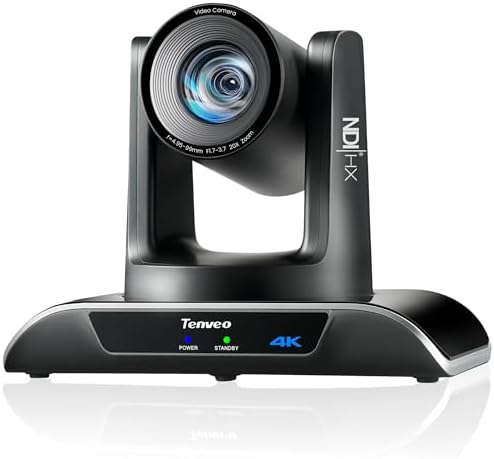
This Tenveo model is designed for rooms where a presenter may move around rather than sit in one place. Its 20x optical zoom and 4K-at-30fps output are paired with a Sony 1/2.8-inch CMOS sensor. It also supports 1080p at 60fps, which may suit workflows that favor a higher frame rate over 4K resolution.
The camera’s AI features combine face and body tracking with auto-framing. You can choose presenter or auto-framing mode, and gesture controls are available for switching modes and zooming. As with the iuZee, the stated gesture range is up to 5–8 meters, so room layout and camera placement matter if you plan to use hands-free controls.
USB 3.0, HDMI, and LAN/NDI provide different connection paths. The product information lists PoE support and recommends a PoE switch for that setup. It also lists USB, HDMI, and Ethernet distances, but actual installation results can depend on your equipment and network. Confirm the camera’s output modes work with your meeting or production software before building a system around it.
Pros:
- Supports both 4K at 30fps and 1080p at 60fps
- 20x optical zoom for rooms where the camera is far from the speaker
- Face and body tracking with presenter and auto-framing modes
- USB, HDMI, LAN/NDI, and PoE support
Cons:
- Gesture control has a stated operating range and positioning requirements
- PoE setup requires a compatible switch
Verdict: The Tenveo is a strong fit if presenter tracking is a priority and you want both 4K and 1080p high-frame-rate options.
FoMaKo 4K 60fps NDI PTZ Camera: For Demanding Video Workflows

The FoMaKo stands out for its listed 4K 60fps capability and 1/1.8-inch, 8.42-megapixel CMOS sensor. That combination may appeal to rooms used for both meetings and higher-quality video production. Its 20x optical zoom handles distant framing, while 16x digital zoom offers additional reach when needed.
Its output details are especially important to check before purchase: HDMI 2.0 and LAN are listed for 4K at 60fps, while USB 3.0 supports 4K at 30fps and 3G-SDI supports 1080p at 60fps. The camera also lists NDI 6 and HX3, PoE, dual streaming, and compatibility with production software such as vMix, OBS, ProPresenter, Zoom, and Teams on Windows and Mac.
AI auto-tracking and auto-framing can help keep a speaker in view, while 255 presets support saved camera positions for repeatable shots. The listed low-light sensitivity and noise reduction features may be useful in dim rooms, but the camera’s higher-end output options are most valuable when the rest of your system can accept them. Confirm software, network, and output compatibility rather than assuming every connection delivers the same resolution.
Pros:
- 4K at 60fps through HDMI 2.0 and LAN
- Large 1/1.8-inch sensor and 20x optical zoom
- NDI 6 and HX3, PoE, and dual-streaming support
- AI tracking and 255 presets for repeatable camera positions
Cons:
- USB output is listed at 4K 30fps, not 4K 60fps
- Its advanced features may be unnecessary for a basic meeting-only setup
Verdict: Pick the FoMaKo if 4K 60fps, NDI workflow options, and saved camera positions matter more than keeping your setup simple.
TONGVEO 1080p NDI PTZ Camera: A Practical SDI Option

This TONGVEO is a 1080p camera rather than a 4K model. It supports 1080p at 60fps, 20x optical zoom, and NDI streaming over a network. That makes it a potential match for a conference room where 1080p is sufficient and the existing video system already uses HD-SDI or other HD connections.
Its tracking options include presenter, zone, and hybrid modes, giving you more ways to tailor camera movement to a room. The camera lists HDMI, USB 3.0, 3G-SDI, and IP streaming, along with PoE. SDI is specified for long cable runs up to 300 feet, which can help when the camera is far from production equipment.
Control options include a web interface, VISCA over IP, a joystick controller, and OBS plugins. The supplied listing data marks this model as unavailable, so check its current listing status before planning a purchase. Its lower resolution also makes it a less natural choice if your workflow requires 4K capture or delivery.
Pros:
- 1080p at 60fps with 20x optical zoom
- Presenter, zone, and hybrid tracking modes
- HDMI, USB, SDI, and IP/NDI connection options
- PoE and SDI support for more flexible installation
Cons:
- Does not offer 4K video
- Listing availability may limit your ability to purchase it
Verdict: Consider this TONGVEO if 1080p is enough and SDI or its tracking modes suit your room, but verify availability before choosing it.
TONGVEO 4K NDI PTZ Camera: Flexible Outputs with a 1080p Network Limit

This 4K TONGVEO PTZ camera offers 20x optical zoom and AI auto-tracking, with presenter tracking and auto-framing modes. It can produce 4K at 30fps through HDMI and USB, but its IP/NDI output is listed at up to 1080p. That distinction is central to choosing it: you can use 4K through supported local connections, but should not expect 4K NDI streaming based on the supplied specifications.
Its connection options include HDMI, SDI, USB 3.0, and network streaming, plus PoE for power and data over one Ethernet cable. The product information lists SDI cable runs up to 300 feet. It also lists compatibility with several streaming and production tools, including OBS, vMix, Streamlabs, ProPresenter, Wirecast, and Zoom.
The AI system is specified to track one person at a time and is not intended for high-speed motion. That limitation is worth considering in rooms where multiple people frequently cross the frame or presenters move quickly. For a single speaker, however, the combination of optical zoom, tracking, and multiple wired outputs offers flexibility.
Pros:
- 4K at 30fps through HDMI and USB
- 20x optical zoom with presenter tracking and auto-framing
- HDMI, SDI, USB, and IP/NDI connections with PoE support
- SDI output is specified for long cable runs
Cons:
- IP/NDI output is listed at up to 1080p
- Tracking is designed for one person and not high-speed motion
Verdict: Choose this TONGVEO if you want 4K over HDMI or USB plus flexible SDI and network connections, and 1080p NDI is adequate for your workflow.
How to Choose an NDI PTZ Camera for a Conference Room
Match the Resolution to Your Workflow
Think about where the video will go, not just the highest resolution printed in a product title. The FoMaKo lists 4K at 60fps through HDMI 2.0 and LAN, while the TONGVEO 4K model lists 4K through HDMI and USB but up to 1080p over IP/NDI. If you need 4K specifically through NDI, check the exact camera output and NDI mode before buying.
Choose Zoom for Your Room Size
Optical zoom helps frame a speaker without the same image-quality loss that can come from relying on digital zoom. All five cameras here list 20x optical zoom, but the best framing still depends on camera placement, room depth, and the view you want. Consider whether the camera will show one presenter, a full meeting table, or both.
Decide Whether AI Tracking Is Useful
Auto-tracking can help when a presenter moves around and no operator is available to control the camera. Presenter tracking and auto-framing serve different purposes, and tracking limits vary by model. For example, the TONGVEO 4K model specifies one-person tracking and says it is not designed for high-speed motion. For a seated meeting, manual presets or a fixed shot may be more predictable than automatic movement.
Check NDI and Software Compatibility
NDI features and supported output modes differ across cameras. Confirm that your network, conferencing platform, and production software support the camera’s specific NDI workflow. Also check whether you need an NDI license, which versions or formats are supported, and whether your software can use the camera’s video resolution over the connection you plan to use.
Plan Your Cabling and Power
PoE can reduce installation clutter by carrying power and data on a network cable, but you need compatible PoE equipment. HDMI and USB can be useful for direct connections, while SDI may suit systems with longer cable runs. Check the supported cable distances and connection types against the layout of your room and the equipment at the other end.
Account for Audio Separately
A PTZ camera handles video and camera movement; it does not automatically provide the full audio setup a conference room needs. The iuZee listing explicitly states that it has no built-in microphone. For any model, confirm your microphone, speaker, and conferencing system plan separately so clear audio is not left to chance.
Consider Room Lighting and Camera Control
Room lighting can affect image quality, especially in large or dim spaces. The FoMaKo lists low-light sensitivity and noise reduction features, while the other supplied descriptions provide fewer lighting details. Also consider how staff will control the camera: web interface, software, presets, gesture controls, or a joystick may each fit a different room routine.
Frequently Asked Questions
What does NDI do in a conference-room camera?
NDI lets compatible video equipment and software send and receive video over an IP network. It can also support camera control in an IP production workflow. Your network and software need to support the camera’s specific NDI implementation.
Do these cameras include microphones?
The iuZee listing specifically says it has no built-in microphone. The supplied descriptions do not confirm built-in microphones for the other models, so plan to use a separate audio system unless the camera’s current product details say otherwise.
Can a PTZ camera automatically follow a speaker?
Several options in this guide list AI presenter tracking or auto-framing. The available modes and limits vary. Check the product details for tracking range, supported modes, and any restrictions on the number or speed of people being tracked.
Which camera supports 4K at 60fps?
The FoMaKo lists 4K at 60fps through HDMI 2.0 and LAN. Its USB output is listed at 4K at 30fps, and its SDI output at 1080p at 60fps.
Does every camera provide 4K over NDI?
No. The listed output limits differ. For example, the TONGVEO 4K model supports 4K through HDMI and USB, while its IP/NDI output is listed at up to 1080p. Check the network output specification rather than assuming it matches the camera’s maximum resolution.
Do I need a PoE switch?
A compatible PoE switch is needed if you want to power a camera through PoE and your setup does not otherwise provide PoE. Check the camera’s requirements and your network equipment before installation.
Final Recommendation
For a flexible 4K conference-room setup with tracking, the iuZee and the Tenveo offer a useful mix of optical zoom, AI features, and USB, HDMI, and network connections. The FoMaKo is the standout choice when 4K at 60fps and expanded production options matter. If your workflow is built around 1080p or SDI, the TONGVEO 1080p model may fit, subject to availability. Choose the TONGVEO 4K model when you want 4K through HDMI or USB and can work with its listed 1080p IP/NDI output.