
Dolby Vision can bring out more detail in bright highlights and dark scenes, but the projector still needs to fit your room, screen size, and viewing habits. These five models pair Dolby Vision support with different strengths, from ultra-short-throw placement to high brightness and flexible lens adjustment. Compare their key features below, and remember that the source device and content must also support Dolby Vision for you to watch in that format.
| Projector | Type | Standout features | Best suited for |
|---|---|---|---|
| XGIMI HORIZON 20 | 4K RGB triple laser | 3,200 ISO lumens, Google TV, optical zoom and lens shift | A flexible all-in-one setup |
| Optoma UHZ68 | 4K dual laser | 4,500 lumens, HDR10+, Filmmaker Mode | Bright rooms and movie-focused viewing |
| JMGO N3 Ultimate | 4K triple laser | 5,800 ISO lumens, motorized gimbal, optical zoom | Large screens and flexible placement |
| Hisense PX3-PRO | 4K ultra-short throw | 80- to 150-inch image range, Xbox-focused features | Living rooms with limited projector space |
| XGIMI MIRA | 4K RGB triple-laser ultra-short throw | 2,000 ISO lumens, Google TV, Harman Kardon audio | Compact rooms and simple setup |
Our Picks: Best Home Theater Projectors With Dolby Vision reviews
XGIMI HORIZON 20: A flexible all-in-one 4K projector
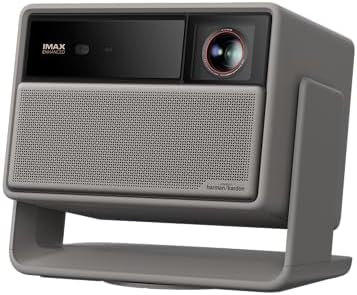
The HORIZON 20 combines a 4K RGB triple-laser light source with Dolby Vision, HDR10+, IMAX Enhanced, and Filmmaker Mode. Its listed brightness is 3,200 ISO lumens, and XGIMI also specifies a 100,000:1 contrast ratio. Those features make it a strong choice if you want a projector that handles a range of video formats without adding a separate streaming device or speaker system right away.
Google TV with licensed Netflix and built-in Harman Kardon speakers give this model an all-in-one feel. Its integrated stand, optical zoom, and lens shift can make placement easier than with a projector that relies on digital image correction alone. The product description also lists gaming features such as VRR, ALLM, and up to 240Hz refresh rate, though the exact experience can depend on the connected device and content.
The main trade-off is that this model is not an ultra-short-throw projector, so you’ll need to plan for its placement and projection distance. Its listed brightness is also lower than the Optoma and JMGO options here. The supplied specifications don’t give a throw ratio or screen-size range, so check the product listing and your room measurements before choosing a screen.
Pros:
- Supports Dolby Vision, HDR10+, IMAX Enhanced, and Filmmaker Mode
- Google TV includes licensed Netflix
- Optical zoom and lens shift offer more placement flexibility
- Built-in Harman Kardon speakers and integrated stand
Cons:
- Not designed for ultra-short-throw placement
- Its listed brightness is below the Optoma and JMGO models in this guide
Verdict: Choose the HORIZON 20 if you want Dolby Vision, built-in streaming and audio, and useful optical setup adjustments in one projector.
Optoma UHZ68: High brightness with movie-focused picture modes

The Optoma UHZ68 is a 4K UHD dual-laser projector with a listed output of 4,500 lumens. It supports Dolby Vision and HDR10+, and Optoma specifies a color gamut covering more than 90% of DCI-P3. That combination makes it worth considering if you want a bright image and a wide range of color for movies and shows.
Filmmaker Mode is intended to preserve picture settings closer to the original creative presentation, while PureEngine Ultra is designed to adjust contrast, color, brightness, and detail. These features give you options for tuning the picture to different material, although your room, screen, and selected settings will still affect what you see.
Unlike some models in this list, the supplied product details don’t mention built-in streaming apps, speakers, optical zoom, or lens shift. That doesn’t establish that those features are absent, but it does mean you should confirm the connections and setup options you need before buying. It may require more planning around source devices and sound than an all-in-one model.
Pros:
- Listed brightness of 4,500 lumens
- Supports Dolby Vision and HDR10+
- Filmmaker Mode and PureEngine Ultra picture processing
- Wide DCI-P3 color coverage specified by the manufacturer
Cons:
- The supplied details don’t specify built-in streaming or audio features
- Setup adjustments such as lens shift and optical zoom are not listed in the supplied specifications
Verdict: The UHZ68 is a compelling fit if brightness and movie picture options matter most, provided its connection and placement needs suit your room.
JMGO N3 Ultimate: Extra brightness and broad placement adjustment

The JMGO N3 Ultimate combines 4K projection and Dolby Vision with a triple-laser light source rated at 5,800 ISO lumens. The product details also cite a 110% BT. color gamut and a 3,000,000:1 dynamic contrast ratio. This is the brightest model by its listed lumen figure among the projectors in this guide, though brightness figures are not always directly comparable across different measurement standards.
Its setup options are a standout. Four-way lens shift, a 0.88–1.7:1 optical zoom, and a motorized gimbal let you adjust the image physically rather than relying only on digital correction. Google TV, native Netflix, and built-in speakers add convenience, while the manufacturer also lists gaming features including VRR, up to 240Hz, and 1ms input lag. Those gaming figures should be checked against the specific input and operating mode you plan to use.
The broad adjustment range and high listed brightness may appeal if your room is difficult to arrange or you want a large projected image. However, the projector’s many features may be more than you need for a simple movie setup. Its claimed screen size of up to 300 inches is a manufacturer specification, not a guarantee that every room or screen will deliver the same result.
Pros:
- Highest listed brightness in this comparison at 5,800 ISO lumens
- Dolby Vision support and a wide stated color gamut
- Lens shift, optical zoom, and motorized gimbal provide flexible placement
- Google TV with native Netflix and built-in speakers
Cons:
- Its extensive gaming and adjustment features may be unnecessary for basic movie viewing
- Large maximum screen-size claims depend on room and screen conditions
Verdict: Consider the N3 Ultimate if you need high listed brightness and unusually flexible physical image adjustment, and plan to make use of its extra features.
Hisense PX3-PRO: Ultra-short-throw projection for a living room

The PX3-PRO is a 4K ultra-short-throw laser projector designed for an image size from 80 to 150 inches. Its short-throw design can be useful when you want a large picture but don’t have room to mount a projector across the back of the room. It supports Dolby Vision, and Hisense lists 110% BT. color coverage and a native contrast ratio of 3000:1.
Hisense also describes this model as designed for Xbox, with a high refresh rate feature labeled HSR 240 and an auto-low latency mode. A 4K AI upscaler is intended to improve lower-resolution material. Because the projector sits close to the display surface, you’ll need to plan its position carefully and use a screen or wall surface that works well for your setup.
The supplied listing marks this model as unavailable, so check its current status before making plans to buy it. Availability can change. The provided product details also don’t give a brightness figure, which makes it harder to compare its light output directly with the other picks here.
Pros:
- Ultra-short-throw design supports a large image from close to the screen
- Dolby Vision and 4K UHD support
- Xbox-focused features include HSR 240 and auto-low latency mode
- Listed image range runs from 80 to 150 inches
Cons:
- The supplied listing marks the product as unavailable
- The supplied specifications do not state a brightness figure
Verdict: The PX3-PRO suits a living room where a short projection distance is essential, but verify availability and brightness details before choosing it.
XGIMI MIRA: A compact ultra-short-throw option with built-in Google TV

The XGIMI MIRA is a 4K RGB triple-laser ultra-short-throw projector with Dolby Vision, HDR10+, and HLG support. It is rated at 2,000 ISO lumens, and XGIMI lists a 110% BT. color gamut and color accuracy of ΔE<1. The very short 0.175:1 throw ratio is intended to create a large image from a small gap between the projector and the display surface.
Google TV is built in, with access to streaming apps including Netflix, YouTube, Prime Video, and Hulu. The projector also includes 36W Harman Kardon audio and Dolby Audio, which may help simplify a smaller-room setup. Its ISA 5.0 features are designed to assist with focus, keystone, and screen alignment, and the listed gaming features include VRR, ALLM, and 1ms input lag.
At 2,000 ISO lumens, the MIRA has a lower listed brightness than the Optoma and JMGO choices. That makes room lighting an important factor: a darker or light-controlled space is likely to make more sense than a bright room. Its ultra-short-throw layout also means you’ll want to measure the available space and make sure your screen surface is suitable before positioning it.
Pros:
- Dolby Vision, HDR10+, and HLG support
- Ultra-short-throw design for rooms with limited depth
- Built-in Google TV and Harman Kardon audio
- Automatic setup features and listed VRR and ALLM support
Cons:
- Lower listed brightness than the Optoma and JMGO projectors in this guide
- Close placement requires careful measuring and screen alignment
Verdict: Pick the MIRA if you want an ultra-short-throw projector with built-in streaming and audio for a room where you can control ambient light.
How to Choose a Home Theater Projector With Dolby Vision
Match the projector type to your room
A standard-throw projector needs more distance between the projector and the screen. An ultra-short-throw model sits close to the display surface, which can be useful in a living room or smaller space. Before choosing, measure the room and compare those measurements with the manufacturer’s throw information and image-size range. The supplied details for these projectors do not provide every measurement, so check the full product specifications before you buy.
Compare brightness carefully
Brightness affects how well a projected image holds up when there is light in the room. The models here list different figures and units: for example, the HORIZON 20, JMGO N3 Ultimate, and XGIMI MIRA use ISO lumens in their descriptions, while the Optoma lists lumens without specifying that standard. Treat these numbers as useful specification clues, not as a perfect apples-to-apples ranking. Room lighting, screen size, and screen material also matter.
Understand the Dolby Vision signal path
A projector’s Dolby Vision support is only one part of playback. The movie or show, the streaming service or disc, and the connected source device must also support the format. Check how you plan to watch—through built-in apps or an external player—and confirm that the complete setup supports the features you want.
Look beyond resolution for picture quality
4K resolution describes image detail, but color performance, contrast, brightness, and picture processing also shape the result. Features such as HDR10+, Filmmaker Mode, or a stated color gamut can help you compare models, but specifications alone cannot predict how a projector will look in your room. Think about the content you watch most and whether you prefer more picture controls or a simpler setup.
Check placement adjustments and screen size
Optical zoom and lens shift can help you position a projector without relying entirely on digital image correction. Ultra-short-throw models solve a different problem by projecting from close to the screen, but they require careful placement. Confirm the supported image size and throw range for your room, and leave enough space to position the projector and connect your equipment.
Decide whether you need built-in streaming and sound
Some models in this group include Google TV, streaming apps, and built-in speakers; others have fewer details about those features in the supplied specifications. Built-in options can make setup simpler, while separate streaming and audio equipment may give you more choice. Check the exact apps, connections, and sound features listed for the model you’re considering.
Consider gaming requirements separately
If you plan to play games, look for the specific features you need, such as VRR, ALLM, high refresh rates, or low input lag. A headline figure may apply only in certain modes or with compatible equipment, so check the manufacturer’s details for your preferred console or computer. For movie-only use, gaming specifications may matter less than placement and picture quality.
Frequently Asked Questions
Does a projector with Dolby Vision automatically show all content in Dolby Vision?
No. The projector, source device, streaming service or disc, and the content all need to support Dolby Vision. If any part of the playback chain does not support it, the content may use another available format.
Which projector in this list has the highest listed brightness?
The JMGO N3 Ultimate has the highest listed figure at 5,800 ISO lumens. The Optoma UHZ68 is listed at 4,500 lumens, but its supplied details do not specify the same measurement standard, so compare those figures with care.
What is the benefit of an ultra-short-throw projector?
An ultra-short-throw projector can create a large picture while sitting close to the screen. That can help when there is not enough room for a projector placed farther back, though careful positioning remains important.
Do I need a special screen for an ultra-short-throw model?
Not every setup requires the same screen, but the surface and placement can affect the picture. Check the projector’s guidance and consider how the screen will work with the room’s light and the projector’s close viewing angle.
Can built-in Google TV replace an external streaming device?
It may, if the apps you want are available on that projector’s version of Google TV. Check the listed app support and your preferred streaming services before deciding whether you need a separate device.
Are these projectors suitable for gaming as well as movies?
Several models list gaming features, including VRR, ALLM, high refresh rates, or low input lag. Check the exact supported modes and compatibility with your gaming system, since feature performance can depend on the connection and settings used.
Final Recommendation
For a balanced all-in-one setup, the XGIMI HORIZON 20 stands out for Dolby Vision, Google TV, built-in audio, and optical adjustments. Choose the JMGO N3 Ultimate if higher listed brightness and flexible placement are your priorities, or the XGIMI MIRA if you need an ultra-short-throw option with built-in streaming in a light-controlled room. The Optoma UHZ68 is worth considering for its brightness and movie-focused picture modes. The Hisense PX3-PRO may fit a living room that calls for ultra-short-throw projection, but confirm its availability and missing brightness details before deciding.