
If you’re looking for a printer you can control by speaking, the options here are mostly compact thermal sticker makers rather than full-size printers for documents. They turn spoken ideas into small prints for crafts, labels, and notes. One pick adds broader AI assistant features, while the others focus on creative sticker-making. Check what each model prints and how it connects before choosing.
| Product | Best for | Notable features |
|---|---|---|
| SeJean AI Smart Voice Sticker Maker | Kids’ crafts and custom stickers | Touchscreen, spoken prompts, thermal printing, coloring pens |
| WAFSOOTOO Smart AI Voice Sticker Maker | Previewing designs before printing | HD preview screen, six art modes, self-adhesive paper |
| Bioetva AI Smart Voice Sticker Printer | Portable, simple sticker projects | Voice control, inkless thermal printing, rechargeable design |
| Generic AI Smart Conversation Thermal Printer | Voice features beyond sticker design | AI conversation, reminders, multiple print uses, app updates |
| SeJean AI Voice Sticker Printer Box | Touchscreen voice-to-sticker projects | Spoken prompts, thermal printing, portable rechargeable design |
As an Amazon Associate, we may earn from qualifying purchases.
Our Picks: Best Smart Printers With Voice Control reviews
1. SeJean AI Smart Voice Sticker Maker: Best for Creative Projects

This compact printer is made for turning spoken ideas into cartoon-style sticker designs. A child selects a style on the touchscreen, says what they want to draw, and the device generates a design to print. The included watercolor pens give kids a way to add color after printing.
It uses thermal printing, so there are no ink or toner cartridges to replace. The printer is rechargeable and portable, and it uses thermal paper rolls. That makes it a better fit for crafts and small labels than for school reports or other full-page documents.
The main appeal is its straightforward, hands-on creative process: speak an idea, print it, then color it. The product information does not specify all the connection requirements or the exact sticker-paper format, so check the listing details before buying if those points matter to you. As with other thermal printers, expect black-and-white output rather than color printing from the device itself.
Pros:
- Combines spoken prompts with a touchscreen interface
- Thermal printing avoids ink and toner cartridges
- Includes watercolor pens for coloring printed designs
- Portable and rechargeable for use in different settings
Cons:
- Designed for small craft prints, not standard document printing
- Printed designs are black and white and need coloring for color effects
Verdict: Choose this SeJean model if you want a kid-friendly voice-to-sticker activity with a touchscreen and coloring supplies, rather than an all-purpose home printer.
2. WAFSOOTOO Smart AI Voice Sticker Maker: Best for Previewing Designs

The WAFSOOTOO combines voice-driven design generation with a screen for checking a pattern before printing. Its display lets you preview a result and cancel an unwanted print, which may help reduce wasted sticker paper. It offers six art modes, including sketch, anime, and ink wash styles.
This small thermal printer comes with three rolls of self-adhesive sticker paper. Its rechargeable battery and compact size suit craft sessions at home or on the go. The product information specifies that it uses 2.4GHz Wi-Fi, not 5GHz, so check your network setup before ordering if you plan to use its Wi-Fi features.
Compared with the SeJean options, the WAFSOOTOO clearly highlights its preview screen and multiple named art styles. It remains a small-format craft printer, though, not a replacement for a regular printer. Its thermal printing is inkless, and the listed paper is adhesive, so confirm that the print size and supplies suit your projects.
Pros:
- Screen preview lets you check designs before printing
- Six art modes provide several visual styles
- Includes three rolls of self-adhesive sticker paper
- Compact, rechargeable design is easy to carry
Cons:
- Wi-Fi features require a 2.4GHz network
- Focused on small stickers rather than documents
Verdict: Pick the WAFSOOTOO if previewing AI designs and choosing among several art styles matter more to you than getting a general-purpose printer.
3. Bioetva AI Smart Voice Sticker Printer: Best for Simple Portable Printing

The Bioetva is a compact voice-controlled sticker printer intended for kids’ labels, crafts, scrapbooks, and notebook decorations. Its basic process is to speak an idea and let the printer generate a design. The product description emphasizes simple controls and a rechargeable, lightweight body.
It uses inkless thermal printing, which means there are no cartridges to refill. Paper rolls are included, but the supplied details do not name a screen, art-style choices, or a specific Wi-Fi requirement. If you want to preview designs or need precise information about setup, check the product listing before buying.
This option shares much of its core purpose with the other compact sticker makers, but its description gives fewer details about interface features than the WAFSOOTOO or touchscreen SeJean models. The supplied product data also marks it as unavailable; that status can change, so confirm availability on the listing before making plans to purchase.
Pros:
- Voice input is aimed at quick, creative sticker-making
- Thermal printing does not require ink or toner
- Portable, rechargeable design suits home or travel use
- Paper rolls are included to get started
Cons:
- Product details provide less information about the interface and connection setup
- Supplied listing data indicates it may be unavailable
Verdict: Consider the Bioetva if its simple portable design fits your needs, but verify availability and setup details before choosing it over models with more clearly listed features.
4. Generic AI Smart Conversation Thermal Printer: Best for More Than Stickers

This rechargeable thermal printer stands apart from the sticker-focused models by pairing voice control with AI conversation features. Its listed functions include question-and-answer interaction, encyclopedia queries, companion chat, and 21 supported languages for dialogue and display. It also includes features such as alarms, memo reminders, and weather or news searches.
For printing, the product description lists AI-generated images, phone photos, study materials, notes, and labels. It comes with two rolls of adhesive sticker paper and connects to a dedicated mobile app for updates and templates. Those broader functions could be useful if you want one device for both voice interaction and small print projects.
The trade-off is that the feature list is more involved than a simple voice-to-sticker workflow. The product information does not clearly establish compatibility with common smart-home assistants, nor does it describe it as a standard full-size printer. Confirm the supported app, print formats, and paper requirements if you need a particular use case.
Pros:
- Offers voice interaction as well as printing
- Supports several listed uses, including notes, labels, and phone photos
- Includes adhesive sticker rolls
- Rechargeable and portable, with app-based updates
Cons:
- More features may mean more setup than a basic sticker maker
- Compatibility with Alexa, Google Assistant, or other smart-home systems is not specified
Verdict: Choose this model if its conversation and reminder features are as important to you as printing; for a simpler craft-focused device, one of the sticker makers may be a better fit.
5. SeJean AI Voice Sticker Printer Box: Best for Touchscreen Voice-to-Image Use
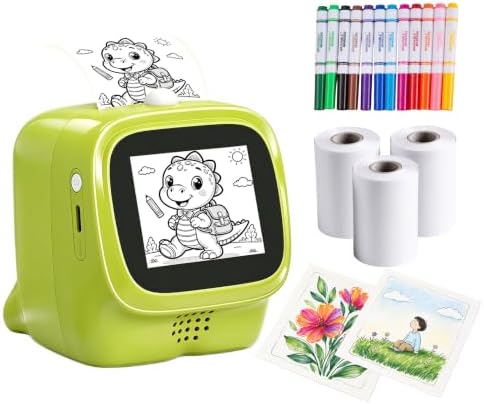
This SeJean listing describes a touchscreen sticker printer that turns spoken drawing ideas into cartoon-style prints. Kids can choose a style, speak a prompt, and then color the black-and-white thermal print with the included watercolor pens. It is intended for activities such as decorating notebooks, making labels, and scrapbooking.
The printer uses thermal paper rather than ink or toner cartridges, and its rechargeable, compact design is suited to craft use at home, in a classroom, or while traveling. Its listed features closely overlap with the other SeJean model in this guide. The available product information does not point to a clear functional difference, so compare the listing’s included supplies and connection details before deciding between them.
Like the other sticker printers here, this is not a substitute for a home or office printer that produces full-size documents. The description calls out direct Wi-Fi and a touchscreen, but does not provide detailed network requirements. Confirm those details if you have a specific setup in mind.
Pros:
- Combines touchscreen style selection with spoken prompts
- Thermal printing avoids ink and toner cartridges
- Includes watercolor pens for adding color by hand
- Portable and rechargeable for craft projects in different places
Cons:
- Its listed feature set is very similar to the other SeJean option
- Prints are small-format, black-and-white stickers rather than full-page documents
Verdict: This SeJean is a sensible choice for touchscreen-based voice-to-sticker crafts, but compare its included accessories and listing details with the other SeJean model before choosing between them.
How to Choose a Smart Printer With Voice Control
Decide what you want to print
Start with the print job. The SeJean, WAFSOOTOO, and Bioetva models are described mainly as sticker makers for crafts and labels. The Generic thermal printer lists a wider set of uses, including notes, study materials, and phone photos. None of these product descriptions presents a conventional full-size home or office printer, so choose another category if you need regular document printing.
Check how voice control works
Voice features can mean different things. Some of these devices use spoken prompts to create sticker designs, while the Generic printer also lists conversational AI and voice-controlled functions. The supplied information does not confirm compatibility with popular smart-home assistants. If you specifically want Alexa or Google Assistant support, verify that feature directly in the product listing before buying.
Look at the screen and design options
A screen can make it easier to choose styles or preview a design before printing. The WAFSOOTOO lists an HD preview screen and six art modes. The SeJean models describe a touchscreen for choosing a style. The Bioetva description gives fewer interface details. Consider whether you want a device that lets you inspect a result before using paper.
Confirm Wi-Fi and app requirements
Connection details can affect setup. The WAFSOOTOO description specifies 2.4GHz Wi-Fi and says it does not support 5GHz. The SeJean listing mentions direct Wi-Fi, while the Generic printer uses a dedicated mobile app. The Bioetva description does not clearly state its connection requirements. Check the listing for the exact phone, network, and app steps you will need.
Understand thermal printing and supplies
Thermal printing does not use ink or toner cartridges, but you still need compatible paper rolls. Some options include self-adhesive sticker paper, while the SeJean descriptions mention thermal paper rolls and coloring pens. Check what comes in the package and whether replacement rolls are easy to find. Thermal prints are not the same as color-ink prints; these products describe black-and-white output for the sticker-focused models.
Consider portability and who will use it
The sticker printers are described as compact and rechargeable, which can suit crafts at home, school, or while traveling. For a child, consider whether the interface is simple enough to use and whether adult help may be needed with Wi-Fi or app setup. For broader everyday features, the Generic printer lists conversation, reminders, and additional print uses, but its setup may be more involved.
FAQs
Are these voice-controlled printers regular document printers?
No. Most of the models here are compact thermal sticker printers intended for crafts, labels, and small notes. The product descriptions do not present them as full-size printers for routine document printing.
Do voice-control features mean the printer works with Alexa or Google Assistant?
Not necessarily. The products describe built-in voice prompts or voice interaction, but they do not clearly confirm compatibility with Alexa, Google Assistant, or other smart-home services. Check the listing if assistant compatibility is important to you.
Do these printers need ink?
The sticker-focused options use thermal printing, so they do not require ink or toner cartridges. They still need compatible thermal paper, and some models use adhesive sticker rolls.
Can these printers make color stickers?
The SeJean descriptions specify black-and-white thermal prints and include watercolor pens for coloring by hand. The WAFSOOTOO description also describes black-and-white thermal stickers. Check each listing for its exact output and supplies; do not assume that thermal printing produces color.
Which option has the clearest design preview features?
The WAFSOOTOO listing specifically describes an HD screen for previewing designs and six art modes. The SeJean models also describe touchscreen style selection, but the WAFSOOTOO gives more detail about previewing and art choices.
Do any of these models require a specific Wi-Fi setup?
The WAFSOOTOO listing specifies 2.4GHz Wi-Fi and says it does not support 5GHz. Other listings provide different levels of connection detail, so check each product’s requirements before ordering.
Final Recommendation
For kids’ creative sticker projects, the SeJean models offer a clear voice-to-image workflow with a touchscreen and coloring pens. The WAFSOOTOO is the stronger fit if you want a stated preview screen and multiple art modes. If you want voice interaction and reminders in addition to printing, consider the Generic AI thermal printer, while confirming its app and setup requirements. These are specialized small-format devices, so make sure sticker printing—not standard document printing—is what you need.